


Email authentication is essential in today’s communication landscape. Companies depend on email for various functions, including marketing, customer service, and internal messaging. However, inadequate email authentication can lead to messages being sent to spam folders or blocked altogether. A key method for authentication is the Sender Policy Framework (SPF).
SPF records enable receiving mail servers to confirm that an email originates from an authorized server associated with a specific domain. If your SPF record is not correctly set up, your domain risks issues such as spoofing, phishing, and problems with message delivery. Major email providers like Gmail, Outlook, and Yahoo rely on SPF checks to assess whether an email is trustworthy.
By properly configuring SPF settings in your domain's DNS, you can enhance your inbox delivery rates and bolster your domain's security. However, many organizations find it challenging to create the right SPF syntax or determine which mechanisms to include.
What is an SPF Record?
An SPF record is a TXT entry in your domain’s DNS that identifies the mail servers permitted to send emails on your domain's behalf. When an email is received, the destination server verifies the SPF record to see if the originating server is authorized.
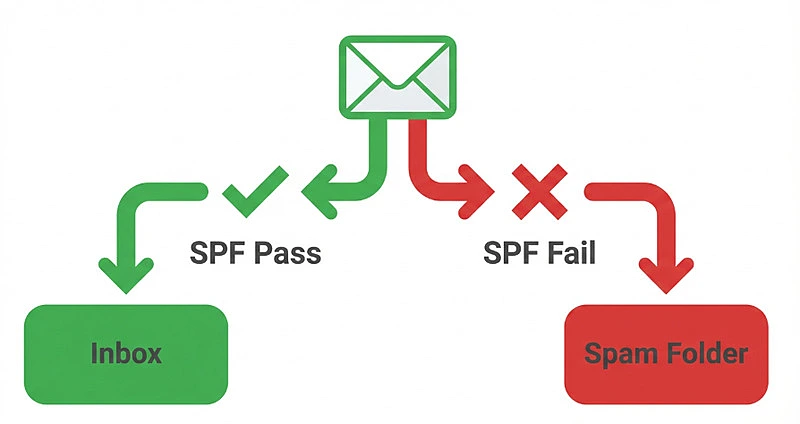
If the sending server is included in the SPF record, the email successfully passes the SPF validation. Conversely, if it isn’t included, the email could potentially be flagged as spam or rejected.
This signifies that it adheres to SPF version 1. Following this, mechanisms like ip4, include, a, mx, and all specify the servers allowed to send emails.
Why SPF Records Are Important for Email Deliverability
Properly configured SPF records are crucial for ensuring that emails reach their intended inbox instead of ending up in the spam folder. Email service providers commonly analyze authentication signals to assess the credibility of senders.
The key benefits of SPF include preventing email spoofing and phishing attacks by verifying sanctioned sending servers, improving sender reputation with prominent email providers, and increasing the likelihood that legitimate messages are delivered to recipients. Additionally, it facilitates effective DMARC authentication by validating the sender's domain and reduces the risk of domain misuse by blocking unauthorized systems from sending emails on your domain's behalf.
Organizations that fail to correctly implement SPF or neglect to use it altogether often encounter problems with email delivery, especially during marketing campaigns or when sending transactional emails.
1. Basic SPF Record for a Single Mail Server
When to Use a Simple SPF Configuration
When your domain transmits emails through a single mail server, a basic SPF record is typically sufficient. This setup permits a designated server IP address.
For instance:
v=spf1 ip4:192.168.1.10 -all
Here's the breakdown:
- v=spf1 indicates the version of SPF
- ip4:192.168.1.10 permits that particular IPv4 address to send emails
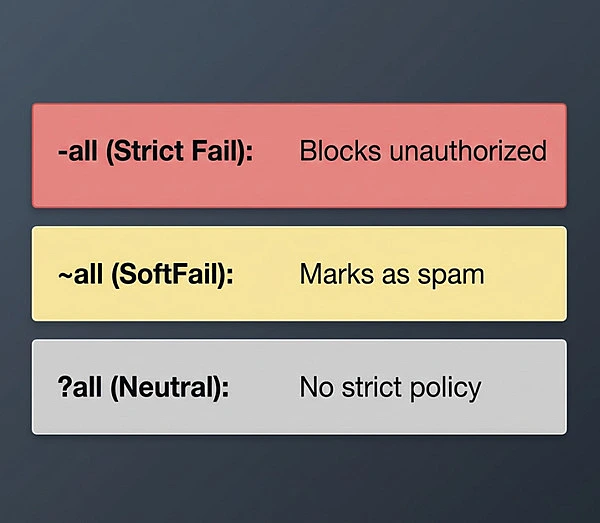
- -all instructs receiving servers to disregard all other senders
This arrangement works well for small businesses or individual domains that operate with just one email server.
2. SPF Record Allowing Multiple IP Addresses
Certain organizations manage several email servers. For this scenario, it's essential to incorporate each server into the SPF record.
For instance:
v=spf1 ip4:192.168.1.10 ip4:192.168.1.11 ip4:192.168.1.12 -all
Clarification:
- Each ip4 mechanism permits the designated servers
- Only the specified servers are authorized to send emails on behalf of the domain
- Any other servers will not pass the SPF verification
This setup is advantageous for companies utilizing multiple outgoing mail servers or secondary systems.
3. SPF Record Using MX Mechanism
If the MX records for your domain manage outgoing mail, you can grant them permission using the MX method.
For instance:
v=spf1 mx -all
Here's what it means:
- The 'mx' part permits all servers specified in your domain's MX records.
- The '-all' part prevents any other servers from being authorized.
This setup automatically gives approval to the mail servers already indicated in your DNS configuration. It's often utilized for email systems that are self-hosted.
4. SPF Record Using the A Mechanism
The A record mechanism permits the server identified in the domain’s A record to dispatch emails.
For instance:
v=spf1 a -all
Interpretation:
- The "a" allows the server linked to the domain’s A record to send emails.
- The "-all" denies permission to any other servers attempting to send emails.
This approach is effective when the server hosting your website is also responsible for sending emails.
5. SPF Record for Google Workspace
Companies utilizing Google Workspace are required to add Google's SPF record to validate Gmail's servers.
For instance:
v=spf1 include:_spf.google.com -all
Breakdown:
- The term include:_spf.google.com validates Google's email sending framework.
- The -all directive blocks any unapproved servers.
This setup guarantees that emails dispatched via Gmail successfully pass SPF checks.
6. SPF Record for Microsoft 365
Companies utilizing Microsoft's cloud-based email service need to incorporate Microsoft’s SPF record.
For instance:
v=spf1 include:spf.protection.outlook.com -all
Clarification:
- The inclusion of spf.protection.outlook.com grants permission for Microsoft 365 mail servers.
- It verifies that emails dispatched from Outlook or Exchange Online successfully meet authentication standards.
This record is crucial for businesses relying on Office 365 for their email communications.
7. SPF Record with Multiple Includes
Numerous businesses operate multiple email systems at the same time, including tools for marketing, customer relationship management, and services for sending transactional emails.
For instance:
v=spf1 include:_spf.google.com include:mailgun.org include:sendgrid.net -all
Clarification:
- Each included entity permits an external email provider.
- The server that receives the email verifies the SPF records of each domain listed.
This setup is typical for organizations that utilize various email delivery services.
8. SPF Record with SoftFail Policy
A SoftFail policy enables administrators to track SPF outcomes without instantly discarding any messages.
For instance:
v=spf1 ip4:192.168.1.10 ~all
Clarification:
- The ~all signifies a SoftFail policy.
- Emails from unauthorized servers are flagged as potentially problematic but are not outright rejected.
This approach is beneficial during the testing or transition stages of SPF implementation.
9. SPF Record with Neutral Policy
The Neutral policy does not succeed or fail SPF validations.
Example:
v=spf1 ?all
Clarification:
The ?all directive indicates that there are no specific policies applied. It leaves the decision on how to handle the email up to the receiving server.
This setup is infrequently implemented in live environments but can be useful for early testing or diagnosing issues.
10. Strict SPF Record for Maximum Protection
To effectively safeguard against spoofing, organizations should implement a rigorous SPF policy.
For instance:
v=spf1 include:_spf.google.com ip4:192.168.1.10 -all
Details:
- This configuration permits email from Google servers as well as a designated mail server while blocking all other sources.
By doing so, it guarantees that only authorized infrastructure is allowed to send emails on behalf of the domain.
Best Practices for Creating Effective SPF Records
Keep the Record Simple
Steer clear of extraneous mechanisms or includes. Maintaining and troubleshooting simpler SPF records is much more straightforward. Focus on keeping your SPF record minimal and tidy by incorporating only essential mechanisms and approved mail servers. A streamlined SPF setup minimizes mistakes, enhances performance, and simplifies future modifications.
Use SPF Testing Tools
Consistently check your SPF records with testing tools to make sure they're functioning properly and adhering to lookup limits. Utilize SPF testing tools on a regular basis to confirm that your SPF record is set up accurately and operating as expected. These tools can reveal syntax mistakes, DNS lookup problems, and configuration errors that might adversely affect email delivery.
Combine SPF with DKIM and DMARC
Depending only on SPF is inadequate. Robust email security requires multiple tiers of authentication.
For effective email authentication, it's crucial to adhere to various best practices. Organizations should implement DKIM signatures to confirm message integrity, create DMARC policies to enforce authentication protocols, and frequently assess authentication reports to track email performance and security. Furthermore, updating SPF records when new email services are added is essential to guarantee that all legitimate sending sources are authorized. When used together with SPF examples, SPF, DKIM, and DMARC create a powerful and dependable email authentication framework that strengthens security and improves email deliverability.
Final Thoughts
SPF records serve as crucial safeguards for your domain while enhancing email deliverability. By explicitly designating which servers have permission to send emails for your domain, you minimize the risk of spoofing attacks and help ensure that authentic messages arrive in recipients' inboxes.
The examples in this guide illustrate how various SPF setups can be tailored to your email infrastructure. Whether you use a single mail server, depend on cloud services, or operate multiple email platforms, implementing the appropriate SPF record can significantly boost the chances of successful email authentication.
Consistently reviewing and optimizing your SPF settings is vital for upholding a robust sender reputation. When paired with other authentication methods, SPF is foundational to secure and dependable email communication.

