


Every minute a customer waits for a response is a minute they're browsing your competitor's site. According to Forrester Research, 53% of adults are likely to abandon their online purchase if they can't find a quick answer to their question — especially when the culprit is a chat system that hasn't been meaningfully updated in years.
Legacy customer support tools weren't built for today's buyer. Modern customers move fast, switch between devices, and expect seamless, personalized conversations. When your chat platform can't keep up, the gap between expectation and reality shows up directly in your revenue.
This article walks you through how to recognize the warning signs of an outdated support stack, what software modernization means in a customer communication context, and the practical strategies companies are using to improve their tools — and their bottom line.
What Is Software Modernization in Customer Support?
Software modernization is the process of updating, replacing, or restructuring existing technology systems to meet current performance, security, and user experience standards. In the context of customer support, it means transforming how your team communicates with customers — from reactive, siloed, and slow to proactive, unified, and fast.
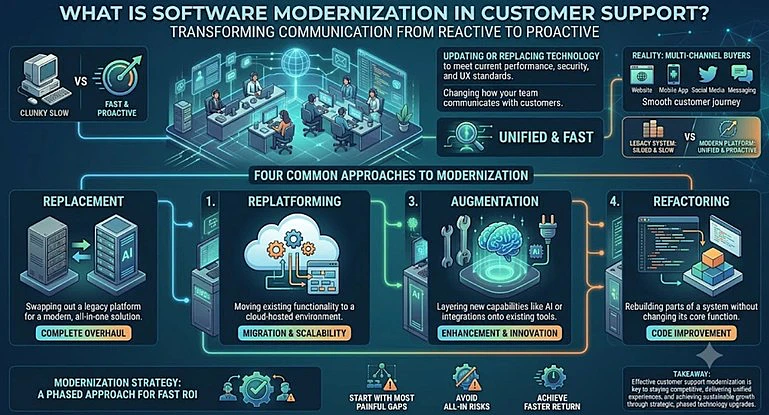
For customer communication tools specifically, modernization matters more than ever. Buyers now interact with businesses across websites, mobile apps, social media, and messaging platforms — often switching between them mid-conversation. A legacy chat system designed for a single channel simply can't serve this reality.
There are four common approaches to software modernization in this space:
- Replacement — swapping out a legacy platform for a modern, all-in-one solution
- Replatforming — moving existing functionality to a cloud-hosted environment
- Augmentation — layering new capabilities (like AI or integrations) onto existing tools
- Refactoring — rebuilding parts of a system without changing its core function
Most companies don't need to go all-in on one approach. A phased modernization strategy — starting with the most painful gaps — often delivers the fastest return.
Warning Signs Your Chat System Needs Modernization
How do you know when your support stack has crossed from "could be better" to "actively hurting the business"? Watch for these indicators.
1. No API or third-party integrations If your chat tool can't connect to your CRM, helpdesk, or e-commerce platform, your agents are working blind. They're copying data between tabs instead of serving customers.
2. Slow or unreliable performance Laggy chat widgets, frequent downtime, or delayed message delivery directly impact customer trust. A chat that loads slowly often gets closed.
3. No mobile support If your agents can't respond from a mobile device, you're creating gaps in coverage. And if your chat widget breaks on customers' phones, you're losing a growing segment of buyers — mobile accounts for over 60% of web traffic today.
4. Zero AI or automation capabilities Modern live chat software includes features like automated greetings, chatbot qualification, and AI-assisted responses. If your current tool has none of these, you're putting unnecessary load on your team and slowing response times.
5. Limited or no reporting If you can't measure first response time, chat volume by channel, or agent performance, you can't improve. Poor analytics is a significant modernization trigger.
6. Security and compliance gaps Older systems may lack encryption, GDPR compliance features, or role-based access controls — all of which create legal and reputational risk as data regulations tighten.
7. Multi-channel blind spots If your chat tool only covers your website and doesn't support messaging apps, social media DMs, or email in one unified inbox, you're missing conversations — and sales — happening elsewhere.
Any one of these is worth addressing. If you're nodding along to three or more, a serious modernization conversation is overdue.
Modernization Strategies for Support Stacks
Once you've identified the gaps, the next step is choosing your path forward. Here are four practical approaches with real-world context for each.
Strategy 1: Migrate to Cloud-Based Live Chat Software
Many legacy chat systems are on-premise, meaning they run on company servers with manual updates and limited scalability. The most straightforward modernization move is migrating to a cloud-hosted live chat software platform.
Cloud-based tools update automatically, scale on demand, and are accessible from any device. For a mid-sized e-commerce company processing seasonal spikes in support volume, this shift alone can eliminate downtime and reduce infrastructure costs by 30–40%.
The migration itself doesn't have to be disruptive. Modern platforms allow data exports and phased rollouts, letting teams transition without going dark.
Strategy 2: Consolidate Channels Into a Unified Inbox
Many support teams manage website chat, Facebook Messenger, WhatsApp, Instagram DMs, and email as separate queues. The result is duplicated effort, missed messages, and inconsistent customer experiences.
A unified inbox — where all incoming conversations from every channel appear in one place — is one of the highest-impact modernization steps available. It reduces agent context-switching, speeds up response time, and gives managers a single view of team performance.
This is a core feature of modern customer communication tools like JivoChat, which aggregates conversations from websites, social media platforms, and telephony into a single operator interface.
Strategy 3: Add API Integrations to Connect Your Stack
If a full platform replacement feels like too big a step, API integration is a lower-risk modernization entry point. By connecting your existing chat tool to your CRM, e-commerce platform, or helpdesk via APIs, you give agents access to customer data without leaving the chat window.
For example, a SaaS company might integrate their chat platform with their subscription management system so that when a customer reaches out, the agent can immediately see their plan, billing history, and recent activity. This context reduces average handle time and increases first-contact resolution.
If your current tool has no API access or a locked ecosystem, that itself is a signal it's time to consider replacement.
Strategy 4: Augment With AI Automation
You don't always need to replace your entire support stack to modernize it. Augmenting with AI capabilities can dramatically improve performance without a full migration.
This includes deploying a chatbot to handle common questions outside business hours, using AI-powered canned responses that adapt to conversation context, and setting up automated routing to direct chats to the right team or agent based on topic.
For a professional services firm that gets high chat volume from prospects asking pricing and process questions, a well-configured AI operator can qualify leads automatically and hand off to human agents only when needed. The result: human agents spend their time on higher-value conversations, response time drops for routine queries, and customer satisfaction improves.
Real Business Impact: The ROI of Customer Support Modernization
Software modernization in the support context isn't just about technology — it's about measurable outcomes. Here's what companies typically see after modernizing their customer communication tools.
Faster response times Moving from email-based support to live chat typically reduces average first response time from hours to under two minutes. Adding AI automation can bring that figure below 30 seconds for common queries. Response speed is directly correlated with conversion rate: studies consistently show that responding to a website lead within five minutes increases the likelihood of conversion by up to 9x.
Higher conversion rates from chat When a chat system is responsive, reliable, and available across channels, it becomes a sales tool — not just a support tool. Companies using modern live chat software report conversion rates from chat-assisted visits 3–5x higher than non-assisted sessions. Visitors who engage with chat are warmer leads; the system just needs to catch them.
Lower cost per contact Consolidating channels, enabling self-service through AI, and giving agents better tooling all reduce the number of contacts that require human handling. The industry benchmark for cost reduction after live chat implementation ranges from 15–33%, depending on the volume of routine inquiries automated.
Improved CSAT and NPS scores Customer satisfaction is highly sensitive to resolution speed and channel convenience. Businesses that implement omnichannel support — the ability to pick up a conversation across any channel — typically see CSAT scores improve by 10–20 points within the first quarter of deployment.
Scalability without proportional headcount growth Perhaps the most strategically important benefit: a modern support stack lets you grow your customer base without hiring at the same pace. AI handles routine queries. Unified inboxes reduce duplicated effort. Cloud infrastructure scales automatically. The result is a support operation that serves 2x the volume with 20–30% more capacity rather than 2x the headcount.
These are documented outcomes of businesses that invested in customer support modernization — and they underscore why delaying the decision has a real cost.
Conclusion: The Cost of Standing Still
Legacy chat systems aren't just inconvenient. They're quietly eroding customer trust, burning out support teams, and sending potential buyers to competitors who can simply respond faster.
The good news: software modernization doesn't require a massive, disruptive overhaul. Start with an honest audit of your current stack. Ask where conversations are being lost, which channels lack coverage, and whether your agents have the tools they need to respond confidently and quickly.
For many businesses, the right path is consolidating onto a modern all-in-one platform — one that supports every channel your customers use, connects to your existing tools via API, and offers AI automation to handle volume at scale. Solutions like JivoChat are built precisely for this: omnichannel coverage, a unified operator inbox, integration capabilities, and built-in automation that grows with your team.
If any of the warning signs in this article describe your current setup, now is the time to act. Start with a free trial, run it alongside your existing tools, and measure the difference in your first month.

