


Remote teams often collapse because nobody built the right systems before sending everyone home.
Gallup's data shows a 40% surge in employee focus when teams use collaboration tools with real-time feedback. You see those kinds of gains only when teams stop trying to recreate the office at home and design something that works for how remote teams operate.
In this article, we will look at nine effective ways to improve workplace productivity in remote teams.
9 Ways to Improve Productivity in Remote Teams
1. Track Productivity With the Right Software
Gut feeling is not a management strategy. And casually checking in with someone doesn't cut it either.
So, what can replace those conversations?
Software to track employee productivity can do so using data showing where time goes, which tasks take more time than necessary, and where individual output drops before anyone notices.
Modern workforce analytics platforms like Time Doctor take this a step further by revealing work patterns, workload distribution, focus time, and productivity trends across teams, helping managers understand not just what is happening, but why it is happening.
Pairing workforce analytics with dedicated time tracking tools also helps teams understand how work hours are spent, making it easier to identify distractions, improve planning, and balance workloads.
Instead of guessing, managers can identify problems weeks before they grow, especially when combined with regular technical audit services that uncover workflow bottlenecks, inefficient tooling, and collaboration gaps that slow remote teams down.
Pro tip: Each week, look at how your whole team is doing before zooming in on any one person. Cross-referencing workforce analytics data with product portfolio management software helps determine whether project delays stem from poor process architecture or simply a lack of personnel. A pattern that shows up across the whole team points to a process problem. One that shows up with one person signals a need for support. They require completely different responses.
2. Set Clear Daily and Weekly Goals
Vague goals lead to vague output. They also produce anxious and directionless work that takes twice as long and still misses the point.
Remote employees without specific targets default to whatever feels urgent. Understanding what is to be delivered urgently and what matters are two different things.
The fix is to write goals in a structure that forces specificity, a deadline, and a measurement method, then attach a lightweight weekly review cadence so that SMART goals survive past the first few weeks rather than quietly dying once momentum fades.
Pro tip: Try wrapping up every Friday with a quick five-minute check-in where everyone calls out their top three priorities for the week ahead. Write them somewhere visible. This way, you can catch misaligned priorities before they become missed deadlines.
3. Use a Centralized Team Chat Platform
Email was basically built for correspondence, so it doesn’t do a great job of coordination. Using it for internal team communication is like using a filing cabinet as a whiteboard. Technically possible. Practically terrible.
Important decisions get lost in reply-all chains, context is missed between inboxes, and new employees end up asking the same questions over and over because nothing is easy to find.
A dedicated team chat platform solves all of this. With such a platform, conversations stay organized, searchable, and in one spot.
Leaving behind messy conversation threads and opting for centralized digital workspaces allows workflows to run smoothly. While many organizations automatically choose the industry standard, there are multiple alternatives to Slack that can perfectly fit your budget and your team's specific daily rhythm.
Pro tip: Build channels by project and function from day one. A general channel for announcements, separate channels for each active project. Keep conversations in the right place, and they stay findable later.
4. Protect Deep Work Hours
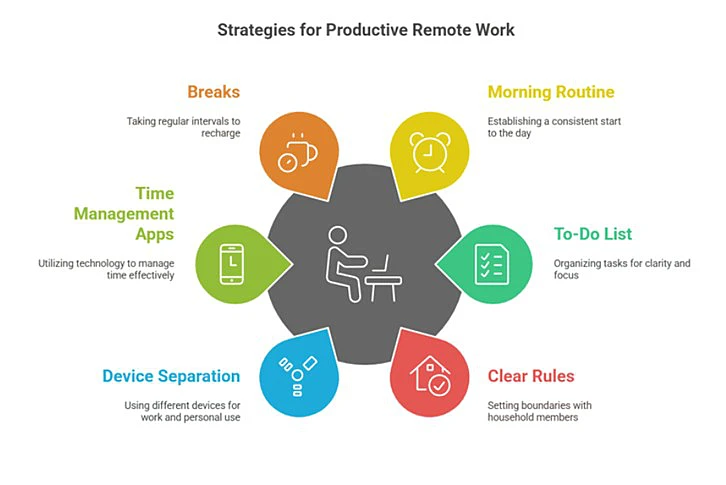
Most remote employees end a full workday only to realize they never did the work they needed to do. Meetings and notifications swallowed everything.
Real and focused work doesn't happen in stolen moments between interruptions. When you give yourself two to three hours of uninterrupted time each day, it will do more for the quality of your work.
Leverage the tools that make this focused time possible. Many teams use botless recording for internal synchronization to ensure no one misses project updates. This way, team members who are absent from meetings can review the transcripts uninterrupted later, protecting their focused time and keeping everyone informed without a bot intruding into the live meeting.
Pro tip: Block out focus time on your calendar and make it visible to everyone. Treat those blocks the same way you'd treat a client call. Don't move them. Make them non-negotiable.
5. Run Shorter & More Focused Meetings
Most 60-minute meetings could have been 15, and everyone in the room knows it. They just do not say it out loud.
Decide on a time limit before a meeting even starts. Send the agenda the day before. Have all relevant project briefs, reports, and slide decks merged into a single PDF to keep everyone on the same page without wasting time mid-call. And always wrap up by assigning specific tasks to specific people, not just a list of "next steps" that everyone assumes someone else will handle.
Using a structured meeting agenda template before each call helps teams stay focused and ensures action items are captured the moment they're agreed on.
Pro tip: Introduce a hard-stop rule. When time runs out, the meeting ends. Anything unresolved moves to async. People come more prepared when they know the meeting will not just keep going.
6. Invest in Real-Time Customer Communication
Support agents who switch between four different tools to handle chat, email, and social messages are inefficient. They also make more mistakes, drop more context, and respond more slowly than they would if everything lived in one place.
A unified communication platform can change all of that. When everything is in one place, agents can handle more, respond quicker, and stay in the zone. That matters because real-time human interaction still outperforms automation in both conversions and customer satisfaction.
Action tip: Pick one week to measure average response time across all customer channels. Then consolidate into one platform and measure again after two weeks. The gap tends to be bigger than most managers expect.
7. Encourage Breaks and Protect Boundaries
The laptop is always there. The inbox is always open. Remote workers skip breaks because there's no natural cue to stop, and when the culture rewards overworking, taking a breather can make you feel guilty.
Burnout does not come announced. It shows up as small errors, missed details, and a general dullness in output before it eventually shows up as someone handing in their notice.
Pro tip: Make it a habit to post a quick "done for the day" message in your team channel when you sign off and do it every day. When leaders model the boundary, the rest of the team gradually starts to believe it is allowed.
8. Hire for Self-Direction Instead of Just Skills
Someone who's technically brilliant but needs constant hand-holding is harder to manage remotely.
Therefore, remote work requires people who can organize themselves, speak up before problems grow, and make decisions independently. This skill doesn’t show up on a resume. You need to screen for them in interviews.
Self-direction also extends beyond day-to-day project work. For growing remote-first businesses, choosing the best LLC services can simplify company formation, compliance management, and administrative tasks, allowing founders to spend more time building and managing their teams.
In distributed teams, employees who can share knowledge, communicate ideas clearly, and contribute to the company's public presence often create additional value.
Platforms like Bloomberry help remote teams turn internal expertise into authentic, approved employee-led content, making it easier for founders, executives, sales leaders, and subject-matter experts to share trusted thought leadership across LinkedIn. This gives organizations a structured way to amplify internal expertise without adding extra coordination work for managers.
Pro tip: In interviews, ask candidates to tell you about a week when everything shifted and how they handled it. Self-directed people give you a specific and structured answer. People who need managing give you a vague one.
9. Review and Adjust Regularly
No system is permanent. The one that worked when your team was five people probably has friction points now that you are fifteen. The one that worked when everyone was in the same time zone may not work for a distributed team across four countries. And with remote work adoption still growing, the pressure to get those systems right is only increasing.
The same applies to project-based teams, where increasing workload can expose gaps in how schedules, updates, responsibilities, and client information are managed. Platforms like Ressio can help teams bring those moving parts into a more organized workflow, making it easier to review what is working, spot recurring friction, and adjust before small issues slow everyone down.
Monthly retrospectives surface friction points before they compound into bigger problems, following a proactive approach similar to a problem management guide focused on continuous improvement and root cause resolution. Thirty minutes. What worked, what did not, and one change to make. Assign someone to implement the change before the next retro.
Pro tip: Write down the one change from every retro and put it somewhere public. Seeing past decisions implemented builds trust in the process and keeps people engaged in future sessions.
Build the System & Watch the Results Follow
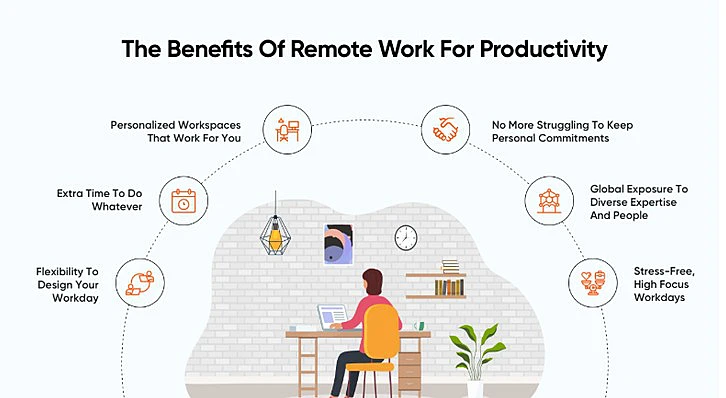
Remote productivity is not about squeezing more hours out of people. Every team on that path eventually runs out of road.
The teams that sustain strong output over time are the ones with clear goals, protected focus time, honest feedback loops, and tools that reduce friction rather than add to it.
Small gestures do more for team cohesion than most managers expect. Build those foundations first. Everything else follows.
JivoChat brings live chat, calls, social messaging, and team communication into one platform. For remote teams managing customer conversations across multiple channels, it reduces the tool-switching that kills focus and slows response times.

