A WhatsApp username is one of the most anticipated features coming to the messaging app. It allows users to start conversations without sharing their phone number in certain situations, making it easier to connect while keeping personal contact information private.
The biggest advantage is improved privacy. Instead of giving out your phone number, you can simply share your unique username. For everyday users, this means greater control over who can see their phone number. For businesses, freelancers, and content creators, it offers a more professional and convenient way to share a contact channel.
In this guide, you'll learn what a WhatsApp username is, how to create one once the feature is available for your account, the rules you need to follow, and tips for choosing a memorable username.
What Is a WhatsApp Username?
A WhatsApp username is a unique identifier linked to your WhatsApp account.
Rather than sharing your phone number to start a conversation, you'll be able to provide your username instead. This makes it easier for others to contact you while helping protect your privacy.
Unlike your profile name—which any user can change and doesn't have to be unique—a WhatsApp username is exclusive. No two accounts can use the same username.
In practice, it works much like usernames on platforms such as Instagram, Telegram, or X, allowing users and businesses to be found without exposing their personal phone numbers.
Besides making contact sharing easier, usernames can also reduce mistakes when entering international phone numbers and provide a more intuitive way to identify contacts.
What Is a WhatsApp Username Used For?
The main purpose of a WhatsApp username is to provide a safer and more convenient way to start conversations.
Some of its biggest benefits include:
- Keeping your phone number private in many situations.
- Making it easier to share your contact information on websites, social media, and business cards.
- Creating a more professional presence for businesses and service providers.
- Giving content creators a simple way to communicate with followers.
- Reducing errors when people try to add international contacts.
For businesses, usernames can also improve marketing campaigns. Instead of promoting a long phone number, companies can simply share a short, memorable username that's easier for customers to remember.
How does name reservation work on WhatsApp?
According to official information, users will be able to reserve a name during the early access phase. For the reservation to be successful, the chosen name must comply with WhatsApp's guidelines and be available at the time of the request. Only unique usernames can be linked to each account.
Once reserved, the username will be associated with the user's account, ensuring exclusive ownership when the feature is publicly released. This process aims to simplify name management, prevent conflicts, and ensure everyone has a fair chance.
How to Create a WhatsApp Username
Once the feature is available for your account, creating a WhatsApp username is a straightforward process.
Typically, you'll need to:
- Update WhatsApp to the latest version.
- Open Settings.
- Tap your profile picture.
- Select Username if the option is available.
- Enter your preferred username.
- Wait while WhatsApp checks its availability.
- Save your changes.
If the username is already taken, you'll need to choose another available option.
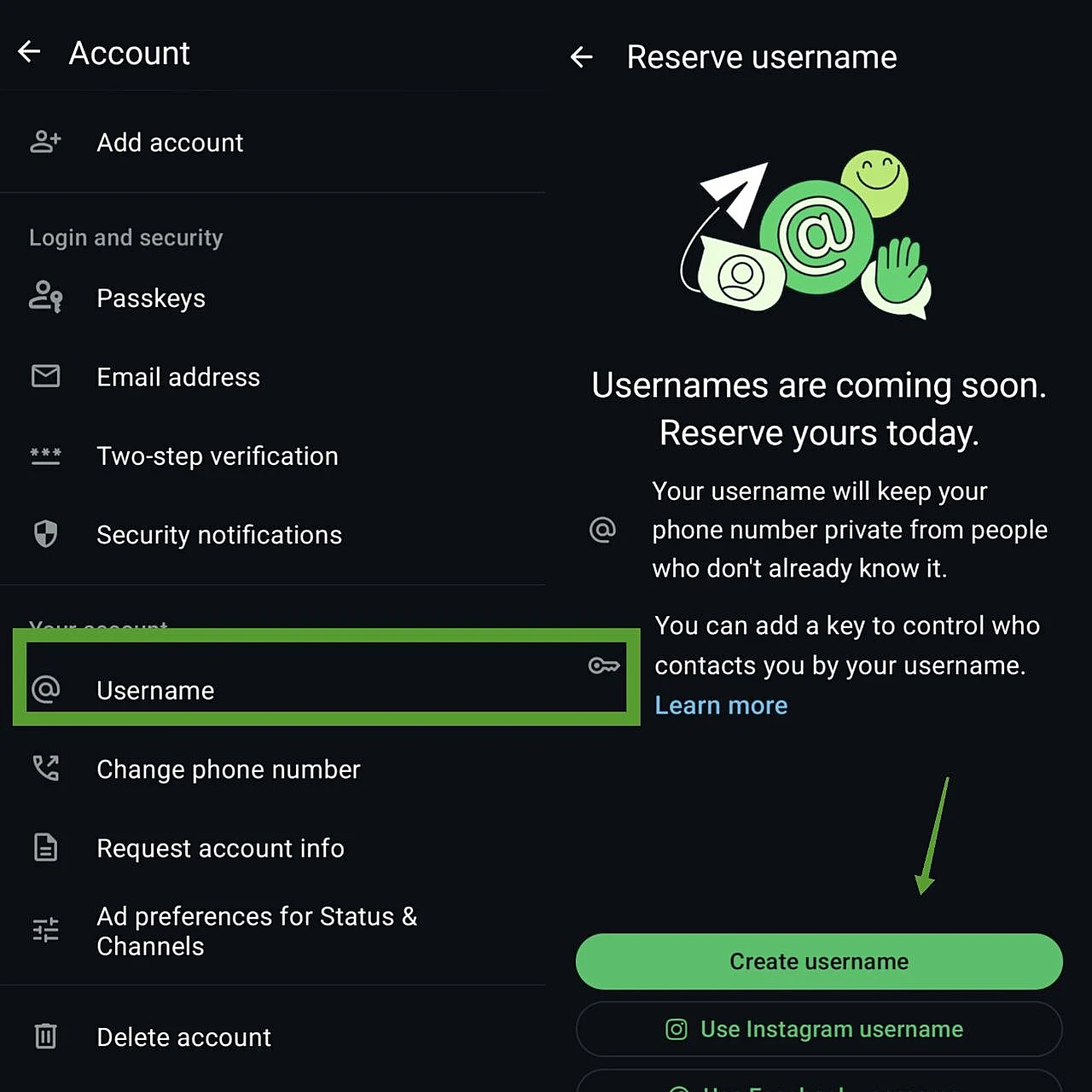
If you don't see the Username option yet, simply keep your app updated and wait for Meta to roll out the feature to your account.
One convenient aspect of the feature is that you'll also be able to use your existing Instagram or Facebook username, provided it's available and meets WhatsApp's requirements. This makes it easier to maintain a consistent identity across Meta's platforms.
WhatsApp Username Rules
Since a username uniquely identifies your account, WhatsApp has established several rules to prevent duplicates and reduce impersonation or fraud.
Although the requirements may evolve as the feature expands, usernames generally must:
- Be unique.
- Use only characters allowed by WhatsApp.
- Not contain spaces.
- Avoid prohibited words or formats.
- Not impersonate brands, public figures, or official accounts.
It's also recommended to choose a username that is short, easy to spell, and easy to remember—especially if you plan to include it in marketing materials or social media profiles.
How to Share Your WhatsApp Username
After creating your username, you can share it across multiple channels so people can easily start a conversation with you.
Some of the best places to use it include:
- Email signatures
- Business cards
- Instagram profiles
- LinkedIn profiles
- Company websites
- QR codes
- Printed marketing materials
- Sales presentations
This removes the need to publish your full phone number every time you want someone to contact you.
How to Find Someone Using Their WhatsApp Username
Once the feature becomes widely available, you'll be able to find people on WhatsApp using their username—as long as they've created one and their privacy settings allow others to contact them this way.
Instead of manually saving a phone number, you'll simply search for the person's username and start chatting.
Keep in mind that availability may vary depending on your country, app version, and Meta's gradual rollout schedule.
Does a WhatsApp Username Replace Your Phone Number?
No. Your phone number remains the primary identifier for your WhatsApp account. A username simply provides an additional way for people to find and contact you without immediately revealing your phone number.
Depending on how a conversation begins, your phone number may remain hidden from the other person, while still being securely linked to your account for authentication and security purposes.
How does this update impact businesses?
With the arrival of usernames on WhatsApp, businesses will need to adjust their systems to maintain communication with customers. This new feature necessitates updates to CRMs, customer service workflows, and integrations that previously relied exclusively on phone numbers.
Additionally, the Business-Scoped User ID (BSUID) will be adopted—a unique identifier linked to each user that ensures messages and notifications are delivered correctly, even when the customer chooses to use a username.