


Employee productivity has always played an important role in business performance, but the way organizations improve productivity has changed significantly. In the past, companies often responded to increasing workloads by hiring more people, extending working hours, or putting additional pressure on existing teams. Today, many businesses are taking a more sustainable approach by investing in technology that helps employees complete tasks efficiently, communicate clearly, and spend less time on repetitive work.
Employee productivity tools now form an important part of modern business operations. These tools include project management platforms, communication software, workflow automation systems, artificial intelligence assistants, cloud collaboration applications, scheduling solutions, and internal knowledge platforms. Although their features may differ, they generally share one purpose: reducing the obstacles that prevent employees from doing their best work.
The goal is not to make employees work longer hours or increase the amount of pressure placed on them. Instead, productivity tools are designed to remove unnecessary administrative work, simplify business processes, improve access to information, and create more organized working environments. When employees spend less time dealing with inefficient systems, they can focus more attention on meaningful activities that create value for customers and the organization.
Why Productivity Matters More Than Ever
Modern businesses operate in an increasingly competitive environment. Customers expect faster service, quicker responses, personalized experiences, and consistent quality. At the same time, employees may work across different offices, cities, countries, and time zones. Organizations are also managing growing amounts of data, software, communication, and customer information.
Hiring additional employees is not always the most practical solution. Recruitment can be expensive, skilled professionals may be difficult to find, and growing the workforce without improving internal processes can create even more complexity.
As a result, businesses are looking for ways to help existing teams use their time and resources more effectively.
Improved productivity can lower operating costs, accelerate project completion, strengthen customer service, and support business growth. It can also improve the employee experience by reducing frustration and giving workers more control over their responsibilities. Even small improvements can create meaningful results when they are applied across an entire organization.
For example, saving ten minutes on a task may not appear significant. However, if hundreds of employees save that time every day, the organization can recover thousands of productive hours over the course of a year. These improvements can lead to faster workflows, lower administrative costs, and stronger overall performance.
Benefits of Investing in Productivity Tools
| Business Objective | How Productivity Tools Help |
|---|---|
| Reduce operational costs | Automate repetitive work and eliminate manual processes |
| Improve customer service | Faster response times and better collaboration |
| Increase employee satisfaction | Reduce frustration caused by inefficient workflows |
| Support business growth | Help existing teams accomplish more without increasing headcount |
| Improve decision-making | Provide real-time business insights and reporting |
Employees Lose More Time Than Businesses Realize
Many organizations assume low productivity is mainly an employee performance problem. In reality, inefficient systems are often responsible for a large portion of lost time. Employees may be capable and motivated, but they still struggle when business processes are confusing, information is scattered, or daily tasks require too many manual steps.
"Many businesses underestimate how much productivity is lost through small inefficiencies rather than major problems. When employees spend a few extra minutes searching for information, switching between disconnected tools, or waiting for updates, those delays quickly add up across an entire organization," says Rawad Baroud, CEO of ZeroGPT.
A worker may spend part of the day searching for files, updating spreadsheets, attending unnecessary meetings, copying information between applications, or waiting for approvals. Another employee may repeat work because responsibilities were unclear or a project update was not communicated properly. These delays may seem small individually, but they can become a major operational cost when repeated across departments.
Productivity tools help businesses identify and reduce these inefficiencies. They can centralize information, automate repetitive work, clarify responsibilities, and provide better visibility into projects. Rather than expecting employees to work harder within broken systems, companies can improve the systems themselves.
Common Sources of Lost Productivity
Instead of assuming employees are the problem, businesses often discover that time is lost because of inefficient systems, including:
- Searching for files across multiple platforms
- Entering the same data into different applications
- Waiting for approvals
- Attending unnecessary meetings
- Switching between disconnected software
- Poor communication between departments
- Outdated documentation and processes
Better Communication Improves Productivity
Communication becomes more difficult as businesses grow. Important information may be spread across emails, messaging applications, documents, meeting notes, and informal conversations. Employees can easily miss updates or work with outdated information when communication is not organized.
Modern communication platforms provide a shared space where employees can discuss projects, exchange files, assign responsibilities, and review previous conversations. This makes it easier to locate important information without searching through long email chains or contacting several colleagues.
"The biggest communication challenge isn't that teams aren't talking. It is that important information is often scattered across too many channels. Productivity improves when employees have a single, reliable place to communicate, share updates, and find the information they need without interrupting coworkers or repeating work," says Conrad Wang, Managing Director at EnableU.
Better communication also reduces misunderstandings. When employees clearly understand project goals, responsibilities, deadlines, and changes, they are less likely to duplicate work or make avoidable mistakes. Clear communication allows teams to move faster while maintaining accountability and quality.
However, introducing more communication tools does not automatically solve communication problems. Businesses need clear guidelines about which platforms should be used for specific types of communication. Without these standards, employees may still struggle to determine where information is stored or which channel they should monitor.
Project Management Tools Keep Work Organized
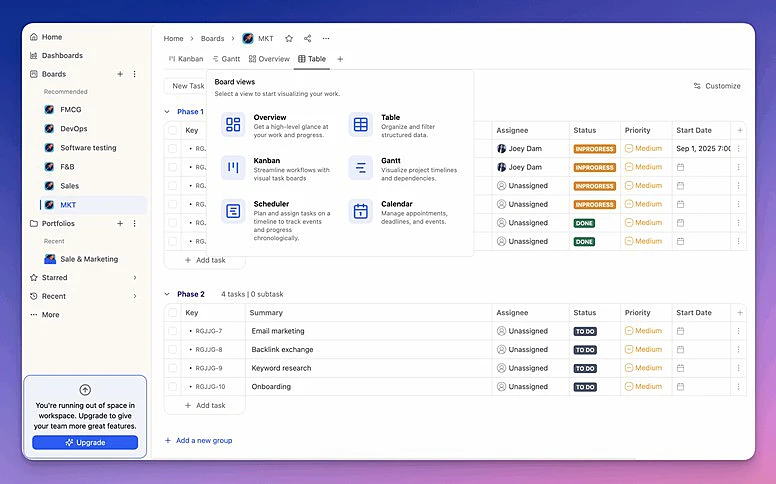
As organizations manage more projects, clients, and internal initiatives, coordinating work becomes increasingly complicated. Without a structured system, deadlines may be missed, tasks may be forgotten, and managers may struggle to understand the true status of a project.
 Why Businesses Are Investing in Employee Productivity Tools
Project management software gives teams a central location for organizing responsibilities, deadlines, milestones, documents, and project updates. For teams that need to coordinate project discussions alongside tasks, Troop Messenger brings chat, file sharing, task discussions, and real-time collaboration into one workspace. This helps teams keep project communication connected to the work without switching between multiple tools. Employees can see what they are responsible for, which tasks are most urgent, and how their work connects to the wider project.
Managers also gain better visibility into workloads and progress. They can identify delays, adjust resources, and support employees before minor problems become serious. This visibility improves accountability without requiring constant meetings or unnecessary micromanagement.
These platforms are particularly valuable for teams working remotely or across different time zones. Instead of depending on verbal updates, employees can review the latest project information whenever needed. This helps teams remain aligned even when they are not working in the same location or at the same time.
Automation Eliminates Repetitive Work
Automation is one of the main reasons businesses invest in productivity technology. Many routine business tasks follow predictable steps and do not require continuous human judgment. These tasks can often be handled more efficiently through automated workflows.
For example, businesses can automate invoice reminders, customer notifications, document approvals, data entry, appointment confirmations, report generation, and support ticket routing. Automation can also move information between business systems, reducing the need for employees to copy and paste data manually.
Tasks Commonly Automated
By handling repetitive administrative tasks, automation allows employees to spend more time on work that requires creativity, problem-solving, decision-making, and customer interaction. It can also reduce human error because processes are completed consistently according to established rules.
The value of automation is not simply that tasks are completed faster. It also creates more reliable processes. When routine work no longer depends entirely on individual memory, businesses experience fewer missed steps and greater consistency across departments.
| Administrative Task | Automation Benefit |
|---|---|
| Invoice reminders | Sent automatically on schedule |
| Customer follow-ups | Faster communication |
| Document approvals | Reduced delays |
| Report generation | Consistent reporting |
| Data entry | Fewer manual errors |
| Support ticket routing | Faster customer service |
AI Is Expanding Employee Capabilities
Artificial intelligence is becoming an increasingly important part of employee productivity. Many organizations use AI as an assistant that helps employees complete certain tasks more quickly rather than as a replacement for human workers.
Employees may use AI to draft emails, summarize meetings, analyze documents, organize information, generate reports, translate content, brainstorm ideas, or review large datasets. These tasks can take significant time when completed manually, especially when employees must process large amounts of information.
AI can also help workers identify patterns and insights that may be difficult to recognize through manual analysis. For example, a sales team may use AI to summarize customer feedback, while an operations team may use it to identify recurring workflow delays. Human review remains important, but AI can provide a useful starting point.
Examples of How Employees Use AI
- Draft emails and proposals
- Summarize meetings
- Analyze spreadsheets
- Organize research
- Generate reports
- Brainstorm ideas
- Translate documents
- Search internal knowledge bases
Responsible implementation is essential. Businesses need clear policies regarding data security, accuracy, privacy, and human oversight. Employees should understand when AI can be used, what information can be entered, and how outputs should be verified. Productivity gains should not come at the expense of trust or quality.
Internal Knowledge Search Saves Valuable Time
Information is often spread across shared drives, email accounts, internal portals, cloud storage, manuals, and business applications. Employees may know that the information they need exists, but finding the correct version can still take several minutes or longer.
An employee may need to locate a company policy, product specification, previous proposal, customer record, contract clause, or technical instruction. Repeating this process throughout the day can significantly reduce productivity.
Internal knowledge platforms help employees search approved company information from a central location. Some systems allow workers to ask questions in plain language and receive relevant answers connected to source documents. This reduces the amount of time employees spend searching through folders or contacting colleagues for basic information.
"Employees should spend their time applying knowledge, not searching for it. When organizations centralize trusted information and make it easy to find, teams can solve problems faster, reduce interruptions, and make decisions with greater confidence," says Sharon Amos, Director at Air Ambulance 1.
These systems can also improve consistency. When employees rely on the same approved sources, they are less likely to use outdated documents or provide customers with conflicting information. Access controls remain important so that employees only see information appropriate to their roles.
Cloud Collaboration Supports Hybrid Work
Remote and hybrid work have changed how teams collaborate. Employees may contribute to the same project while working from different locations, making cloud-based productivity tools essential for many organizations.
Cloud platforms allow employees to edit documents together, share files, participate in meetings, review project updates, and access business systems securely. Team members no longer need to wait for files to be emailed back and forth or worry about working from different document versions.
Real-time collaboration also helps businesses respond more quickly. Employees can review changes, provide feedback, and make decisions without being physically present in the same office. This flexibility is valuable for organizations with remote workers, international teams, contractors, or employees who travel regularly.
Cloud technology also supports business continuity. Employees can continue working when access to a physical office is disrupted, provided they have secure internet access and appropriate permissions.
Better Scheduling Improves Resource Management
Scheduling can be difficult when businesses must balance employee availability, customer demand, deadlines, skill requirements, legal requirements, and overtime costs. Manual scheduling becomes increasingly complicated as the workforce grows.
Scheduling software helps managers allocate employees and resources more effectively. It can highlight staffing gaps, reduce conflicts, and ensure that people with the right skills are assigned to the right tasks. Some systems can also use historical data to predict periods of high demand.
"Scheduling is not just about filling shifts. It is about matching the right people to the right work at the right time. Better planning reduces unnecessary costs, prevents employee burnout, and helps businesses maintain consistent service even during periods of high demand," says Daniel Apke, founder of Land Portal.
Industries such as healthcare, construction, retail, hospitality, logistics, and professional services can particularly benefit from intelligent scheduling. Better planning helps these businesses maintain service quality while avoiding unnecessary labor costs or employee overload.
Improved scheduling also benefits workers. Employees receive clearer information about their shifts and responsibilities, while managers can consider availability and workload more consistently.
Productivity Data Supports Better Decisions
Modern productivity platforms provide managers with information about how work moves through the organization. Businesses can review project completion times, resource allocation, team capacity, customer response times, workflow delays, and recurring bottlenecks.
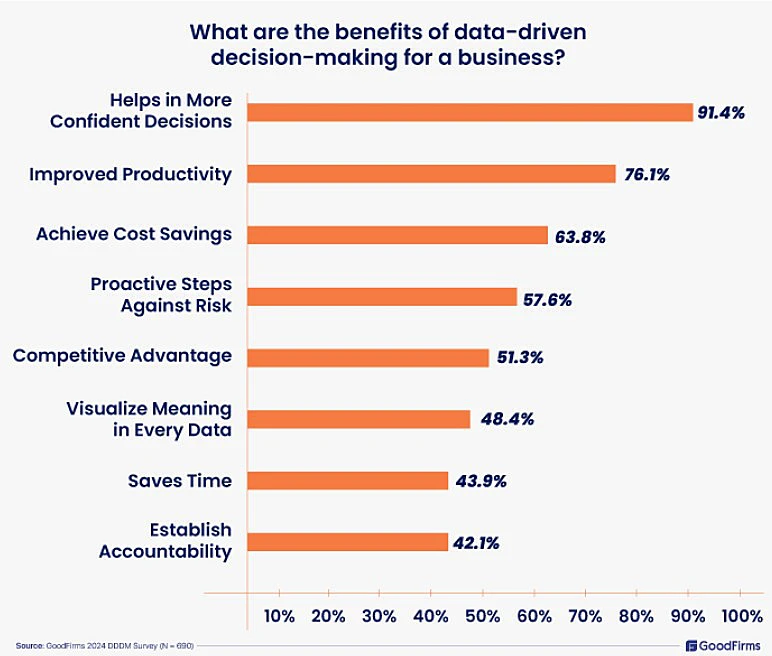
This data allows leaders to improve processes based on evidence rather than assumptions. For example, a company may discover that delays are caused by a complicated approval process rather than poor employee performance. Another business may find that one department is overloaded because responsibilities are not distributed effectively.
Productivity data should be used carefully. The goal should be to improve systems and support employees, not create unnecessary surveillance. When workers feel that every action is being monitored, productivity tools can damage trust instead of improving performance.
Companies should be transparent about what information is collected and how it will be used. Data is most valuable when it helps remove barriers, improve planning, and create fairer workloads.
Reducing Context Switching
Employees often use many different applications during a normal workday. They may move between email, messaging software, customer relationship management platforms, accounting systems, spreadsheets, shared drives, and project management tools.
Each switch requires the employee to pause, locate information, and refocus attention. Frequent context switching can reduce concentration and increase the likelihood of errors. It can also make simple tasks feel unnecessarily complicated.
Businesses are therefore investing in integrated systems that connect different applications and provide more unified workflows. Employees can access relevant information without moving repeatedly between disconnected tools.
"Small interruptions add up quickly throughout the workday. Every unnecessary application switch breaks focus, slows decision-making, and increases the chance of mistakes. Businesses that simplify workflows help employees spend more time on meaningful work and less time navigating software," says Paul Posea, Outreach Specialist at Superads.
The objective is not necessarily to replace every platform with a single system. Instead, businesses should ensure that their tools work together and that employees have a clear, efficient way to complete common tasks.
Integration Creates Smoother Workflows
Individual productivity tools can provide value, but their impact increases when they are connected. Integration allows information to move automatically between departments and applications.
For example, when a customer completes an online form, a connected system can create a customer record, notify the sales team, generate a follow-up task, and store the information in the appropriate database. If the customer becomes a client, the same information can move into project management and billing systems without being entered again.
This type of integration reduces duplicate work and improves data accuracy. It also creates a smoother customer experience because employees have access to consistent information throughout the relationship.
Without integration, businesses may simply replace manual tasks with a collection of disconnected digital tasks. Effective productivity strategies therefore consider the entire workflow rather than focusing on individual tools.
Employee Experience Matters
Productivity and employee satisfaction are closely connected. Employees become frustrated when technology slows them down, systems are unreliable, or processes require unnecessary effort.
"Slow software, outdated equipment, repeated data entry, and unclear approval chains can make employees feel that their time is not valued. Over time, these problems can contribute to stress, disengagement, and burnout," Says Jazil Ahmed, Outreach Specialist at Outrankr.io.
Modern productivity tools can improve the employee experience by simplifying daily work and reducing administrative friction. When employees can easily find information, complete tasks, and communicate with colleagues, they are better able to focus on meaningful responsibilities.
A better employee experience can also support retention. Skilled professionals are more likely to remain with organizations that provide effective tools and well-designed processes.
Supporting More Effective Meetings
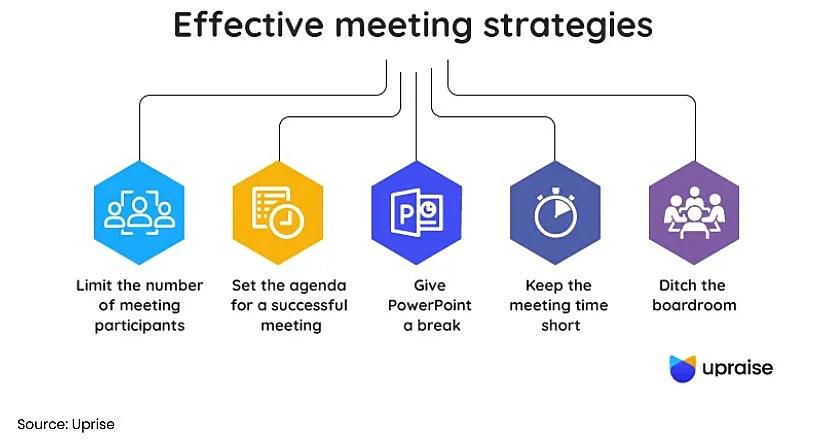
Meetings are necessary for collaboration, but poorly managed meetings can consume large amounts of productive time. Employees may attend discussions without clear objectives, take extensive notes, or leave without understanding the next steps.
Productivity tools can help organizations create agendas, record discussions, transcribe meetings, summarize key decisions, and assign follow-up actions. This allows participants to focus on the conversation rather than spending the entire meeting taking notes.
Clear summaries also benefit employees who could not attend. Instead of scheduling another meeting, they can review the decisions and responsibilities afterward.
Technology cannot make every meeting productive on its own. Businesses must still decide whether a meeting is necessary, invite the right people, and establish a clear purpose. However, the right tools can reduce administrative work and improve follow-through.
Mobile Productivity Is Increasing
Many employees do not work from a traditional desk. Sales representatives, construction managers, healthcare professionals, consultants, technicians, and field service workers often need to complete tasks while traveling or visiting customer locations.
Mobile productivity applications allow these workers to update records, review documents, capture photos, communicate with colleagues, complete approvals, and access customer information from smartphones or tablets.
This reduces the delay between completing work and updating business systems. A technician can record service details immediately, while a sales representative can update customer information after a meeting.
Mobile access also improves communication between office-based teams and field workers. Everyone can view current information instead of relying on handwritten notes or delayed updates.
Cybersecurity Remains Essential
Businesses cannot improve productivity by sacrificing security. Productivity platforms often contain sensitive employee, customer, financial, or operational information, making cybersecurity an important part of implementation.
Modern tools may include multi-factor authentication, encryption, access controls, audit logs, role-based permissions, and secure cloud storage. These features help protect information while allowing employees to work from different locations and devices.
Businesses should also provide cybersecurity training. Even secure tools can create risks when employees use weak passwords, share information carelessly, or ignore access policies.
Essential Security Features
- Multi-factor authentication (MFA)
- Role-based access controls
- Data encryption
- Secure cloud storage
- Audit logs
- Regular software updates
- Employee cybersecurity training
Security and productivity should support each other. Well-designed security controls can protect information without creating unnecessary obstacles for employees.
Training Determines Success
Purchasing software does not automatically improve productivity. Employees need to understand why the tool is being introduced, how it should be used, and how it will improve their work.
Organizations that implement productivity tools successfully usually provide structured onboarding, practical training, and ongoing support. They also collect employee feedback and adjust workflows when problems appear.
When employees are not properly trained, they may avoid the tool, use only a small portion of its features, or create their own alternative processes. This reduces the return on the investment.
Best Practices for Successful Adoption
- Explain why the new tool is being introduced.
- Provide hands-on employee training.
- Offer ongoing support after launch.
- Gather employee feedback regularly.
- Continuously improve workflows based on real usage.
Training should focus on real daily tasks rather than only explaining technical features. Employees are more likely to adopt a platform when they can clearly see how it saves time or solves an existing problem.
Avoiding Tool Overload
Too many productivity tools can create the opposite effect. Businesses sometimes purchase separate applications for messaging, file sharing, scheduling, task management, reporting, note-taking, automation, and artificial intelligence.
When these systems are not coordinated, employees may struggle to remember where information is stored or which tool should be used for a particular task. Notifications from multiple platforms can also become distracting.
Successful organizations regularly review their technology stack and remove tools that duplicate existing functions. They also look for opportunities to consolidate systems and simplify workflows.
The goal of productivity technology should be to reduce complexity, not introduce more of it. A smaller number of well-integrated tools can often provide more value than a large collection of disconnected applications.
Measuring Productivity Improvements
Businesses need clear ways to determine whether their investments are delivering results. Measuring productivity does not mean tracking every minute of an employee's day. Instead, organizations should focus on meaningful business outcomes.
These outcomes may include faster project delivery, reduced administrative workload, improved customer response times, lower operating costs, higher employee satisfaction, fewer errors, and stronger revenue per employee.
Businesses should establish performance measures before introducing a new tool. This makes it easier to compare results and understand whether the technology has solved the original problem.
Common KPIs
Employee feedback should also be part of the measurement process. A platform may appear successful according to certain metrics but still create frustration or additional work for the people using it.
| KPI | Expected Outcome |
|---|---|
| Administrative hours saved | Higher efficiency |
| Project delivery speed | Faster completion |
| Employee satisfaction | Better workplace experience |
| Customer satisfaction | Improved service quality |
| Error rate | Higher accuracy |
| Revenue per employee | Greater profitability |
Small Businesses Are Investing Too
Productivity technology is no longer limited to large enterprises. Cloud-based subscription models have made advanced software more accessible to smaller organizations.
Small businesses can now use project management platforms, AI assistants, accounting systems, digital document signing, customer relationship management software, and workflow automation without making large infrastructure investments.
These tools allow small teams to operate more efficiently and compete with larger organizations. A business with a limited workforce can automate administrative work, provide faster customer service, and manage projects more professionally.
However, small businesses should be selective. They may have fewer resources for implementation and training, making it especially important to choose tools that solve clear problems and are easy to manage.
The Human Element Still Matters
Technology alone does not create a productive organization. Clear leadership, realistic goals, defined responsibilities, effective communication, and a positive workplace culture remain essential.
Productivity tools support these areas by removing unnecessary friction and making information easier to access. They cannot correct poor management, unclear priorities, or unrealistic workloads.
Employees still make important decisions, solve complex problems, build relationships, and create new ideas. Technology allows them to spend more time on these valuable activities by reducing repetitive and administrative work.
The most successful businesses treat productivity tools as support systems rather than replacements for human expertise.
Looking Ahead
Employee productivity tools will continue to evolve as artificial intelligence, automation, and analytics become more advanced. Future platforms may anticipate employee needs, recommend workflow improvements, summarize information automatically, and support more complex decisions.
Businesses may also see greater personalization. Productivity systems could adjust recommendations based on an employee's role, responsibilities, workload, and working preferences.
However, companies will still need to consider privacy, security, accuracy, and employee trust. Technology should make work more manageable rather than creating constant monitoring or unrealistic expectations.
Organizations that introduce these tools thoughtfully will be better positioned to respond to changing markets, support their employees, and grow without creating unnecessary operational complexity.
Conclusion
Businesses are investing in employee productivity tools because improving efficiency has become one of the most practical ways to remain competitive. Rising costs, complex operations, distributed teams, and increasing customer expectations have encouraged companies to look for better ways to use their existing resources.
The greatest productivity gains rarely come from asking employees to work harder. They come from eliminating unnecessary work, simplifying communication, improving access to information, and automating repetitive processes.
Project management platforms, AI assistants, cloud collaboration tools, scheduling systems, and integrated business applications can help employees complete work more effectively. However, their success depends on proper training, clear policies, thoughtful implementation, and a strong understanding of employee needs.
When businesses combine effective technology with good leadership and a culture of continuous improvement, productivity tools become more than software. They become a strategic investment that supports employee satisfaction, stronger customer experiences, and long-term business growth.

