


Do you know how to add music to Instagram post? The right song can make your stories, reels, or video feeds much more interesting and engaging to your followers. Digital influencers and brand profiles, for example, often use this feature in their posts to catch the audience's attention and help to make the content even better.
You can add music to Instagram posts, Reels, and Stories by tapping Add Music during the creation process, selecting a song, choosing the section you want, and publishing. If the music option is missing, it’s usually due to account type, region restrictions, outdated app version, or copyright limitations.
Why Adding Music to Your Instagram Posts Matters in 2026
Instagram continues to evolve into a platform where audio is a central part of storytelling, especially with the rise of Reels and the popularity of short-form video. Music isn’t just decoration—it can actively increase:
- Engagement rates (likes, comments, shares, saves)
- Retention (users stay on your post longer)
- Discoverability (your post can appear in audio-driven Reels feeds)
- Brand perception (music communicates tone, mood, and personality)
With Instagram competing directly with TikTok for audio usage, the platform frequently boosts posts that use trending sounds, giving creators and brands a chance to gain fast visibility.
And as Instagram expands its global music licensing, users today have more audio options than ever—but also more rules to follow (especially for business accounts).
What You Can Add Music To on Instagram Today
Adding audio to your Instagram content is no longer restricted to the videos you post. You can include it in:
Feed Photo Posts
Music can be added to static photo posts. The audio plays as a "soundtrack" while the post is viewed.
Feed Video Posts
Music can be added directly, or you can upload a video that already includes your audio mix.
Reels
This is the most powerful format for music. Instagram gives priority to Reels using trending songs or audio clips.
Stories
You can add music using the Music Sticker, with various lyric styles, album covers, and visualizations.
Carousel Posts
Music can be added to carousels, but soundtrack length and availability vary by region.
Business Accounts (Important!)
Music access may be restricted for commercial accounts. Popular songs often won’t appear. You may see only "free to use" or "copyright-cleared" tracks.
Tip: If your business account doesn’t show popular music, try switching to Creator Account—you often regain access instantly.
How to Add Music to An Instagram Story
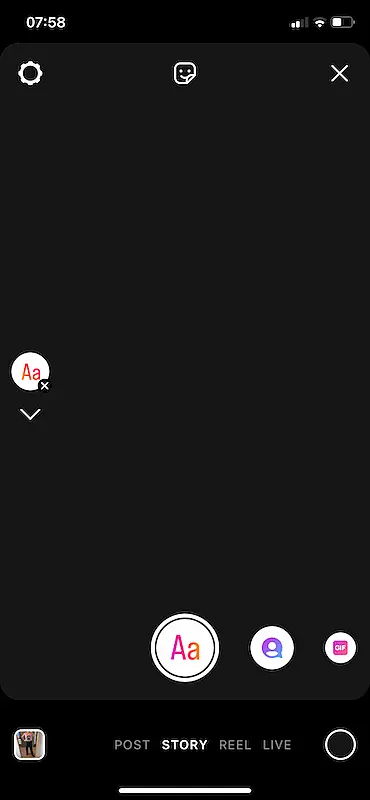
1 - Open your story.
 How to add music to instagram post 1
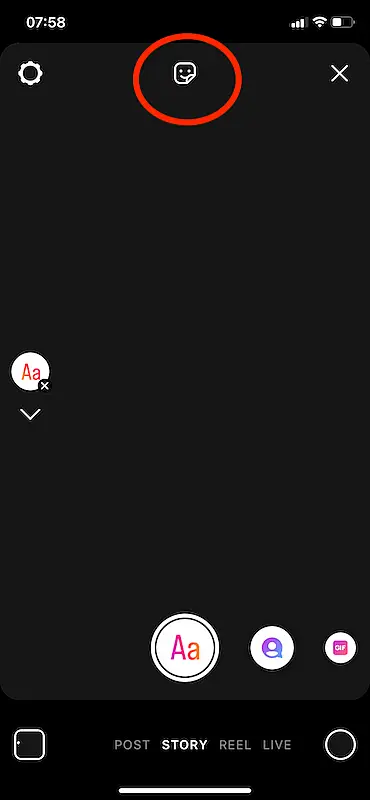
2 - Click on the sticker icon on the top of the screen.
 How to add music to instagram post 2
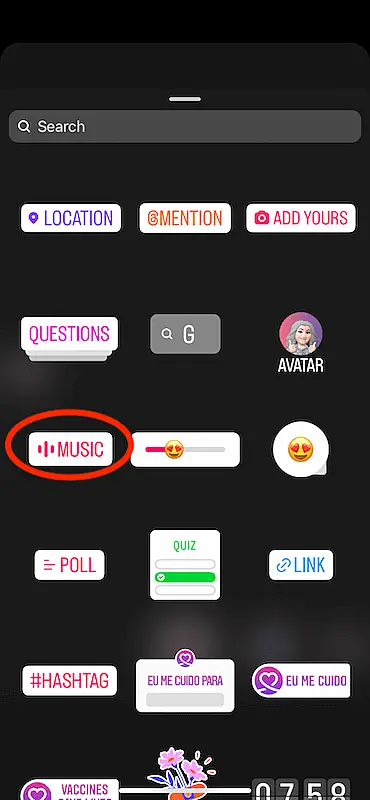
3 - Select "Music".
 How to add music to instagram post 3
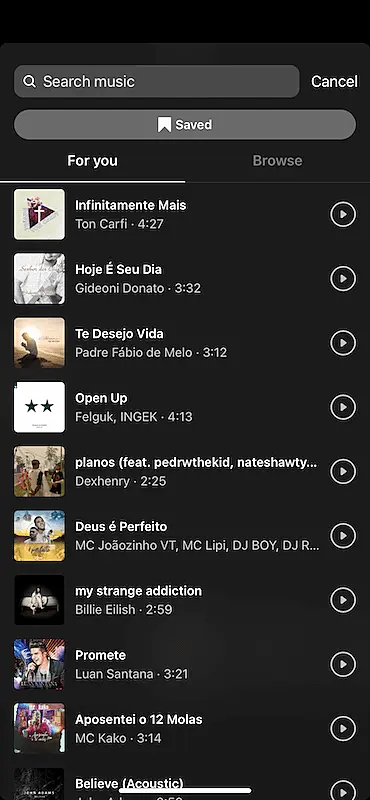
4 - Search for the music you want to add.
 How to add music to instagram post 4
5 - Select the part of the song you will insert.
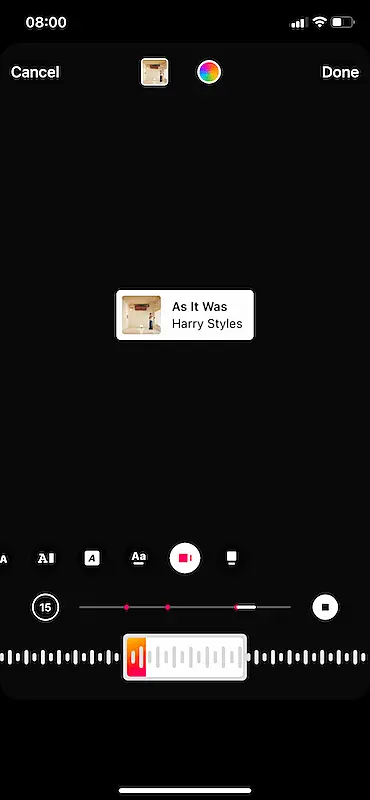 How to add music to instagram post 5
6 - Click on the "Done" button, then on "Your Story" to post.
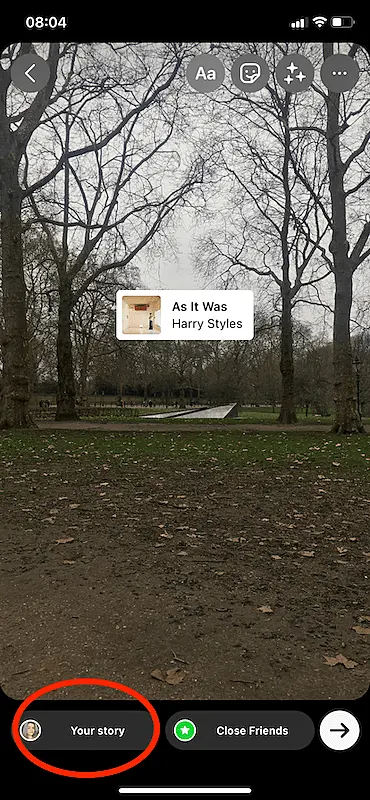 How to add music to instagram 6
How to Add Music to an Instagram Post (Step-by-Step)
These steps apply to both Android and iPhone, with minor interface differences.
How to Add Music to Instagram Reels
1 - Click on the music sticker on the top of the screen.
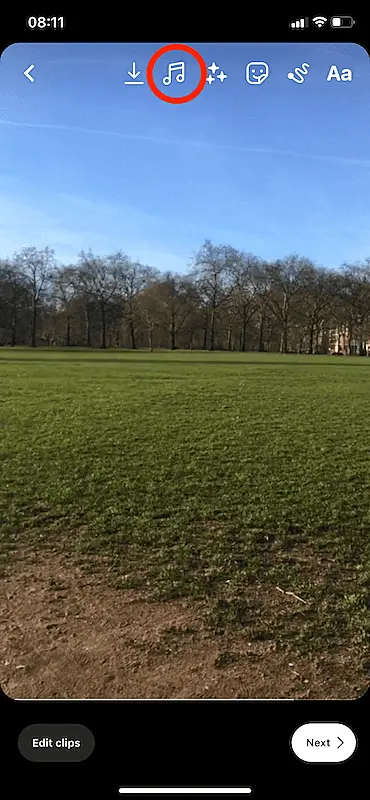 How to add music to instagram post 7
2 - Select the button "Music".
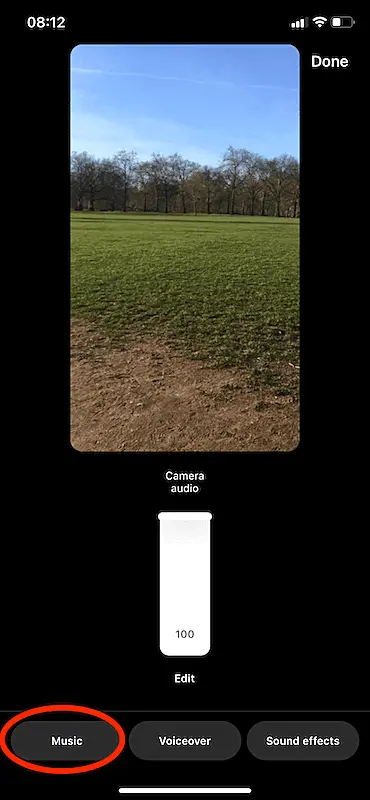 How to add music to instagram post 8
3 - Search the music you wish to use on the reels
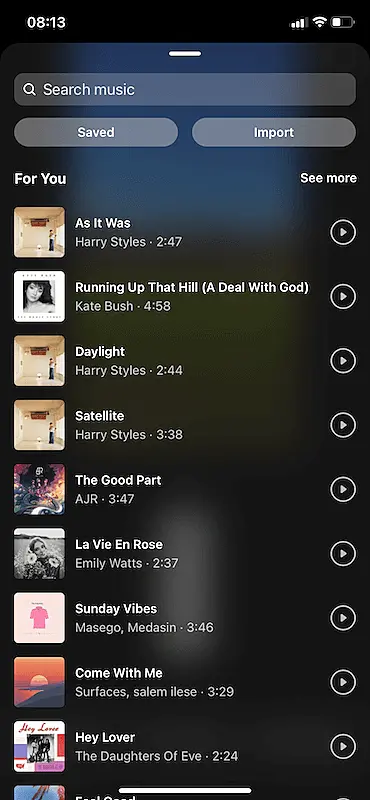 How to add music to instagram post 9
4 - Choose the part of the music you want to include.
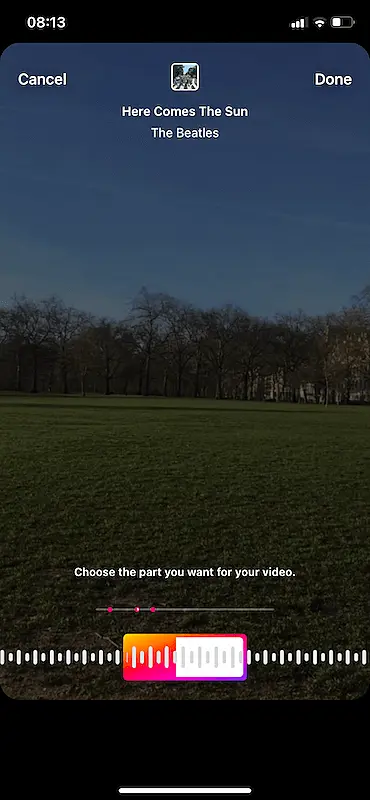 How to add music to Instagram post 10
5 - Click on "Done".
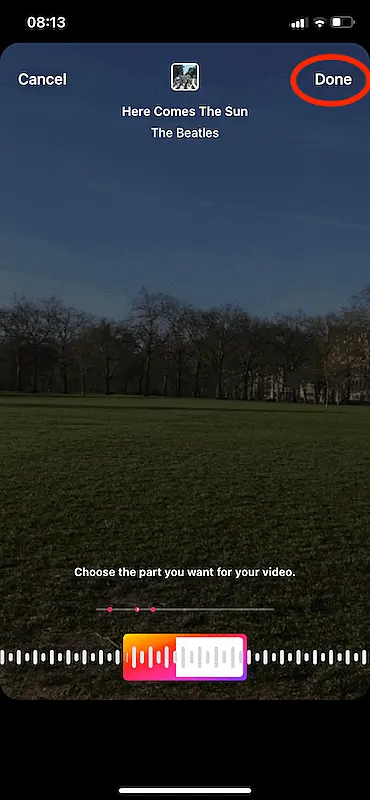 How to add music to instagram post 11
6 - Click on the button "Next", then, on the next screen, click on "Share".
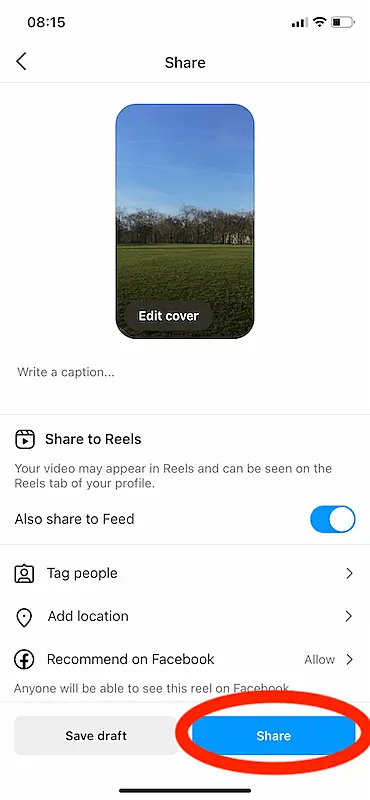 How to add music to instagram post 12
Tip: Use Auto-Sync (Beat Sync Feature): Instagram now offers Auto-Sync, which automatically aligns your clips to the music beat. This feature dramatically improves video quality for users who aren’t editors.
How to Add Music to a Photo Post
1 - Choose the photo you want to post on your feed
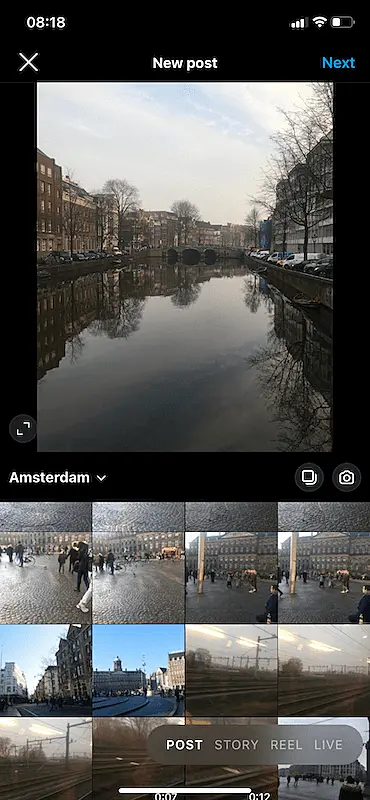 How to add music to instagram post 13
2 - Click on "Next" twice.
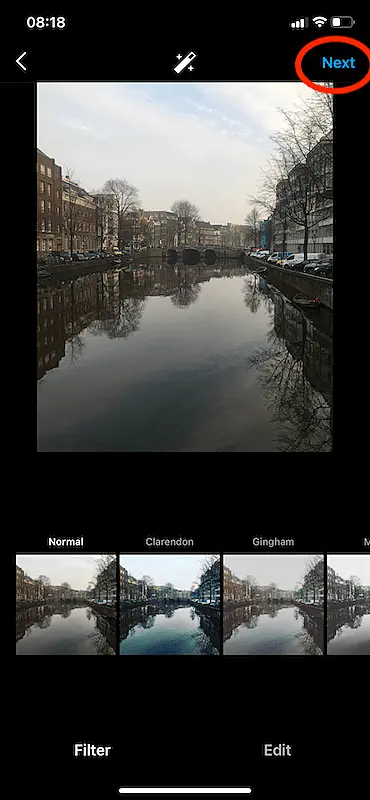 How to add music to instagram post 14
3 - Click on "Add music".
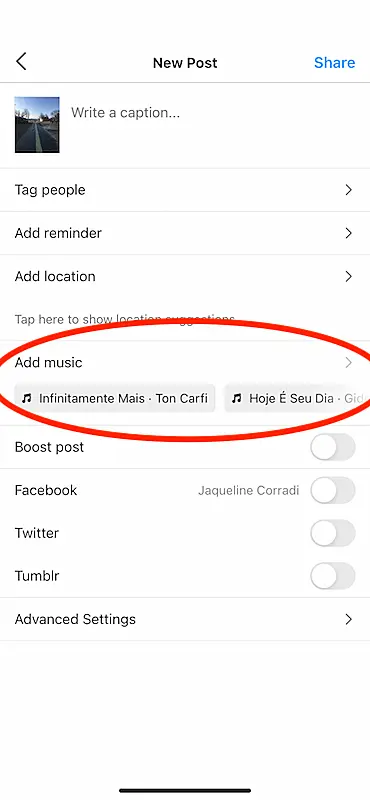 How to add music to instagram post 15
4 - Search the music you want to put on the post.
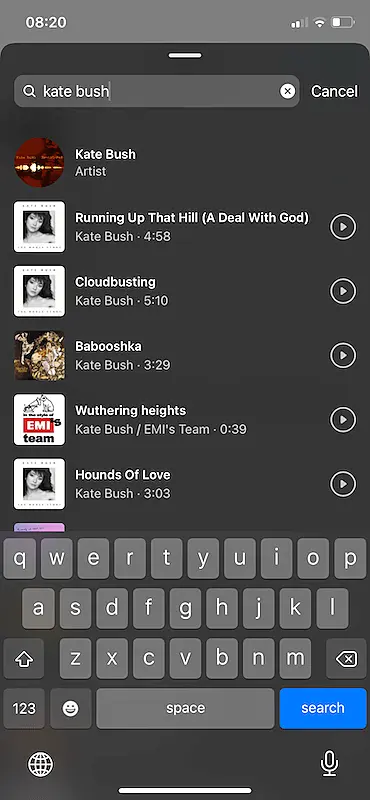 How to add music to Instagram post 16
5 - Adjust the part of the track that you wish to include.
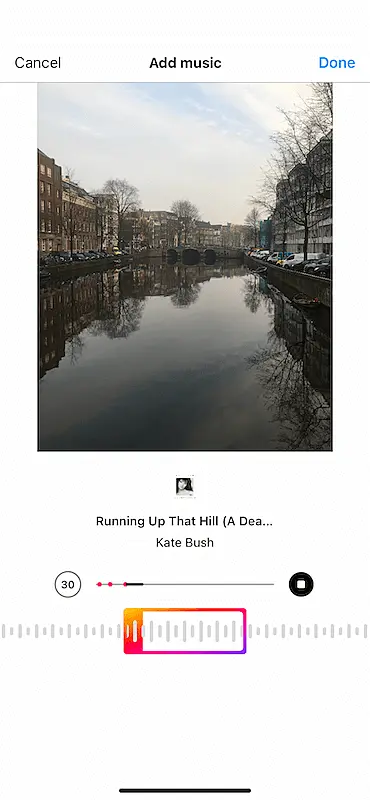 How to add music to instagram post 17
6 - Click on the " Done" button.
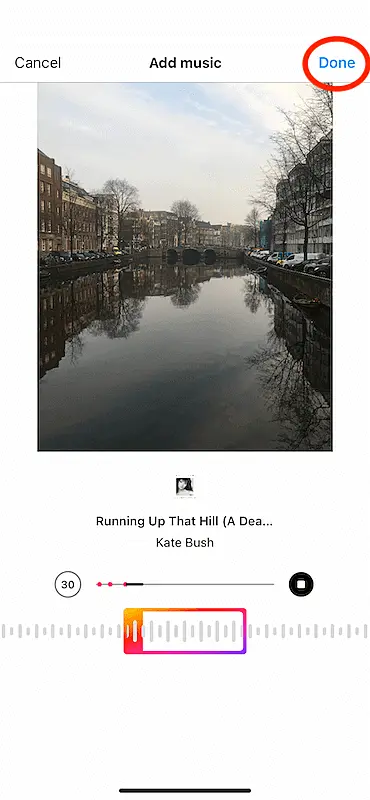 How to add music to instagram post 18
7 - Click on "Share".
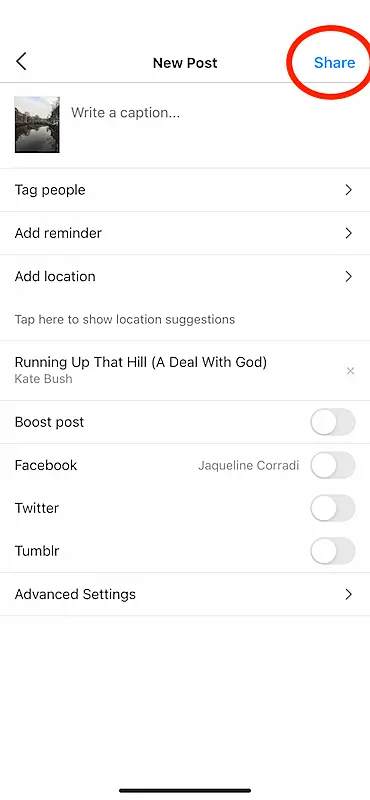 How to add music to instagram post 19
Why You Can’t Add Music on Instagram
1. The "Add Music" Button Is Missing
Likely causes:
- Outdated app
- Limited regional music licensing
- Account type restrictions
- Temporary Instagram glitch
- Music disabled for branded/sponsored posts
Fix: Update the app, restart, or try a VPN for testing (not for continuous use).
2. Music Search Isn’t Loading
Possible issues:
- Poor connection
- Instagram outage
- Cache/storage issues
- Device limitations
Fix: Clear cache, restart phone, or delete and reinstall the Instagram app if necessary.
3. Business Account Music Restrictions
Business accounts may not access trending or commercial songs.
Fix: Switch to Creator mode to regain full access.
4. Region Restrictions
Some countries don't have full music licensing.
Fix: You can't legally bypass this for commercial content. Use royalty-free tracks instead.
5. Copyright-Blocked Content
Instagram can mute your video if:
- You use unlicensed songs
- Your video includes copyrighted audio in the background
- You’re posting paid/sponsored content with commercial songs
Fix: Use royalty-free, licensed, or original audio.
Best Practices for Using Music on Instagram (Expert Tips)
Follow these to maximize reach and avoid copyright issues:
- Choose Music That Matches Your Brand Identity: Your audio choices can define your personality and consistency.
- Use Trending Sounds Early: The first 7–10 days of a trend deliver the biggest growth potential.
- Keep Music Volume Below Your Voice: If using voiceover, ensure speech is at least 20–30% louder.
- Use Songs That Match Your Video’s BPM: Beat alignment increases retention significantly.
- Avoid Overused Trends: Once a trend peaks, engagement often drops.
- Consider Accessibility: Add captions and avoid songs that overpower speech.
Copyright and Licensing: What You Must Know in 2026
Personal vs Commercial Use
- Personal accounts can use most popular songs.
- Business accounts face restrictions due to licensing rules.
Sponsored Content
If a brand pays you, you may not legally use a copyrighted song unless the brand has licensing rights.
Original Audio Rights
If you upload your voice, music, or sounds, you own the "Original Audio" unless you use copyrighted samples.
What Happens if You Violate Music Policies?
- Your audio may be muted
- Your post could be removed
- Your account may face reduced reach
- Repeated violations can lead to partial or full restrictions
Boost Your Posts With Your Favorite Songs
As you can see, learning how to add music to Instagram post is very simple. Now that you understand the step-by-step, enjoy this feature, use your creativity, and create different types of content for Instagram with the proper soundtrack to each one of them.

