


The pattern is familiar. A prospect calls while the owner is with a customer, a technician is driving, or the office line is already tied up. The call rolls to voicemail, the prospect hangs up, and nobody knows whether that was a routine question or a high-value lead.That's why interest in the AI receptionist has moved from curiosity to operations.
For small teams, the issue usually isn't whether someone cares about answering the phone. It's that the front desk function breaks under real business conditions: lunch rushes, after-hours calls, overlapping calls, and staff who already wear three hats.
The broader market reflects that shift. AI receptionists for small businesses sit inside a virtual receptionist market valued at $3.85 billion in 2024 and projected to reach $9 billion by 2033, with 68% of small businesses already using AI and 9% planning adoption according to AI receptionist statistics roundup. That doesn't mean every business needs one. It does mean phone automation is no longer niche.
What is an AI Receptionist and What It Is Not
The simple definition
An AI receptionist is a phone-based digital front desk that answers calls, understands what the caller wants, and completes defined tasks such as routing, booking, note-taking, and message capture. The useful version isn't just a voice on the line. It connects to calendars, call routing rules, and customer records so the call can turn into an action.
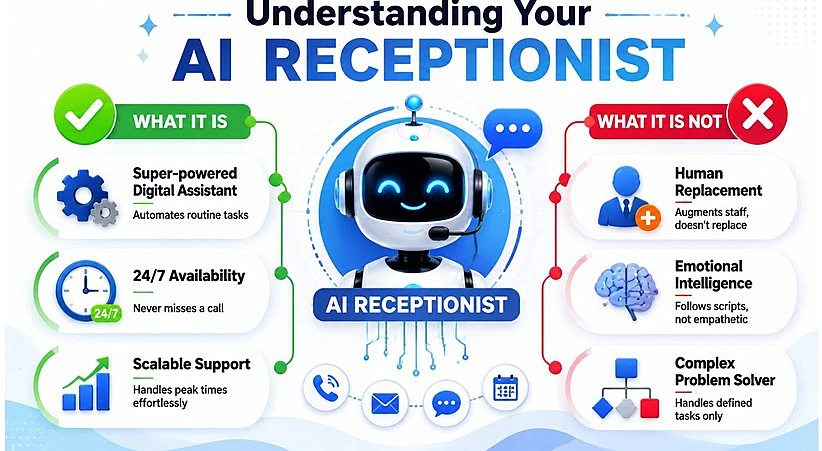
A real advantage over a human-only front desk is concurrency. RingCentral states that its AI Receptionist can answer multiple inbound calls simultaneously and stay available continuously, which matters when several callers hit the line at once or when staff are off the clock.
Where small businesses get confused
Most confusion comes from lumping modern AI systems together with old phone trees. They aren't the same.
Basic IVR says "press 1 for sales." An AI receptionist should let the caller speak naturally, interpret intent, and take the next step. It also isn't a robocaller and it isn't a full substitute for judgment, empathy, or exception handling.
Practical rule: Treat it as a front-desk operator for defined workflows, not as a universal replacement for experienced staff.
For businesses comparing options, the trade-offs become clearer when reviewing different virtual receptionist models. Pure AI works well for repeatable tasks. Hybrid models make more sense when calls regularly involve legal sensitivity, emotional escalation, or complicated service coordination.
Key Benefits for Your Business Bottom Line
The cost of missed demand
The strongest business case isn't novelty. It's leaking. Zenoti reports that 37% of all calls go unanswered, and 82% of those missed calls happen during business hours. The same research says businesses can recover 35% of lost bookings from missed calls and waitlist alerts, that 30% of lapsed clients rebook with smart nudges and reminders, and that automation and improved engagement can add $3,000–$4,000 in monthly revenue per location in the contexts studied, according to Zenoti's analysis of AI receptionist ROI.
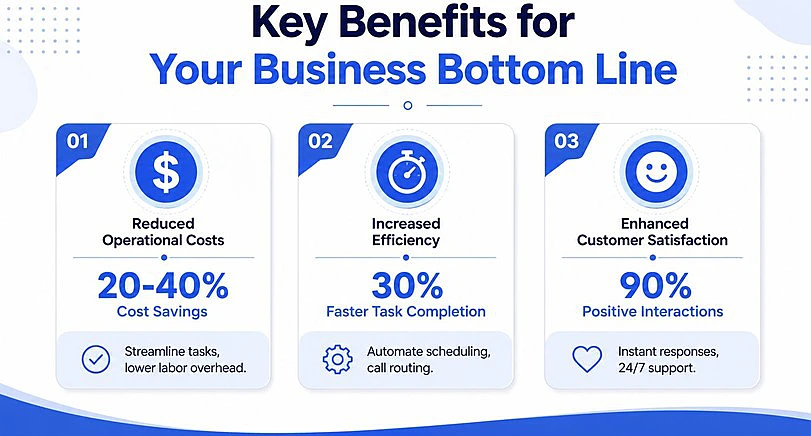
Those numbers matter because they shift the conversation. An AI receptionist for a small business isn't just a cheaper phone answerer. It can be a revenue recovery tool.
What changes operationally
The most immediate wins are usually operational, not technological:
- Fewer interruptions: Staff stop dropping live work to answer every routine question.
- Better lead capture: After-hours and overflow calls turn into appointments or qualified messages instead of voicemails.
- Cleaner follow-up: Call details can move into workflows instead of sitting in someone's notebook.
- Consistent call handling: Every caller gets the same baseline response quality.
A good summary of the broader automation impact appears in this guide to customer service automation, especially for teams trying to reduce repetitive call handling without expanding payroll.
Businesses usually lose more money from unhandled demand than from overpaying for phone coverage.
Practical Use Cases for Everyday Business Tasks
A normal business day with AI handling the front desk. A salon gets a call before opening. The caller wants the first available appointment this week. The system checks the calendar, offers open slots, confirms the booking, and logs the interaction.
A plumbing company gets two calls while the dispatcher is already on the line. One caller needs emergency help. The other wants pricing for a standard job. The urgent call gets routed immediately according to rules. The routine inquiry gets captured and queued for follow-up.
A real estate office gets an evening inquiry on a listing. Instead of voicemail, the caller gets answers to basic questions, leaves preferences, and triggers a next-day callback with context attached.
A psychologist’s patient has a midnight mental health crisis. Usually they’d have to wait until morning to get an answer. With an AI receptionist that connects to an EHR for therapists, they can schedule a visit no matter the time. Even the mere thought of a visit being scheduled can ground the patient and help them survive the night.
Workflows that actually save time
The valuable part is orchestration. Similar principles are driving the growth of AI in eCommerce, where businesses use intelligent automation to manage customer inquiries, personalize interactions, and streamline operational workflows without increasing staffing costs.
Independent small-business guidance describes AI receptionists as tools for call handling, calendar booking, CRM logging, and conditional handoff, reducing the lag between intent and a confirmed appointment while cutting manual entry that causes missed follow-up.
Three workflows usually produce the most value:
- Appointment management The caller books, reschedules, or cancels without waiting for a staff member to become free.
- Lead intake The system collects name, need, urgency, and contact details in a structured format.
- Priority routing Calls that fit urgent criteria go straight to an on-call person or the right department.
For industry-specific examples, this walkthrough of an AI receptionist for salons shows how high-frequency booking businesses can use these workflows without turning the phone into a frustrating script maze.
Getting Started A Practical Implementation Checklist
What to set up before turning it on the most failed rollouts have the same problem. The phone agent was activated before the business rules were clear.
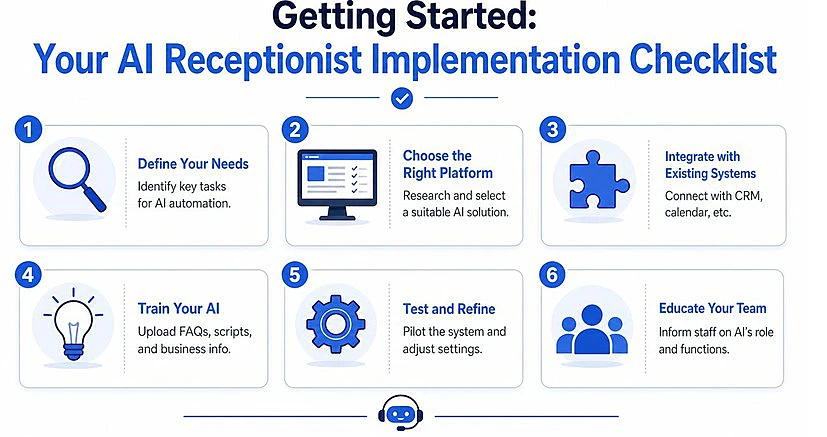
Start with a checklist:
- Define call types: Separate booking calls, quote requests, support issues, complaints, emergencies, and spam.
- Load business knowledge: Hours, locations, services, service areas, FAQs, pricing boundaries, and policies need to be explicit.
- Connect systems: Link the phone workflow to calendars, routing destinations, and CRM or ticketing tools like Sleekflow.
- Write approved responses: Decide how the system should answer common questions and what it should never improvise.
- Test live scenarios: Run after-hours, peak-hour, upset-caller, and transfer-failure tests before full launch.
Escalation rules that protect the customer experience
This is the part vendors often underplay. Small businesses don't usually get hurt on routine calls. They get hurt on the handful of calls that involve urgency, confusion, or emotion.
Nextiva's use-case guidance highlights the importance of deciding which calls should never be automated, especially urgent complaints or complex issues, and designing handoff rules that transfer calls with context before frustration rises. Nextiva is based on REST API and many industries like financial services require powerful API security features. For this reason, small businesses should be mindful of whether it integrates with an API security testing platform.
A practical handoff policy should include rules like these:
Complaint or dispute Minimal intake Fast transfer with notes Multi-part complex request Partial capture Transfer after summary
If a caller is upset, confused, or high-stakes, speed to the right person matters more than automation rate.
Choosing a Vendor and Measuring Your ROI
How to evaluate vendors without getting distracted
Price matters, but it's rarely the deciding factor by itself. The better vendor questions are operational.
Ask whether the system can book directly during the call, whether it logs outcomes cleanly, whether transfer logic is configurable, and how easy it is to update business knowledge. Voice quality matters too, but workflow reliability matters more.
A small business should also check whether the product fits the actual use case:
- After-hours coverage
- Overflow handling during peaks
- Appointment-heavy workflows
- Lead qualification before handoff
- CRM and calendar integration
A simple ROI model for small teams
Zoom's recent coverage makes an important point. Payoff often comes from after-hours capture and overflow handling, not just replacing a person, and autonomous resolution rates can range from 60% to 95%, while pricing may range from roughly $75 to over $299 per month depending on the model, as discussed in Zoom's overview of AI receptionists for retail and small business.
That means ROI should be calculated around four inputs:
- Recovered opportunities: How many calls currently die in voicemail or wait too long?
- Transfer rate: How often does a human still need to step in?
- Administrative time returned: How much staff time gets freed from repetitive phone work?
- After-hours demand: How many inquiries arrive when nobody is staffed to answer?
A low-volume business might not justify full replacement logic. It may still justify overflow coverage. That's often where AI receptionists for small businesses earn their keep.
If missed calls are turning into lost leads, byVoice is one option to evaluate for AI receptionist workflows such as answering, routing, appointment scheduling, and human handoff across calls and messaging.
The practical next step isn't buying the first tool on a feature list. It's mapping the calls that matter most, deciding what should be automated, and testing whether the system protects revenue without creating new friction.

