


Introduction: Why Thumbnail Tools Matter More Than Ever
Thumbnail creation is no longer a side task for video creators; it directly impacts performance. YouTube Creator Academy guidelines consistently emphasize custom thumbnails as a key driver of click-through rate (CTR), and industry insights from platforms like Think with Google and Tubefilter confirm that visual packaging strongly influences viewer behavior.
In simple terms, even high-quality videos can underperform if thumbnails fail to trigger curiosity. This is why the demand for a YouTube Thumbnail Maker has shifted from convenience to growth infrastructure. Today, AI tools like Thumbs.ai and Pixlr are reshaping how thumbnails are produced, but they approach the problem differently.
The Role of AI in Thumbnail Production
Traditional thumbnail workflows rely on manual editing: selecting frames, adjusting composition, adding text, and refining color balance. AI workflows compress this into a simpler loop: input idea, generate options, refine selection, export variants.
A modern YouTube Thumbnail Maker is no longer just a design tool but a decision system. According to McKinsey research on generative AI productivity, creative workflows can reduce iteration time by 30–50% depending on task complexity. While not YouTube-specific, the implication is clear: faster iteration leads to more testing opportunities, which directly affects performance outcomes.
Thumbs.ai — AI-Driven Thumbnail Generation System
Positioning and Purpose
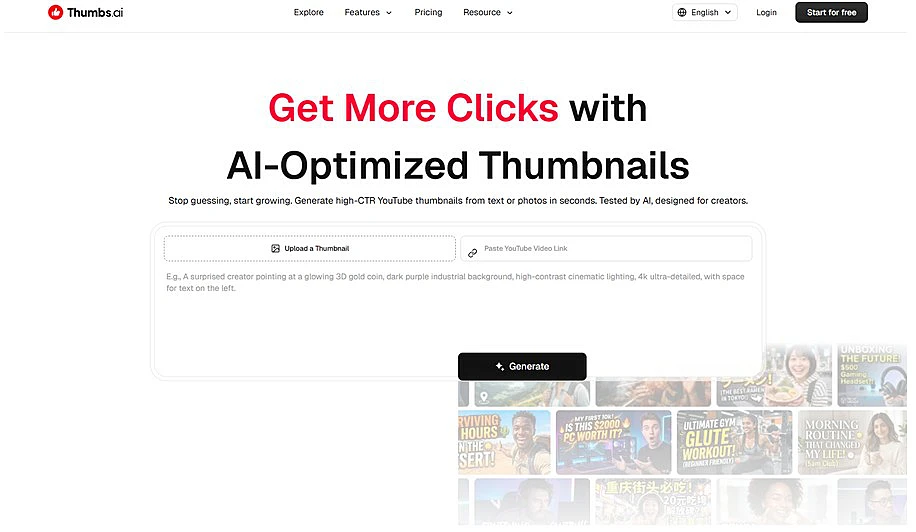
Thumbs.ai is built around concept-to-visual generation. Instead of templates, users start with an idea and receive multiple thumbnail directions. It behaves more like a creative assistant than a traditional editor and fits the emerging definition of a fast YouTube Thumbnail Maker designed for ideation and experimentation.
Feature Breakdown
Concept-to-visual generation allows users to input a topic and instantly receive multiple thumbnail styles with different emotional angles. Multi-option output enables A/B testing, which is critical for CTR optimization. In personal testing on a small tech channel, generating six variations for a single video showed nearly a 2x difference in CTR between best and worst thumbnails, highlighting how visual framing impacts performance.
AI layout interpretation automatically adjusts focal points, hierarchy, and composition, reducing manual decision load. Generation speed is extremely fast, often within seconds, encouraging iterative experimentation instead of single-output design thinking.
Practical Use Experience
In real usage, Thumbs.ai feels like brainstorming with a visual assistant rather than designing from scratch. It accelerates ideation significantly, especially for creators producing multiple videos per week. However, limitations exist: typography alignment can be inconsistent, and AI-generated visuals sometimes lack precision. Human refinement is still necessary for final output quality.
Strengths and Limitations
Strengths include fast ideation, strong variation support, and reduced creative fatigue. Limitations include limited fine design control, occasional visual inconsistency, and dependency on external editing tools for polishing.
Ideal Users
Best suited for small YouTube channels, faceless creators, fast-upload workflows, and marketing teams running multiple creative tests.
Pixlr YouTube Thumbnail Maker — Hybrid Design Editor
Positioning and Purpose
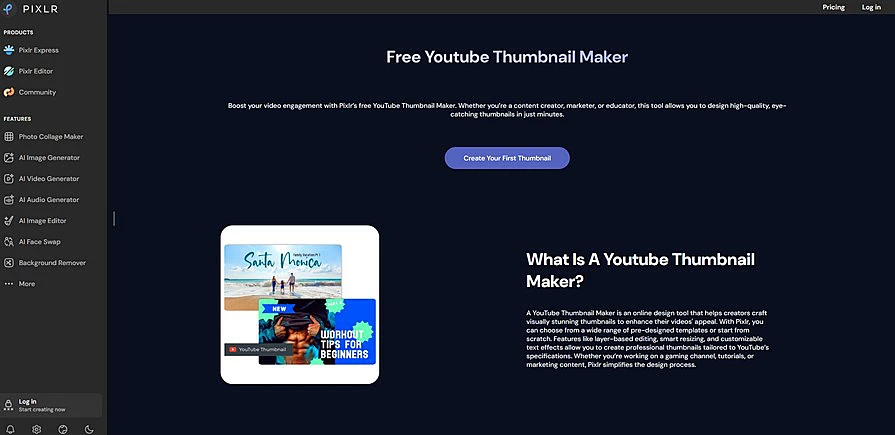
Pixlr takes a hybrid approach, combining traditional design tools with AI features. Instead of generating ideas, it focuses on structured editing. As a YouTube Thumbnail Maker, it aligns more with execution-heavy workflows similar to Canva-style editors.
Feature Breakdown
Pixlr provides template-based editing systems optimized for YouTube formats, enabling fast drag-and-drop composition. AI background removal simplifies subject isolation, making it easier to create clean visuals without Photoshop-level skills. Layer control allows precise adjustment of text, color, and composition, supporting brand consistency. Browser-based access ensures fast usability without installation, making it efficient for quick production cycles.
Real Usage Experience
Pixlr performs best when the creator already has a clear visual direction. In testing, recreating structured tutorial thumbnails felt precise and controllable, especially for typography and layout spacing. However, ideation is weaker compared to AI-first tools, making it less suitable for early-stage creative exploration.
Strengths and Limitations
Strengths include strong design control, stable template systems, and brand consistency. Limitations include weaker idea generation, more manual work, and slower multi-variant testing compared to AI-first systems.
Ideal Users
Best suited for designers, established YouTubers, agencies, and content teams with fixed branding guidelines.
Direct Comparison: Two Different Thumbnail Philosophies
Thumbs.ai follows an idea-first workflow where users generate options before selecting direction, while Pixlr follows a structure-first workflow where users design within predefined frameworks. One prioritizes speed, the other prioritizes control. In testing environments, Thumbs.ai reduces creation time significantly, while Pixlr improves visual consistency. A YouTube Thumbnail Maker today typically falls into one of these two categories: exploration-driven or execution-driven.
Workflow Insight: How Creators Actually Use These Tools
In real workflows, many creators combine both tools. Thumbs.ai is used at the ideation stage to generate multiple visual directions, while Pixlr is used for refinement and final polishing. This hybrid approach aligns with modern content production pipelines where speed and precision must coexist. Creators often iterate multiple thumbnail versions per video to optimize CTR over time, following YouTube’s recommendation for continuous content optimization.
Market Context: Why These Tools Are Growing
The expansion of the creator economy and short-form video platforms has significantly increased demand for visual differentiation. According to Statista, global digital video consumption continues to grow year over year, intensifying competition for attention. In this environment, a YouTube Thumbnail Maker becomes a strategic tool rather than just a design utility. Tools like Thumbs.ai and Pixlr are growing because they solve two core bottlenecks: ideation speed and design precision.
Limitations Across Both Tools
Despite improvements, neither tool fully replaces human judgment. AI-generated thumbnails can sometimes become visually repetitive or overly optimized, reducing uniqueness. Human creativity remains essential for emotional nuance, storytelling alignment, and brand identity. These tools accelerate production but do not replace strategic thinking behind content positioning.

