


Have you just heard of DupliChecker and are unsure if it’s truly worth relying on? If so, this review post is going to be invaluable for you. How? Well, we’ll walk you through everything you need to know about this plagiarism detector to decide whether you should use it or not. By the end of this article, you’ll be clear about all of its features, pros, and cons. Plus, you’ll have a strong understanding of how exactly to use it to meet your content originality assessment needs.
So, let’s set off on this journey.
DupliChecker At A Glance
At its core, DupliChecker is an advanced plagiarism checker that excels at accurately identifying plagiarized content. The tool is built to catch all kinds of plagiarism, including direct, self, accidental, patchwork, and even slightly rephrased text.
For each check, it offers a clear view of which parts are similar to other sources and provides the exact reference where the match occurs. Moreover, the detector can handle text of any length, whether emails, ad copies, blogs, post descriptions, or newsletters.
What Sets Duplichecker Apart: Feature Breakdown
As mentioned earlier, DupliChecker isn’t another ordinary tool that supports basic plagiarism checks. Instead, it’s known as a dedicated web utility that combines multiple powerful features to offer smooth and effective checks.
Let’s know what capabilities make it stand out.
Color-Coded Text Highlights
This plagiarism detector doesn’t keep you blind to potential issues. Rather, it highlights each line, whether it matches exactly or partially. For your convenience, the tool uses different colors so you can easily differentiate between the types of matches and don’t get confused about anything.
Percentile View Of Results
Instead of just highlighting the unoriginal parts, DupliChecker provides a clear percentile score of how much of your content is original. The tool makes the reporting even easier by separately showing the percentages for exact and partial matches. That means you easily figure out if your post or article is safe to publish.
AI-Backed Content Analysis
The tool integrates the latest AI technology to process text. It involves NLP and ML algorithms to scan, understand, and match each sentence across the web. This ability to maximize the potential of AI enables it to catch even subtle traces of plagiarism in uploaded documents.
Cloud Storage Compatibility
Since creators and writers often store their content in cloud storage, DupliChecker makes it easy to check files without downloading them first. You can connect it directly to platforms like Google Drive and Dropbox and import pre-saved text files effortlessly. This flexibility further speeds up the detection process.
Detection Via Web URLs
Another good feature of this plagiarism detection tool is that it can check originality via web URLs. This facility is especially helpful to evaluate the uniqueness of already published content on the website. The tool claims to work equally well when detecting plagiarized parts through a live link as it does with the copy-pasted or uploaded text.
Multi-Language Support
The tool supports a wide range of global languages that include Arabic, Spanish, French, Italian, Turkish, and many others. This means that writers working in languages other than English can still ensure their content is original. It’s a great option for international or multilingual content creators.
No Compromise On Privacy
As you land on its official page, you’ll see a clear note that your content is safe and secure. All the documents you upload, or each piece of text you paste, remains completely yours. The tool doesn’t use them for personal purposes. This commitment to data safety ensures that you feel protected when checking your content.
Supports For Multiple Formats
Whether your content is in Word, PDF, TXT, or other common formats, DupliChecker can handle it efficiently. This compatibility applies to files imported from both device storage and cloud storage. So, you don’t need to be involved in unnecessary conversions in either case.
Weighing DupliChecker: The Pros And Cons
As a content creator who frequently uses different kinds of web utilities, you know that no tool is perfect, and DupliChecker is no exception. While it offers a wide range of features and claims to deliver reliable plagiarism detection, it also has some limitations that users should be aware of. Similarly, it also comes with some additional benefits and strengths that are worth considering. So, let’s take a close look at its key pros and cons.
Pros:
- Completely free to use for content creators with no daily or monthly limits.
- Allows excluding 5 particular URLs from the detection process if needed.
- Provides a simple drop-down button to change the input content language.
- Completes text scanning and matching in just a few blinks of an eye.
- Permits downloading plagiarism reports in both Word and PDF formats.
- Integrated with a powerful plagiarism remover and grammar checker.
- No technicality is involved in the tool’s usability, offering a smooth journey.
Cons:
- DupliChecker’s interface comes with a few annoying ads.
- You’re restricted to inputting only 1000 words per check freely.
- The tool doesn’t provide an option to share reports directly.
- It may miss highlights in longer documents occasionally.
How Accurate is DupliChecker? A Closer Look
An honest review of a web-based tool like DupliChecker is incomplete without practical testing. Why? Because accuracy is the most important factor when evaluating plagiarism checkers. So, it's essential to see how well the tool identifies copied or closely matched content.
In the following tests, we’ll check its performance with different types of inputs.
Let’s see how it handles content.
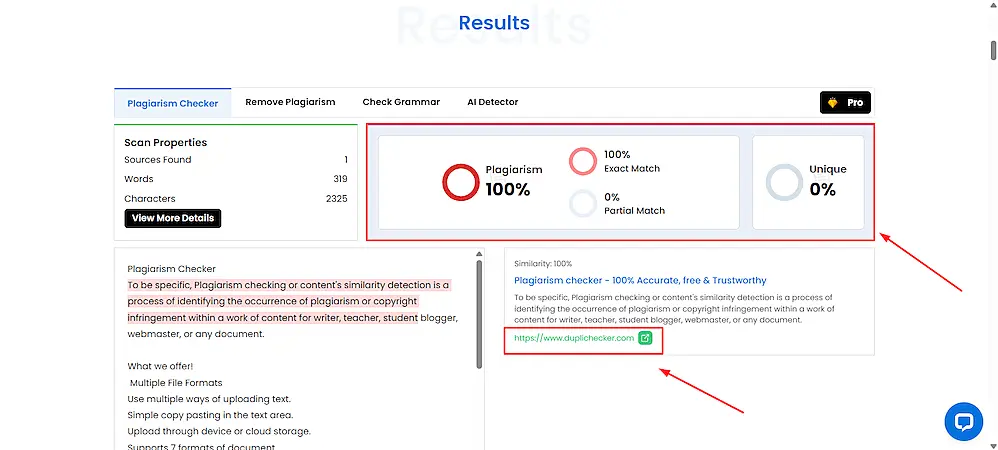
Check 1: Official Content Of DupliChecker’s Page
When tested with DupliChecker’s own content, the tool performed incredibly well and marked all the content as plagiarized. You can see that it accurately showed the link to its own homepage in the matching source section.
 Duplichecker review - official content of Duplichecker's page
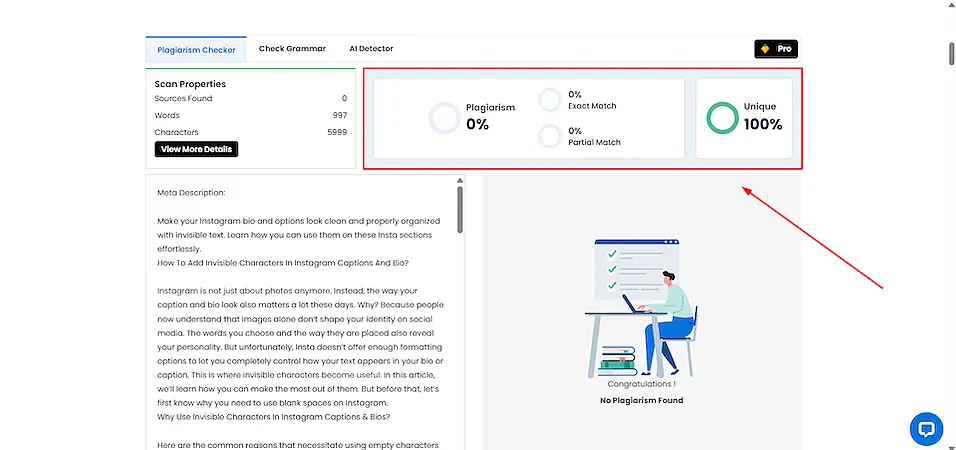
Check 2: A Completely Unique & Fresh Blog Post
In the case of a completely fresh blog post, the detector didn’t make any false claims. Instead, it marked the content as original and reported no matching sources. This shows that it can correctly recognize unique content without raising unnecessary flags.
 DupliChecker review - a completely unique and fresh blog post
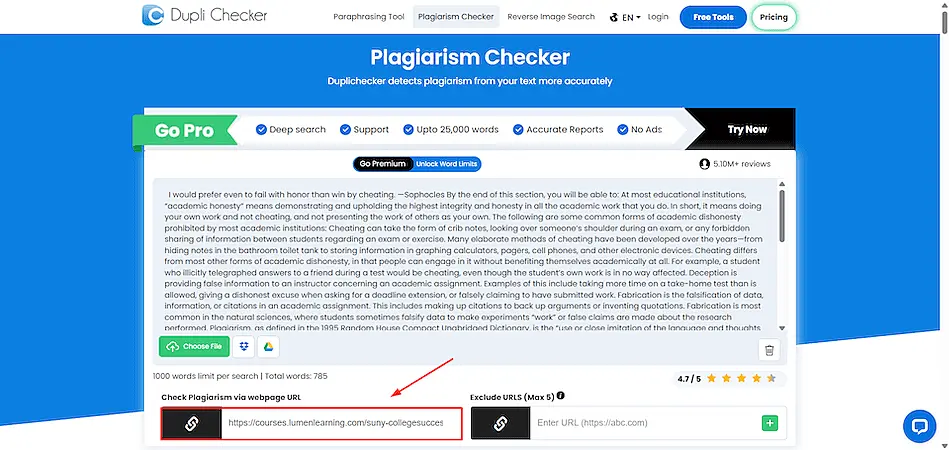
Check 3: Content Available Against A Web URL
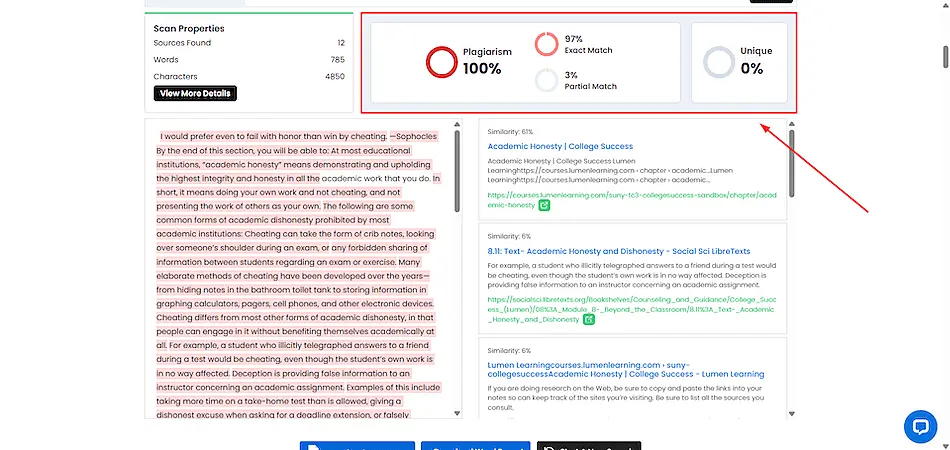
In the third check, we entered a URL of already published content on the web. The tool perfectly scanned the live page and compared it with other sources online. Since the entered URL was not excluded from the detection process, the tool highlighted all the text as plagiarized, which is the same as expected.
 DupliChecker review - content available against a web URL
 DupliChecker review - plagiarism checker results
Check 4: A Piece Of Spanish News Article By CNN
For further assessment, we entered a copied piece of multilingual content into the tool, and it recognized it accurately. DupliChecker detected the matched text and provided the correct source reference, even though the content was in Spanish. That means the tool can handle non-English content effectively.
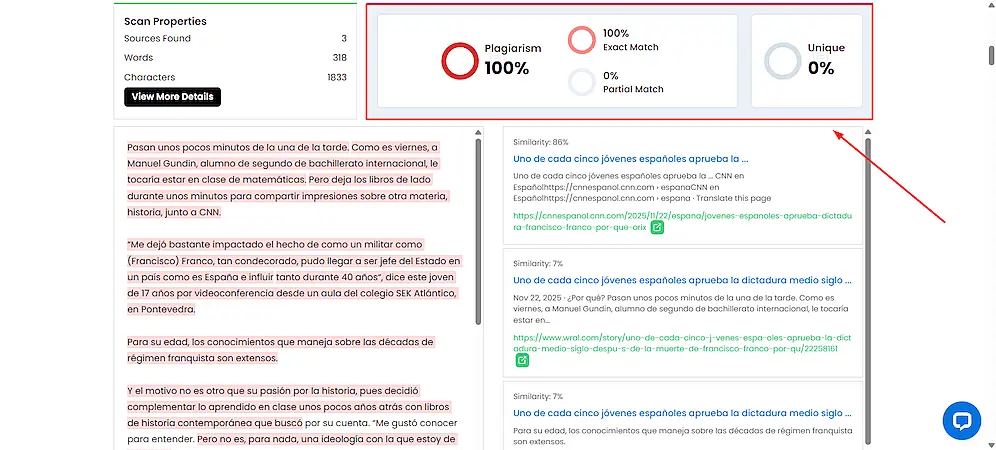 DupliChecker review - a piece of spanish news article by CNN
Putting DupliChecker To Use: A Step-By-Step Guide
By now, we hope that you have familiarized yourself with the features, pros, cons, and detection capabilities of DupliChecker. Now, let’s understand the steps the tool requires you to perform while detecting plagiarized parts.
- Input Content: Your first step is to provide the tool with the content using the copy-paste, file upload, cloud import, or URL paste method.
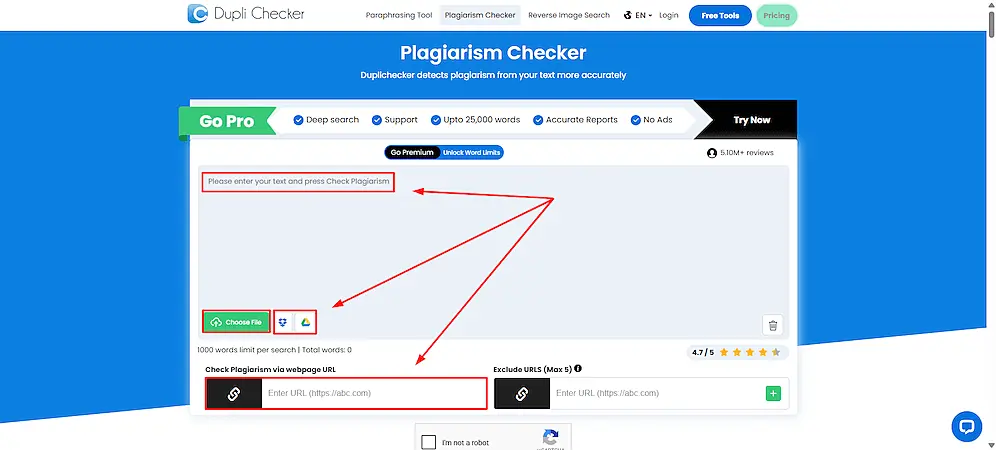 DupliChecker review - input content
- Verify reCAPTCHA: Once you enter the reference text, the next step is to verify reCAPTCHA.
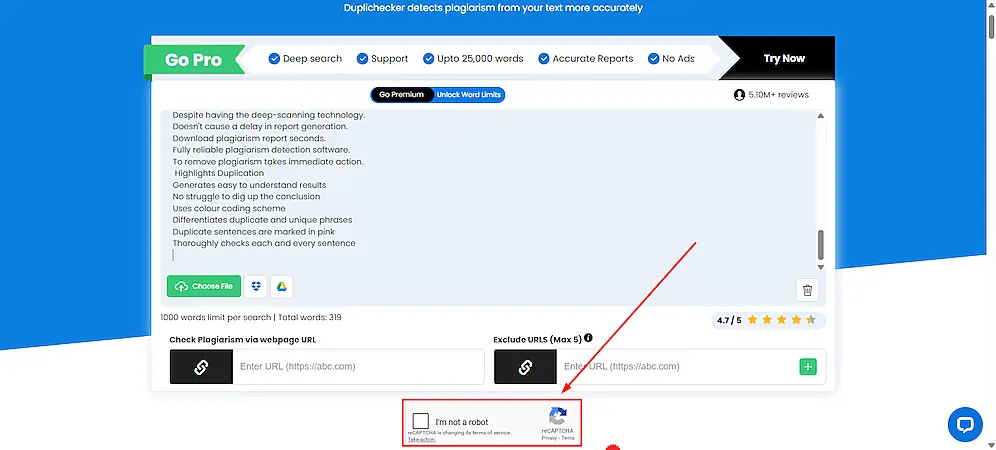 DupliChecker review - verify reCaptcha
- Hit "Check Plagiarism": After that, you just need to press or tab the "Check Plagiarism" button. This is when the real analysis begins.

- See A Detailed Report: Finally, let the tool generate a detailed plagiarism report and go through it carefully.
DupliChecker review - see a detailed report

