


An online SPF record checker, available at no cost, allows you to quickly verify your domain's SPF settings, ensuring that only designated mail servers can send emails for you. This tool swiftly detects syntax mistakes, DNS resolution problems, and incorrect setups, which helps in avoiding email spoofing and failed deliveries. By using this straightforward utility, you can enhance email authentication, bolster sender reputation, and improve overall delivery rates to inboxes.
Understanding SPF Records: What They Are and Why They Matter
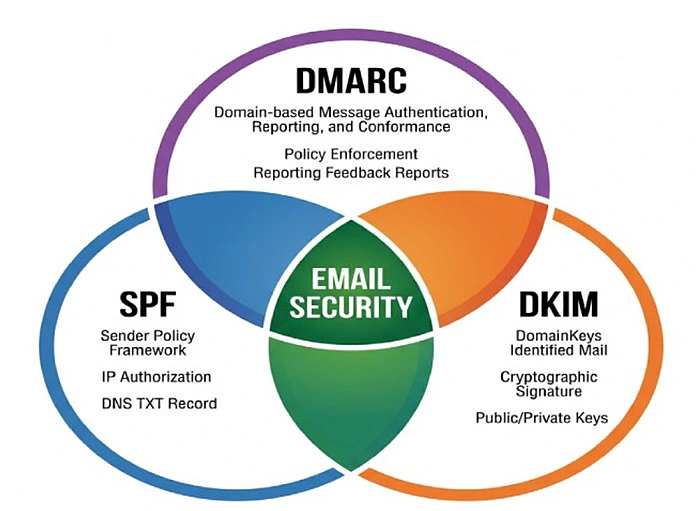
SPF records, or Sender Policy Framework records, are critical DNS records used to outline which mail servers are permitted to send outbound email on behalf of your domain name. By specifying authorized sending sources, an SPF record enables email authentication protocols to discern legitimate messages from fraudulent email, thereby curbing email spoofing and email impersonation. This layer of email security forms the foundation for DMARC and DKIM, creating a robust defense against phishing attacks and ensuring domain protection.
The SPF record is stored as a TXT record within your domain’s DNS settings. It enumerates the IP addresses or mail servers allowed to handle your organization’s email traffic. Proper SPF syntax and the strategic use of SPF include mechanisms to ensure third-party domain senders—like marketing tools or CRM platforms—can be authorized without exposing your domain to unnecessary risk.
With the rise in phishing attacks and the increasing significance of domain reputation, maintaining accurate and effective SPF records is not just a best practice—it is mandatory for organizations serious about security issues, regulatory compliance issues, and sender reputation.
Common Challenges in SPF Record Management
Despite the simplicity of the underlying concept, SPF record management presents several challenges:
Complexity of SPF Syntax and Execution
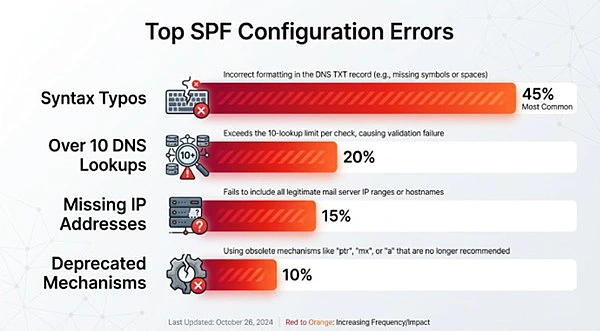
The SPF syntax is sensitive: even a misplaced space or erroneous SPF include entry can cause SPF validation to fail, which may in turn lead to SPF authentication failure for legitimate outbound email messages. Many domains encounter inadvertent SPF failures due to syntax errors or incorrect IP address entries.
Multiple Email Services and Third-Party Domains
Modern organizations often use several third-party domain services—such as EasySender for transactional emails or other email campaign platforms. This complicates the SPF record, as each service requires a properly formatted SPF include or explicit listing of IP addresses. Exceeding the DNS lookup limit (10) is a common pitfall, putting SPF compliance at risk.
Dynamic IP Addresses and DNS Changes
Frequent changes in DNS settings—such as those prompted by switching DNS hosting providers or updating core mail servers—require continual SPF record updates. Each change demands a corresponding SPF check to preserve accurate SPF record status. Missed modifications can inadvertently authorize unauthorized senders or disrupt legitimate email deliverability.
Lack of Periodic Monitoring and Risk Assessment
Without periodic monitoring using a domain scanner or SPF evaluation tool like EasyDMARC or a dedicated reputation monitoring platform, silent errors can persist in your SPF record. This invites not only email deliverability issues but also security concerns over potential domain impersonation and fraudulent email activity.
The Importance of Regular SPF Record Checks
Minimizing Deliverability Risks
A misconfigured SPF record can result in failed deliverability tests, with inbound mail gateways potentially flagging—or outright rejecting—your legitimate emails. This undermines the effectiveness of business-critical email campaigns and can adversely affect domain risk level scores evaluated by security testers.
Protecting Against Security Threats
SPF record validation, when performed regularly, ensures that only authorized sending sources can represent your domain name in email traffic. This minimizes entry points for attackers looking to exploit gaps in your email authentication protocol—reducing the likelihood of domain reputation being damaged by phishing campaigns or other fraudulent activities.
Ensuring Ongoing Compliance and Trust
With evolving regulations and increasing client scrutiny, SPF compliance is essential for organizations participating in programs such as the Channel Program or MSP Program. Regularly validated SPF records ensure smooth interoperability with DKIM record and DMARC record policies, fortifying the entire email authentication framework.
How Free Online SPF Record Checkers Work
Input and SPF Record Lookup
Typically, a user enters their domain name into the SPF record checker interface. The tool performs an SPF lookup, querying the DNS records—primarily the TXT record—for that domain. This SPF record lookup process extracts the raw SPF record for examination.
SPF Syntax and Policy Evaluation
Next, the SPF raw checker or SPF diagnostic tool parses the record, validating SPF syntax for accuracy and adherence to policy best practices. It checks for common errors such as missing SPF include statements, excessive DNS lookups, and misconfigured IP address ranges.
SPF Record Generator and Repair Suggestions
State-of-the-art SPF record checker platforms, such as those recommended by Expert Insights or reviewed on G2 Crowd and SourceForge, offer built-in SPF record generators. These tools assist users in correcting detected issues or generating a new SPF record, thus simplifying DNS settings management and DNS hosting provider coordination.
Instant SPF Result and Compliance Status
Upon analysis, the SPF checker provides a detailed SPF result. This summary outlines SPF record status, highlights any compliance or security issues found during the SPF check, and offers actionable recommendations for remediation. Advanced platforms may also correlate findings with DMARC record checker and DKIM checker outputs for holistic SPF authentication insight.
Key Features to Look for in a Free SPF Record Checker
Not all SPF diagnostic tools are created equal. When selecting a free SPF record checker, consider the following essential features:
Comprehensive SPF Record Validation
Ensure the tool performs in-depth SPF validation, examining the full scope of SPF syntax—including all SPF include statements—and accurately measuring SPF compliance against current requirements and domain authentication best practices.
DNS Records and SPF Lookup Depth Analysis
A robust SPF checker should analyze the effective DNS lookup count and warn if limits are exceeded—a frequent cause of SPF failures. The feature should include checks on all mail servers, subdomains, and third-party domain inclusions within the SPF policy.
Inclusivity in SPF and Advanced Error Detection
Modern SPF evaluation tools must identify and describe inclusivity in SPF practices within your organization’s DNS settings. They should flag issues such as redundant SPF include entries, multiple SPF records in the same zone, and deprecated mechanisms.
Integration with Other Email Security Tools
Look for an SPF record checker that integrates with DKIM checker, DMARC record checker, and email header analyzer utilities. Some tools, like EasyDMARC, provide a unified platform supporting DMARC XML Report Analyzer, BIMI evaluations, MTA-STS, TLS-RPT compliance, and additional domain scanner modules.
Automated SPF Monitoring and Alerts
The best platforms facilitate periodic monitoring, automatically scanning for changes in SPF record status and sending notifications upon detecting SPF failure or policy drift. This is especially vital for organizations with complex DNS settings or multiple DNS hosting providers.
User Experience and Report Clarity
An effective SPF checker delivers clear, actionable feedback tailored to your technical expertise. It should offer step-by-step SPF record generator guidance and easy-to-interpret risk assessment and reputation monitoring outputs.
When considering your options, free platforms such as the free SPF tool provide essential SPF record lookup, syntax validation, and actionable diagnostics at no cost, making them invaluable for both technical teams and business owners focused on outbound email security.
By leveraging reputable SPF diagnostic toolsets and enforcing routine SPF record validation, organizations safeguard their email deliverability, bolster their domain reputation, and stand resilient against the ever-evolving landscape of phishing attacks and email spoofing.
Step-by-Step Guide: Using an Online SPF Record Checker
- Choosing an Appropriate SPF Checker for Your Requirements: Opt for a trustworthy SPF checker that provides SPF lookup, validation, syntax analysis, and real-time status updates. Reputable options like EasyDMARC can help you uncover DNS problems and manage intricate SPF policies involving numerous sending sources.
- Accessing Your Current SPF Record: Log into your DNS hosting service to find and copy the SPF TXT record associated with your domain. Ensure that it accurately lists all approved mail servers and any third-party senders.
- Conducting an SPF Lookup: Enter your SPF record into the checker and initiate the lookup to examine authentication results, includes, IP ranges, and mechanisms. Advanced tools will conduct a thorough analysis of all referenced records for a comprehensive SPF assessment.
- Analyzing the Output from the SPF Test Tool: Review the outcomes for pass, fail, or softfail indications, along with any warnings or errors. Utilize the suggestions provided to resolve issues, enhance SPF compliance, and bolster your email security.
Analyzing SPF Checker Results: Interpreting Warnings and Errors
Common Warnings in SPF Record Status
- Excessive DNS Lookups: One of the most frequently flagged SPF validation issues is exceeding the limit of 10 DNS lookups—crucial for SPF compliance. Exceeding this triggers a permanent SPF failure.
- PermError or TempError: Errors can indicate syntax flaws or temporary DNS issues. SPF record lookup tools clearly highlight these for urgent review.
Decoding SPF Syntax Warnings
SPF record checkers may identify non-optimal syntax, such as using deprecated mechanisms or incorrect include statements. For example, a misplaced SPF include can result in unintended authorization of third-party domains, exposing you to fraudulent email risks and phishing attacks.
Handling Mechanism and Modifier Issues
- Invalid IP Address Formatting: Ensure IPv4 or IPv6 addresses are correctly entered.
- Redundant Mechanisms: SPF evaluation tools call out duplications in your SPF policy, which may impact email deliverability and sender reputation.
Addressing SPF Failures
When the tool flags an SPF failure, it often relates to missing mail servers or unresolved include chains. Immediate updates to your DNS records and testing via a free SPF tool can resolve many SPF authentication problems promptly.
Comparing Popular Free Online SPF Record Checker Tools
Evaluating Online SPF Record Checker Tools
There are several feature-rich, free solutions that make certified SPF record validation easily accessible. When comparing platforms, consider ease of use, accuracy, support for extended SPF evaluation, and whether the tool provides a detailed breakdown of SPF record status and DNS settings.
Top Free SPF Record Checker Platforms
- EasyDMARC: Lauded on sites like Expert Insights and SourceForge, EasyDMARC offers an intuitive SPF checker, SPF raw checker, and enhanced DMARC XML Report Analyzer capability. Organizations also benefit from Academy EasyDMARC resources and integrations such as the EasyDMARC Channel Program and MSP/Reseller Programs.
- AutoSPF: If you need a simple and effective free SPF tool, AutoSPF’s checker leads with its capability for instant SPF record lookup and clear, actionable diagnostics.
- MXToolbox: Known for advanced SPF test tool features and sender reputation analysis.
- DNSChecker: Provides reliable global SPF lookup with immediate SPF result feedback.
Key Features to Compare
- SPF Syntax Validation
- Display of SPF Record Status (Pass/Fail/Warnings)
- Multi-level SPF Include Resolution
- Integrated SPF, DKIM record, and DMARC record testing
- Compatibility with email authentication protocols beyond simple TXT analysis

