


What is Wikis AI?
Wikis AI is an online platform that lets you ask one question and receive answers from multiple intelligent AI models at the same time. This makes it easy to compare different answers side by side, so you can get a better understanding of your question from several perspectives.
When you use Wikis AI, you’ll see how AI models like GPT, Claude, and Gemini each respond independently. Instead of switching between tabs and tools, you can read all their answers in one place. This helps you spot what’s the same, what’s different, and decide which one makes the most sense for you.
AI Wiki provides clear guides and explanations on popular AI questions. For example, you can learn about artificial intelligence basics, how big AI models work, and what makes generative AI different from other types. Each topic is explained in a simple way, so it’s easy for everyone to understand.
- Ask one question and get answers from several trusted AI models.
- Compare responses side by side for different points of view.
- Explore easy-to-read guides in the AI Wiki.
- Continue your conversation with the model response you trust most.
- No need to search on multiple websites—everything is in one place.
Wikis AI is designed for students, parents, teachers, or anyone curious about AI. Whether you want to know when AI became popular or what AGI means, Wikis AI makes finding answers simple and clear.
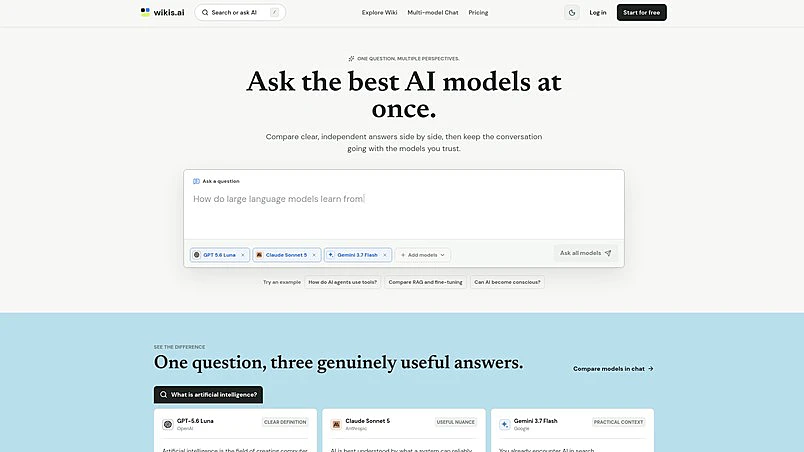
What Makes Wikis AI Stand Out?
Wikis AI offers a unique way for users to get answers to their questions by comparing responses from multiple advanced AI models, all in one place. This platform is especially useful for people who want different perspectives, so they can make smarter decisions and understand topics more clearly.
One of the best parts about Wikis AI is that you can ask a question and see how different AI models answer. For example, you can easily compare answers from GPT, Claude, and Gemini models side by side. This makes it simple to spot which answer fits your needs best, and you can even keep chatting with your favorite model for more details.
Another handy feature is the ability to continue the conversation directly from any AI Wiki guide. This means you’re not stuck with one answer—you can ask follow-up questions and get even more information just by chatting. This way, learning never stops!
Wikis AI also provides clear guides on important topics like What is an AI Chatbot? These guides help explain big ideas in easy-to-understand language, making them perfect for students and curious learners.
- Get multiple, independent answers to your questions at once.
- Compare responses from leading AI models like GPT, Claude, and Gemini.
- Continue the conversation with the model you trust most.
- Explore easy-to-read Wiki guides about important AI topics.
- Try out Multi-model Chat for side-by-side model answers.
- Ask follow-up questions for deeper understanding.
With all these features, Wikis AI is a great tool for anyone who wants the best answers, faster. You can also check pricing plans if you want to see which plan fits you.
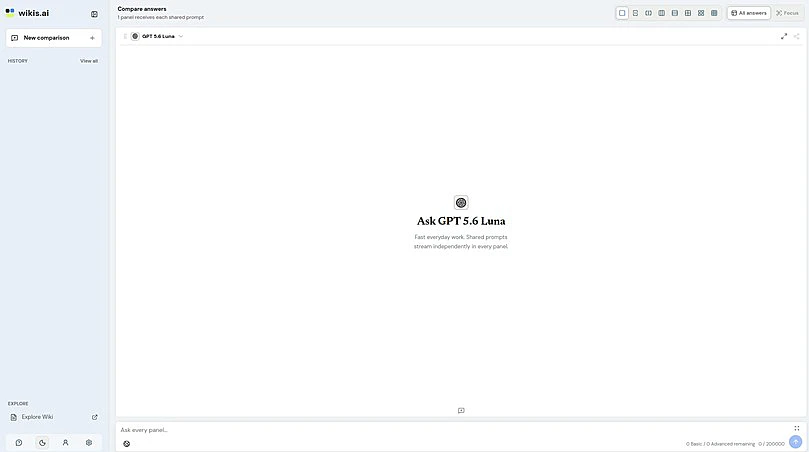
Who is Wikis AI For?
Wikis AI is a versatile tool that can help many people with different backgrounds and needs. Whether you are a student, a teacher, a tech enthusiast, or simply curious about artificial intelligence, Wikis AI has something useful to offer.
By bringing together multiple AI models, Wikis AI lets users compare answers, understand diverse viewpoints, and explore complex topics with clear and independent explanations. This approach makes learning about AI easier and more reliable for everyone.
- Students can use Wikis AI to get clear answers for homework or projects, and compare different AI explanations.
- Teachers can find straightforward ways to explain AI topics, thanks to multiple model responses that highlight key differences and similarities.
- AI beginners and tech enthusiasts gain quick access to trusted information, helping them keep up with the fast-changing AI landscape.
- Researchers or developers can cross-check answers across models, making it easier to verify facts and dive deeper into advanced concepts.
Even if you are just curious, Wikis AI welcomes all users to ask questions and see how different intelligent models respond. Exploring topics like when AI became popular or what AGI means in AI is easy for anyone, making complex subjects more accessible and understandable.
If you want to try Wikis AI for free, or see all of its available options, visit the pricing page for more information. Wikis AI is designed to support everyone interested in artificial intelligence, making learning and exploring smoother for all ages.
Getting Started with Wikis AI
Learning how to use Wikis AI is simple and fun, no matter if you are new to AI or have used similar tools before. Wikis AI is designed to help you ask questions and get answers from several advanced AI models at the same time. You can compare their responses side by side and decide which answer you like best.
To get started, first go to the Wikis AI home page. From there, you can explore different topics, or you can start a chat with multiple AI models using the multi-model chat feature. This means you don't have to switch between tabs or websites to see what different AIs say—you’ll have all the answers in one place.
- Visit Wikis AI with your web browser.
- Type your question or choose a popular topic from the home page.
- Select which AI models you want to ask. You can choose from several options like GPT 5.6 Luna, Claude Sonnet 5, and Gemini 3.7 Flash.
- Click 'Ask' to send your question to all chosen models at once.
- View and compare the answers. Each model will give its own response, so you can see different views together.
- Keep the conversation going. You can ask follow-up questions to each model right from the same screen.
Using Wikis AI is helpful because you can get several clear, reliable answers at the same time. This helps you think more critically and spot differences between the responses. The platform makes it easy to check facts, learn details, and explore new topics with confidence.
If you want to discover which AI applications are considered the best, or how to choose the right app for you, check out this example page:What is the Best AI App?
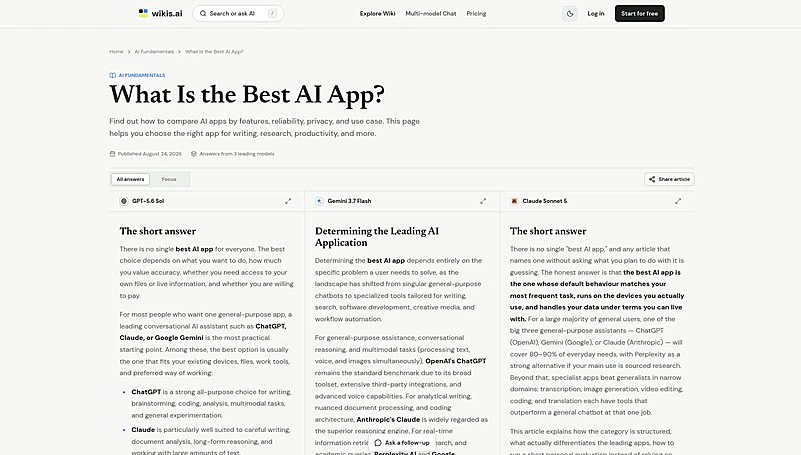
Ready to try it yourself? Start exploring different AI perspectives and see how much you can learn by using Wikis AI today. If you want to know more about the plans and pricing, you can visit the pricing page for more details.
Final Thoughts
To sum up, AI Wiki is your go-to place for discovering and understanding artificial intelligence. By bringing together answers from multiple advanced AI models at once, this platform helps you compare information, find the most reliable perspectives, and keep learning about this ever-evolving field. Whether you are just getting started with AI or looking for more detailed comparisons, AI Wiki makes it simple and accessible for everyone.
If you’re interested in trying out different AI models or want to continue improving your knowledge in artificial intelligence, check out the pricing options to see which plan fits your needs. You can start for free and explore a wide range of topics and answers all in one place. Remember, asking questions and comparing answers with trustworthy AI models gives you a head start in learning and using AI safely and effectively.

