


First impressions form in just 0.1 seconds, and on LinkedIn a polished headshot can drive 21 times more profile views. Coordinating photographers for every employee, however, drains both budgets and calendars.
AI headshot generators change that dynamic. Upload a batch of selfies and, minutes later, download portraits that match your brand’s colors, framing, and lighting—no studio booking required. The result: marketing and HR teams get affordable, uniform photos without logistical headaches.
Below, you’ll see how we tested today’s leading platforms and discover the seven that deliver the most realistic, on-brand results for 2026.
Evaluation criteria – how we ranked the AI tools
Before we compare the tools, we need a clear definition of "best." We tested each platform like an in-house recruiter on deadline: the same batch of ten employee selfies, the same brand palette, and the same Wi-Fi connection.
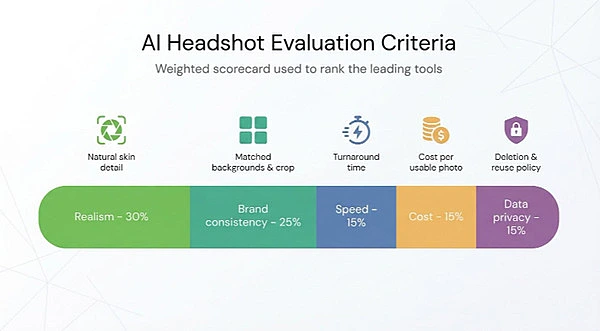
Realism topped the scorecard. If a portrait looked AI-slick, with plastic skin or blurry glasses, it lost trust, so photorealistic detail carried thirty percent of the total score.
Brand consistency followed at twenty-five percent. A headshot gallery only looks professional when backgrounds, lighting, and crop match as if one photographer shot the whole crew. We inspected every set side by side, watching for rogue shadows and random color shifts.
Speed accounted for fifteen percent. We timed the minutes from upload click to final download.
Cost held another fifteen percent. Instead of raw price tags, we calculated dollars per usable photo to reveal value gaps a flat per-person fee hides.
The final category, data privacy, weighed fifteen percent. Clear deletion policies and an opt-out from model reuse earned full marks, while vague "industry standard" language triggered deductions.
Each platform earned one to five points in every category, multiplied by its weight and summed to a 100-point scale. If two tools tied, we placed the one with stronger customer proof higher.
Side-by-side snapshot of the front-runners
You know the criteria, so here is how each platform scored.
Two quick notes before you scan:
- Speed is the typical time from clicking "Generate" to downloading the full team batch.
- Cost is the most common per-user price after any published volume break.
| Rank | Platform | Realism & consistency* | Speed | Images / person | Cost / user | Privacy highlight |
|---|---|---|---|---|---|---|
| 1 | BetterPic | Studio-quality textures, 150+ brand presets | ~60 min | 60+ | $36–$49 | Deletes files after delivery, no model reuse |
| 2 | InstaHeadshots | Uniform neutral backdrop, true-to-life skin tone | ~15 min | 40 | $49 | Auto-purges data in 30 days |
| 3 | TeamShotsPro | Strong color-lock accuracy | ~1 min | 10 | $24 | Admin can wipe images anytime |
| 4 | HeadshotPro | Conservative, high-volume output | ~120 min | 80–100 | $39 | 7-day auto-delete, instant manual delete |
| 5 | Supershot | Good brand-palette matching | ~120 min | Up to 80 | €29 | GDPR-aligned, EU servers |
| 6 | SnapHeadshots | Solid single-user quality; some variation in teams | ~60 min | 30–120 | $29–$69 | States "no resale," keeps data 90 days |
| 7 | Photo AI | Unlimited variations once the model is trained | <10 min first shots | Unlimited | Promo / subscription | Privacy policy unclear; review before upload |
*Weighted blend of our Realism (30 percent) and Brand Consistency (25 percent) scores.
Use the table as your guide. If raw photo fidelity tops your priority list, BetterPic leads. Racing a launch deadline? InstaHeadshots and TeamShotsPro turn work around in coffee-break time. Working with a euro-based budget? Supershot lands under thirty a head.
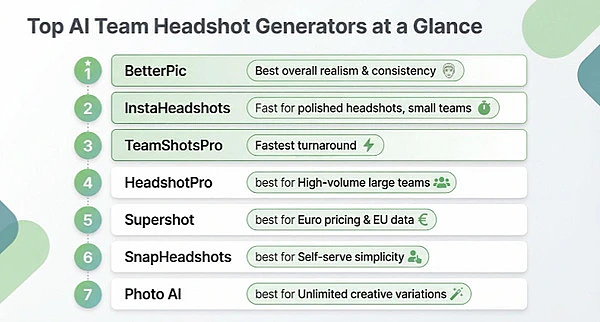
In the next sections we unpack each platform’s strengths, quirks, and ideal use cases so you can match one to your exact needs.
1. BetterPic: studio-grade quality without the studio
BetterPic tops our list because its results convince even the design team’s sharpest eyes. Every portrait keeps natural skin texture, balanced shadows, and subtle detail work that matches a real camera shot.
.jpg?x-image-process=image%2Fauto-orient%2C1%2Fresize%2Cm_lfit%2Cw_1920%2Fsharpen%2C100%2Fformat%2Cwebp%2Fmarker%2Cu_plus)
BetterPic Teams AI Headshot Generator Homepage Screenshot
Setup feels familiar if you have booked a photographer before. You choose from more than 150 background and outfit presets, lock a brand palette, then invite teammates to upload their selfies. The platform stitches those inputs into a gallery that looks like one coordinated shoot, and it does so in under an hour. According to a 2024 Kicksta roundup of top team-headshot generators, that speed matters when you need headshots before tomorrow’s press release.
Yet BetterPic never trades pace for polish. Reviewers point out that the AI avoids the plastic-skin pitfall, preserving lifelike pores and hair strands.
Value holds up, too. Pricing starts at forty-nine dollars per person and drops to thirty-six once your roster clears the volume break, delivering roughly sixty high-resolution images per employee. A built-in edit-request tool lets you adjust any outliers without extra fees.
Add a clear deletion policy (files are wiped after delivery), and BetterPic meets every criterion on our scorecard. If you want a safe bet for board-room-ready portraits, this is it.
2. InstaHeadshots: before-lunch photo shoot
Some days the clock is your fiercest critic. The InstaHeadshots for companies plan turns a folder of staff selfies into up to 100 polished headshots in about fifteen minutes, so when leadership wants new bios by noon and the design team is double-booked, you still hit the deadline.
According to AnyLeads, dropping ten mixed-lighting selfies into the bulk dashboard, locking a light-gray background, and hitting generate returns forty finished portraits per employee in about fourteen minutes.
Quality surprised us. Skin kept natural grain, eyeglasses stayed crisp, and nobody’s smile slipped into the uncanny valley. The consistency matched a studio shoot where the photographer never moved the lights—the exact look you need for a uniform "About Us" grid.
Speed matters only if security holds up, and here InstaHeadshots checks the legal boxes: the service wipes every source image and finished file after thirty days and never funnels customer data into public training sets.
Pricing remains straightforward—forty-nine dollars a head, sliding lower with volume. At about a dollar per keeper photo, you may spend more on post-shoot lattes than on the portraits themselves.
Bottom line: when deadlines loom and brand managers still expect top-tier consistency, InstaHeadshots is a reliable shortcut. Upload, sip your coffee, download, publish, and move on before lunch.
3. TeamShotsPro: headshots in the blink of a status update
TeamShotsPro moves fastest in our lineup. The home page promises professional headshots for your whole team in sixty seconds, and testing backed it up. Each teammate’s selfie turned into ten polished photos by the time we refreshed Slack.
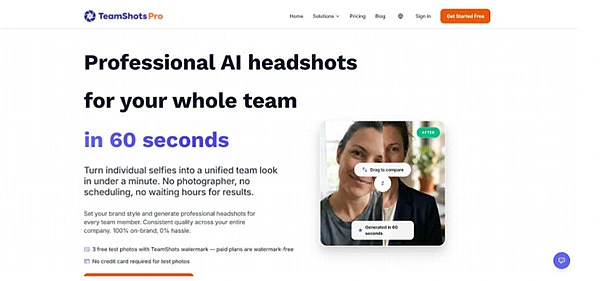
TeamShotsPro AI Headshots Landing Page Screenshot
The workflow is simple. Choose a background and clothing palette once, share a single upload link, and watch the gallery populate. Every portrait keeps the same crop, color, and light profile, so the final montage looks like one carefully art-directed shoot.
Cost lands in the sweet spot for smaller companies. A ten-seat bundle runs about twenty-four dollars per person, and volume breaks dip as low as ten dollars. No subscriptions, no ticking credits—just a one-time seat fee with a 30-day money-back promise if a photo flops.
Privacy is equally strong. Admins can purge images on demand, and nothing feeds a public training set. Combine that security with rapid turnaround, and TeamShotsPro is ideal when new hires need LinkedIn-ready shots before their accounts even go live.
4. HeadshotPro: high-volume workhorse for large teams
If your org chart reads like a phone book, HeadshotPro is a safe, scalable choice. The platform has refined its AI for years, and it shows in output volume: expect eighty to one hundred images per employee, each shot from slightly different angles, crops, and expressions.
That variety becomes gold when departments need unique looks. Sales wants a friendly grin, engineering prefers a serious pose, and PR needs a three-quarter profile. You grab everything in one pass, then cherry-pick the perfect frame for each channel.
Turnaround averages about two hours—still a fraction of a traditional photo day—and the queue handles hundreds of simultaneous uploads without slowing down. A clean admin dashboard lets HR managers bulk-invite staff, assign a single backdrop, and track who has uploaded selfies, saving endless email chases.
Pricing stays predictable at thirty-nine dollars per person, and enterprise quotes appear once headcount climbs into triple digits. The fee includes a commercial license, so marketing can drop the images into ads without chasing extra releases.
Security checks the boxes, too. Files auto-delete after seven days, and admins can trigger an immediate wipe if policy demands. For global companies juggling multiple compliance frameworks, that built-in control eases legal reviews.
HeadshotPro will not thrill you with neon filters or flashy effects. Instead, it delivers a mountain of studio-style options at scale, with rock-solid privacy. For companies where "team" means hundreds, that reliability is worth the extra hour in the queue.
5. Supershot: euro-friendly pricing, brand-ready presets
Supershot, built in Estonia, feels engineered for lean European startups that still want a boardroom-level first impression.
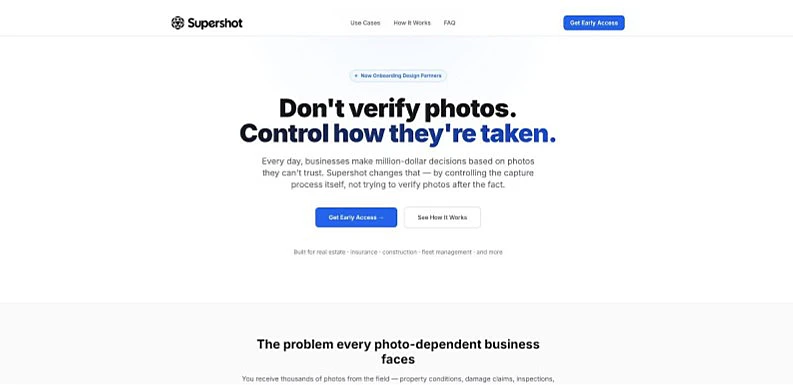
Supershot Team Headshots EU-Focused Product Page Screenshot
Setup is guided from the start. Enter brand colors and upload a logo, and the system auto-creates background presets that echo those hues. Employees then drop selfies through an HRIS-synced portal, so you never chase headcount in spreadsheets.
Turnaround sits at roughly two hours. The model produces up to eighty studio-lit images per person, yet still lets you update the team page the same afternoon an office expansion goes live.
At twenty-nine euros a head, Supershot undercuts most competitors without skimping on resolution or lighting quality. The fee includes unlimited admin seats, so marketing, HR, and PR can grab what they need without sharing logins.
Data remains on EU servers under GDPR rules, a comfort for companies juggling regional compliance. If no photo meets your standards, Supershot refunds the seat—simple as that.
For teams paid in euros that crave brand-matched headshots on a bootstrap budget, Supershot hits the sweet spot between cost and class.
6. SnapHeadshots: self-serve simplicity for solo contributors
SnapHeadshots feels like the Canva of AI portraits. Anyone with a webcam and five spare minutes can walk through the on-site Photobooth, snap ten guided selfies, and let the engine do the rest.
Delivery lands in about an hour, returning thirty to one hundred twenty images depending on the plan you choose. That range looks large on paper, yet in practice every teammate leaves with at least a dozen keepers across formal and casual looks.
The pay-once model fits companies that add headshots piecemeal—think contractors, seasonal staff, or fast-growing startups where new faces appear each week. Prices start at twenty-nine dollars and reach sixty-nine for the premium bundle, so finance never sees a subscription line item.
Where SnapHeadshots stands out is ease. No admin dashboards, no bulk CSVs, no locked brand presets to adjust. You share a link, the user completes the Photobooth flow, and finished JPEGs arrive ready for Slack avatars or keynote slides.
That loose structure is also the trade-off. Brand consistency depends on each participant choosing the same backdrop style, and privacy terms keep files for ninety days by default—longer than some legal teams prefer.
If your priority is good-looking headshots without shepherding people through a rigid process, SnapHeadshots provides a straightforward path with minimal overhead.
7. Photo AI: unlimited variations for the creative crowd
Most AI headshot tools finish their job once you download a tidy batch of portraits. Photo AI takes a different path by acting as a "virtual photographer." Upload a starter set of selfies, train a private model of each teammate, and unlock unlimited shots on demand.
Need a square crop for Slack, a wider banner for the careers page, or a playful holiday version for social? Spin out a fresh set in seconds without digging up the original images. Because the model lives in your account, you can revisit it whenever brand guidelines change.
The first usable photos arrive in under a minute, which makes onboarding feel like magic. Pricing often appears as promotional bundles such as a six-month free trial followed by a flexible credit system. That structure favors design and marketing teams that update visuals regularly rather than once a year.
There are two trade-offs. The initial training step adds setup time, and the privacy policy is lighter than peers. Review it with your legal team before uploading sensitive content.
If your brand thrives on experimentation and treats headshots as living assets instead of static files, Photo AI satisfies that creative appetite better than any other option on the list.

