


A support chatbot greets your customer at 2 a.m. It scans last week’s transcript, grabs an attachment, suggests a refund, and updates the CRM before anyone else is online. Convenient, yes. But the moment that bot accesses regulated data, makes a change to a production record, or steers a decision, it crosses into your security and compliance boundary, and auditors will expect proof.
In this guide, we explain when an AI tool becomes auditable, how the 2026 rule updates reshaped artificial intelligence in security compliance, and which controls, evidence, and practices help you pass.
What "artificial intelligence in security compliance" really means, and when a tool enters scope
The phrase artificial intelligence in security compliance typically shows up in two ways:
- Some teams use AI to run parts of compliance, like collecting evidence or monitoring controls.
- Other teams need to govern the AI itself because it touches customer data or influences decisions.
This guide focuses on the second case, with one important note: if an AI system generates audit worksheets or reports your auditors rely on, that output can become evidence, too.
So when does a chatbot, copilot, or fraud-detection model move inside your audit boundary? Watch for six signals:
- It processes regulated, customer, or employee data.
- It delivers part of the contracted service.
- It operates, or materially supports, a security or compliance control.
- It produces evidence auditors rely on.
- It holds privileged access or can act on connected systems.
- A law, contract, or risk decision explicitly states the tool is "in scope."
If any one trigger fires, log the system in your AI governance platform, assign an owner, and record the risk rating. Teams using Vanta’s AI governance platform find that new agents and models appear in the register automatically through its 400-plus cloud and SaaS integrations.
Each entry inherits contextual risk and links to more than 1,400 hourly control tests mapped across SOC 2, ISO 42001, and the EU AI Act-turning what is usually a spreadsheet scramble into audit-ready evidence on day one.
That single register entry can save hours when auditors arrive.
Being in scope does not automatically make the tool high risk, require extra certification, or pull every SOC 2 control into AI territory. Scope follows data, impact, and accountability-nothing more.
Why AI scope changed in 2026
On September 11, 2026, the AICPA issued Technical Q&A Section 9561. It brings artificial intelligence directly into SOC 1 and SOC 2 examinations. If a model, copilot, or agent helps deliver the service or operate a control, auditors need to understand how it works, what data it touches, and whether its safeguards function as designed.
The practical shift is straightforward: management now has to document that dependency and produce evidence for it, the same way you would for access reviews, change tickets, or incident-response records.
Regulation moved from principles to operating duties
In 2026, several requirements moved from "good practice" into enforceable expectations:
- EU AI Act (Article 50, transparency) became effective August 2, 2026. Chatbots must identify themselves as AI, log conversations, and keep a human hand-off path. The Omnibus amendment deferred most high-risk obligations to December 2, 2027 (or August 2, 2028 for embedded systems), but it left transparency intact.
- SEC cyber-risk disclosure rule, in force since December 18, 2023. Public companies must file a Form 8-K within four business days once an AI-enabled breach is deemed material.
- NIST AI Risk Management Framework revision work began May 2026 to add a critical-infrastructure profile that maps directly to security-control families.
Across laws, disclosure rules, and voluntary frameworks, the direction is consistent: regulators expect operating evidence, from chatbot notices to model cards and data-flow diagrams.
Risk moved from anecdotes to numbers
Quantified impact sealed the shift. IBM’s 2026 Cost of a Data Breach study found that 25 percent of malicious incidents used AI and averaged 6 million dollars in losses. A Grant Thornton poll of 950 U.S. executives reported 78 percent lacked confidence they could clear an AI-focused audit within 90 days.
With those numbers on the table, artificial intelligence in security compliance is no longer a talking point. It is a board-level requirement to know where AI lives, prove controls still work, and keep evidence ready.
Is AI compliance different from SOC 2?
You do not need a brand-new rulebook. The five SOC 2 Trust Services Criteria—security, availability, processing integrity, confidentiality, and privacy—already cover the bedrock of AI governance.
If your team already reviews privileged-user lists, monitors system health, logs changes, and assesses vendors for a standard SOC 2, you have most of the scaffolding an AI rollout needs. The work is to apply familiar controls to new AI-shaped risks:
- Logical access: The same policy that limits admin rights must also restrict an AI agent that can update a customer record.
- Monitoring: Dashboards that flag CPU spikes can also surface a sudden jump in prompt volume, which can indicate abuse or drift.
This approach also keeps audits moving. Instead of bolting on a parallel framework, you refine controls you already prove every year, then spend your effort closing the AI-specific gaps that remain.
Add AI-specific context and evidence
Extending SOC 2 is not about inventing brand-new policies. It is about proving existing ones still hold once artificial intelligence enters the mix. Below is how common controls pick up an AI lens, and what auditors typically want to verify.
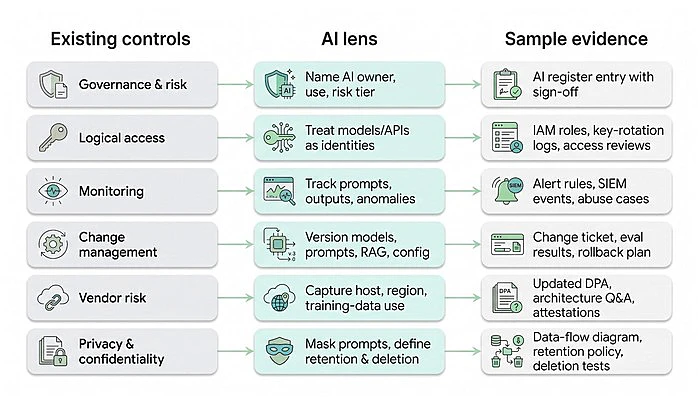
| Existing control | AI lens | Sample evidence (U.S. org) |
|---|---|---|
| Governance & risk | Name an AI owner, document intended use, assign a risk tier | AI register entry with management sign-off |
| Logical access | Treat models, APIs, and agents as privileged identities | IAM role list, key-rotation log, quarterly access-review report |
| Monitoring | Track prompt volume, outputs, and anomalies | Alert rules, SIEM events, abuse-case investigation write-up |
| Change management | Version models, prompts, RAG sources, and configs | Change ticket, evaluation results, rollback plan |
| Vendor risk | Record model host, region, and training-data use | Updated DPA, architecture Q&A, third-party attestation |
| Privacy & confidentiality | Enforce prompt masking, retention limits, and deletion | Data-flow diagram, 30-day retention policy, deletion test results |
Across every row, two questions decide whether an AI audit moves quickly or stalls: Can you trace the action back to a person or system, and did a human approve the step? If you cannot show who owns a model, when it changed, or how data moves, audits of artificial intelligence in security compliance bog down fast.
Five ways AI slips inside your audit boundary
1. Employees using third-party AI tools
A support rep pastes a tricky email into a public chatbot to rewrite the tone. Marketing relies on a browser plug-in to draft alt text. Finance cleans a CSV with an AI spreadsheet add-on. These shortcuts save time, but they also create a familiar compliance problem: sensitive data can leave your environment through a vendor your organization has not vetted.
"Shadow AI" is common. One 2026 survey of 6,000 digital workers by Glean found 54 percent admit to using unapproved tools or approved tools in non-compliant ways.
Start with visibility. Endpoint agents, proxy logs, DLP alerts, and identity- and device-management signals (IdP and MDM) can surface chatbots, transcription plug-ins, and image generators you never added to your artificial intelligence in security compliance register. Once you can see usage, you can make a clear call: approve it, block it, or fence it with data-loss rules.
Approval is only step one. Auditors will still ask for an acceptable-use policy, access records, and proof that sensitive data stays in the safe zone. In practice, a quarterly export of access or usage logs, plus a retention setting and a deletion test, answers most questions quickly.
Treat shadow AI like any other vendor. Require a data-processing agreement (DPA), document whether prompts train the model, and collect a current security certificate. If the provider will not commit, block the tool or route the workflow through a sanctioned alternative. That one decision reduces breach-disclosure risk and shows auditors you can identify, assess, and govern AI as fast as employees adopt it.
2. AI embedded in live chat and customer support
Customer support is where AI governance becomes real. Chat transcripts can surface email addresses, card numbers, or medical details in a single message, and that data often flows through multiple systems before it ever reaches a human.
Customer expectations are also explicit. A 2026 Gartner survey of 3,566 customers found that 87 percent insist on a clear route to a human agent when companies use GenAI for service. That is why support is a high-scrutiny area for artificial intelligence in security compliance.
Start with transparency. Article 50 of the EU AI Act requires chatbots to identify themselves as AI. In practice, a clear banner in the widget header both meets the rule and sets expectations with customers.
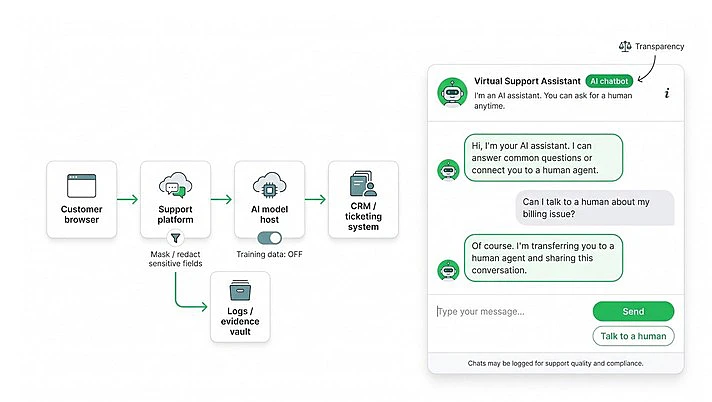
Map the data path. Document every hop, from browser to SaaS gateway to model host, then decide where to mask, redact, or block sensitive fields before they reach the model. Save the diagram and the risk notes in your AI register.
Preserve a human hand-off. Define what triggers escalation, such as a confidence-score threshold or a keyword list. Log each transfer so you can prove the hand-off works when regulators or auditors ask.
Control retention and training. Many vendors train on transcripts by default. Disable training unless legal signs off, then store the setting and a quarterly deletion-test screenshot in your evidence vault.
Need a deeper playbook? Our guide to secure live chat covers encryption, access controls, and logging in more detail.
3. Third-party models embedded in your product
Your app calls an external API, the model returns an answer, and the customer may never realize a third party is in the loop. That is why external model providers belong in your artificial intelligence in security compliance register. Microsoft’s 2024 Work Trend Index found 78 percent of AI users bring their own AI tools to work, and that "bring it in fast" behavior shows up in product roadmaps as much as it does in employee workflows.
Document the dependency. Keep an architecture diagram that shows where prompts originate, which cloud the model runs in, and where outputs are stored. Attach the vendor’s SOC 2 or ISO 27001 report, but treat it as vendor assurance only. You still own how data leaves and re-enters your environment.
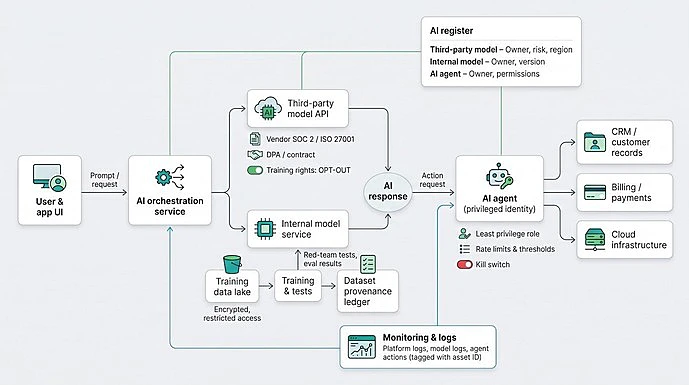
Track version drift. Log each API version in your change-management tool and capture evaluation results before and after every upgrade. Silent changes to temperature, region, or model family can break expectations, shift data handling, or invalidate prior testing.
Control training rights. If the provider wants to train on your data, record explicit opt-in. If you do not allow it, store the contract clause that forbids it. Review this at least annually, and keep the proof accessible. Auditors will ask.
Monitor performance and cost. Latency spikes, error surges, or unpredictable token bills often signal an unseen change. Feed those metrics into your existing monitoring stack, then link alerts back to the model record so compliance and engineering are looking at the same events, not separate dashboards.
4. Internally trained or fine-tuned models
Owning the weights can feel freeing, but it also makes you the vendor of record under artificial intelligence in security compliance expectations. You are no longer inheriting governance from a third-party API. You have to prove it end to end, from training data to deployment controls.
The weak spot is often data. A 2024 MIT audit of more than 1,800 widely used text datasets found license-omission rates above 70 percent and error rates above 50 percent. Auditors will flag that gap quickly if you cannot show where your training data came from and what rights you have to use it.
Provenance first. Keep a ledger for every dataset, including source, license, collection date, and removal date. Link that ledger to the model’s entry in your AI register so legal and engineering can trace any record on demand.
Secure the pipeline. Treat the S3 bucket (or Azure Blob) storing raw training text like production PII. Encrypt at rest, restrict write access, and rotate keys on the same cadence as customer databases.
Test before launch. Run red-team exercises for prompt injection, refusal bypass, and data leakage. Attach failures, fixes, and retest results to the model’s change ticket. Auditors trust a documented learning loop more than a claim of perfection.
Monitor drift. Language and usage patterns change over time. Schedule evaluation runs and set performance floors that trigger retraining. Each retrain cycle should log the data window, code commit, and evaluation score so reviewers can trace output lineage.
Keep a kill switch. One toggle should revoke the model’s service account, route traffic to a safe fallback, and alert on-call staff. Demonstrate the switch in staging once a quarter and save the log. A working kill switch turns a hard audit question into a five-minute demo.
5. AI agents acting on core business systems
Autonomous agents can refund orders, spin up cloud resources, or change customer records without a person reviewing the action first. That convenience becomes an audit risk quickly, especially when agent deployments spread outside formal approval paths. A 2026 Cloud Security Alliance study found that 54 percent of organizations report having between 1 and 100 unsanctioned AI agents—enough volume to overwhelm manual oversight.
Register the agent as a privileged identity. Create a dedicated service account, add it to your AI register, and grant the narrowest role that still allows the workflow to function. Route every command through that identity so actions land in a clean, filterable log.
Set guardrails. Pair permissions with rate limits and transaction thresholds. The goal is simple: if the agent loops, it should drain one workflow, not your budget or your production environment.
Keep a human in the loop for irreversible actions. Require explicit approval, captured in your ticketing system, before the agent executes payments, deletions, or policy changes. Store the prompt and relevant context alongside the approval so you can prove who authorized what, and why.
Test the kill switch. One toggle should revoke the agent’s API key, pause workflows, and alert owners. Demonstrate this in staging each quarter and save the log. A tested shutdown path turns "What happens if the agent misbehaves?" into a routine control walkthrough.
The controls and evidence auditors (and buyers) expect
Inventory and classification: the cornerstone
You cannot govern what you cannot find. A 2026 survey by Salt Security found that 82 percent of organizations uncovered AI agents they did not know existed. That visibility gap turns every other control into guesswork. If you do not know which models and agents exist, you cannot review access, track changes, enforce retention, or explain incidents.
Start by listing every model, agent, dataset, API, and automated workflow in one place. In most environments, the fastest path is to combine engineering sources (repos and deployment inventory) with operational signals (identity, device, and security tooling, plus whatever usage and audit logs your AI platforms expose). The goal is one register that stays current, not a spreadsheet that goes stale.
For each entry, capture the details auditors ask for first:
- Business purpose and success metric
- Named owner and backup owner
- Data categories handled and sensitivity tier
- Hosting region and residency constraints
- External providers and subprocessors
- Risk rating and review cadence
Record the item the day a team launches an experiment, not months later. Version every change so reviewers can rewind history and tie a disputed output back to the exact configuration that produced it. Store the register in your compliance platform so each asset links directly to its controls, evaluations, and evidence.
That single source of truth is what gives you a clean answer to the first audit question: Who owns this AI system, and how do you know it is safe today?
Data and third-party governance: keeping information on a short leash
Visibility is still the limiting factor. Only 31 percent of organizations have accurate visibility into their AI software, according to Flexera’s 2026 State of ITAM Report. When you cannot see where AI runs and which vendors touch prompts, effective third-party risk management becomes difficult and every downstream control becomes harder to prove.
Map every hop. A single prompt can move from a browser to a SaaS gateway, through a model host in another region, and back into your database. Capture that full path in a diagram and link it to the asset’s entry in your AI register. Without this, it is difficult to answer basic audit questions about residency, subprocessors, or where sensitive data can leak.
Enforce retention with evidence. Decide up front how long prompts, embeddings, and outputs live in each store. Then schedule deletion jobs and keep proof they ran. A quarterly success log in your evidence vault matters more than a perfectly worded policy.
Scrutinize vendors like part of your service boundary. For every model provider, plug-in, or analytics tool in the workflow, collect and store:
- Current security report (for example, SOC 2 or ISO 27001)
- A data-processing agreement (DPA) that covers residency and training clauses
- A written statement on whether customer data trains their model
Keep these documents alongside the register record so incident response and audit prep do not turn into a scavenger hunt.
Upgrade the questionnaire. Classic questions like "Do you encrypt data at rest?" are no longer enough on their own. Add AI-specific due diligence, including how the provider prevents prompt injection, segregates embeddings by tenant, and audits its own training pipeline. Clear answers separate enterprise-ready partners from weekend experiments.
Technical security: proving the nuts and bolts are tight
Identity drives many AI incidents. IBM’s 2026 X-Force report logged 300,000 stolen ChatGPT credentials in a single year and cited credential abuse as the fastest-rising vector in AI platforms. That is why the technical core of artificial intelligence in security compliance starts with access discipline and ends with traceable logs.
Identity first. Give every model, agent, and orchestration service its own credential. Do not reuse a shared admin key. Rotate secrets on a fixed schedule, and log every request so you can tie a risky output back to one identity. Link the key’s metadata to the asset record in your AI register.
Encrypt everywhere. Prompts, embeddings, and outputs can look like plain text and still contain personal data and intellectual property. Encrypt at rest and in transit, and treat these stores with the same care as customer databases.
Validate inputs and outputs. Before the model runs, reject oversized payloads, dangerous code, or malicious links. After the model responds, strip or quarantine outputs that leak sensitive data or include phishing bait.
Test for abuse. Schedule weekly automated prompt-injection scans, then run manual red-team sessions after major releases. Store test scripts and results in your evidence vault so auditors see an active control, not a one-time exercise.
Log at multiple layers. Model logs help you spot suspicious prompt patterns and odd outputs. Platform logs show cross-region access, privilege escalation, and key misuse. Tag both streams with the AI asset ID in your SIEM and alert on anomalies within minutes, not days.
Lifecycle and change control: holding the line as models evolve
AI systems change in more places than traditional software. A model can shift, a prompt template can be edited, or a retrieval source can be updated, and the behavior your customers see can change overnight. A 2026 Panterra survey found that 93 percent of organizations experienced an AI-caused infrastructure incident, yet only 30 percent have a formal AI governance policy in place. That gap makes lifecycle discipline a core requirement for artificial intelligence in security compliance.
Log every change. Use the same ticketing system you rely on for code releases to capture updates to models, prompts, retrieval sources, and configurations. Each ticket should include evaluation results, any red-team findings, and a rollback plan so reviewers can see the decision and the supporting evidence in one place.
Version everything. Store hashes for model weights, prompt templates, retrieval queries, and guardrails. Link those hashes to the AI register entry so you can reproduce the exact state that generated a disputed output.
Watch for drift signals. Spikes in prompt abuse, latency, or error rates often indicate an unseen change. Set automated alerts that reach engineering and compliance teams together so investigation and evidence collection stay aligned.
Prove the kill switch. Disable the model in staging once a quarter, confirm traffic routes to a safe fallback, and save the timestamped log. A tested shutdown path turns a high-stakes auditor question into a routine walkthrough.
Monitoring, evidence, and incident response: showing controls work in real time
AI incidents are common. A 2026 Cloud Security Alliance study found 47 percent of organizations experienced a security event involving an AI agent in the past year. That reality changes what "good governance" looks like. Policies help, but monitoring and evidence decide whether you can investigate quickly and defend your program in an audit.
Monitor at three layers.
- Platform logs show who accessed a key and what credentials were used.
- Model logs surface odd prompt patterns, unexpected outputs, and latency spikes.
- Agent logs capture the real-world business action that followed.
Tag each stream with the asset ID from your AI register so alerts, tickets, and evidence all point to the same system.
Preserve evidence as you go. Keep raw events for the full audit period. Export a monthly sample to your evidence vault so you always have a clean, auditor-friendly set ready. For every alert that turns into work, link the log trail to an investigation ticket. Auditors want to see discovery, response, and closure in one thread.
Build muscle memory for AI-specific incidents. Create an incident playbook that covers containment, root-cause analysis, user notification, and disclosure triggers. Run tabletop exercises twice a year, then attach attendance and lessons learned to the playbook entry in your register. Those after-action notes often carry more weight than the plan itself because they prove the process gets used.
People and accountability: culture closes the loop
Governance fails when nobody owns the model. It also fails when employees feel they have to hide their AI usage to get work done. Glean’s 2026 Work AI Index found that 36 percent of high AI achievers hide how much AI helps them, often because they lack clear organizational guidance or approved tools. That is a control problem, not a motivation problem.
Assign a business owner for every AI system. Each model, agent, or AI-powered workflow needs one named individual who understands its purpose, risk tier, and success metrics. Record that owner, plus a backup owner and review dates, in the AI register. When auditors ask "Who approves changes?" or "Who responds to incidents?", this is where the answer should live.
Run governance as a short monthly operating rhythm. Security owns identity and hardening. Legal owns licensing and data transfer terms. Product and engineering own user impact and failure modes. A brief monthly review of the AI register keeps scope creep visible and turns "surprises" into scheduled work.
Train by role and store proof next to the policy.
- Developers need prompt-security patterns and safe integration practices.
- Support reps need bright-line guidance on what data must never enter chat.
- Executives need disclosure thresholds and escalation paths.
Save completion attestations alongside the relevant policy so you can show both the rule and the training record in one place.
Reinforce the behavior you want to see. Recognize the engineer who flags a risky prompt pattern or the support rep who escalates a suspicious chat. Over time, that positive reinforcement shows up as cleaner ticket notes, faster incident triage, and fewer unapproved tools, which is exactly what auditors look for when they assess whether controls are real or just written down.
Comparing AI security and compliance solutions
The ecosystem for artificial intelligence in security compliance is crowded because no single tool solves the whole problem. Some products help you inventory and prove controls. Others secure the infrastructure where AI runs. Others reduce data leakage or harden the AI application itself. Assessors play a separate role entirely—they validate what you built.
A practical way to evaluate vendors is to start with the job you need done, then confirm how each tool feeds your AI register and your audit evidence, instead of creating another disconnected console.
| Category (example) | Best fit | What it does well | Biggest gap | Register touchpoint |
|---|---|---|---|---|
| Integrated compliance and AI governance platform: Vanta | Orgs already running SOC 2, ISO 27001, HIPAA, or similar programs that need to extend governance to AI | Central AI inventory populated via 400+ integrations; cross-framework mapping including ISO 42001, NIST AI RMF, and EU AI Act classifications; 1,400+ automated tests running hourly; workflow and evidence evaluation support via Vanta AI Agent | Not a runtime enforcement or DLP product, and does not replace model security testing or MLOps monitoring | Creates and owns the master AI register, then links controls, evidence, vendors, and frameworks to each entry |
| Cloud-native AI infrastructure security: AWS | Workloads primarily on AWS (Bedrock, SageMaker, Lambda) | Deep cloud-layer identity, encryption, and logging signals (for example CloudTrail and Config) that become strong technical evidence | Limited visibility into SaaS and multi-cloud AI usage; no unified AI register; AWS Audit Manager is in maintenance mode as of April 30, 2026, which limits AWS-native assessment workflows for new customers | Pushes cloud security signals and logs into the register through integrations and exports |
| Cloud-native AI security suite with data security and agent governance: Microsoft | Microsoft-centric enterprises using M365, Azure, and Copilot | Strong coverage across shadow AI discovery and data protection, posture for AI workloads, agent governance, and compliance templates | Tool sprawl and licensing complexity; compliance features skew toward assessment and templates, not continuous evidence collection across your full stack | Feeds usage, sensitivity, and workload posture signals that your register can reference for scope and risk decisions |
| Cloud-native AI infrastructure security with agent governance: Google Cloud | Orgs building on Google Cloud who want platform-native agent and model governance | GCP-native agent governance controls, plus Security Command Center compliance features and SAIF-aligned security posture | Visibility largely limited to what runs on GCP; not a cross-system governance or audit workflow platform | Supplies GCP inventory and control evidence that should be attached to the relevant register entries |
| Data security and shadow AI enforcement: Cyberhaven | Teams most concerned about sensitive data flowing into AI tools, including unsanctioned apps | Discovers shadow AI across endpoints and browsers; traces data lineage through AI interactions; enforces block, warn, or redact policies in real time | Does not provide governance workflows, framework mapping, or audit packages by itself | Feeds usage and data-lineage events into your register as monitoring evidence |
| Application and model security tools: Mend.io | Engineering and DevSecOps teams building AI features into products | Produces AI-BOMs and technical evidence; hardens system prompts; runs CI/CD red teaming; supports runtime guardrails inside customer infrastructure | Does not manage org-wide governance, vendor risk, policies, or audit workflows | Attaches scan outputs, AI-BOMs, and red-team reports to the model or service record in the register |
| SecOps suites with emerging GRC capabilities: Rapid7 | Mature security teams needing 24×7 detection, vulnerability management, and incident evidence | Generates operational security evidence and can support compliance via Cyber GRC early access (launched May 2026) | Not a dedicated AI governance or AI inventory platform, and AI governance coverage is not its core product focus | Links incident and security operations evidence back to the impacted AI systems and related controls |
| Independent assessor and certification body: Schellman | Orgs ready for third-party validation (SOC 2, ISO 27001, ISO 42001, AIUC-1) | Independent assurance, ISO 42001 certification, AIUC-1 agentic AI certification, and AI governance assessments | Not a software platform, does not collect evidence continuously, and does not run your governance program for you | Reviews your register and evidence, then issues audit opinions or certifications based on what you can prove |
When you evaluate vendors, confirm three things:
- The tool can feed discoveries, logs, or attestations back into your AI register automatically.
- Evidence can map across SOC 2, ISO/IEC 42001, NIST AI RMF, and relevant laws without forcing you to maintain four separate evidence sets.
- You can export source-linked proof that an auditor can verify without extra meetings.
These checks keep "helpful dashboards" from becoming siloed systems, and they push your investment toward tools that produce audit-grade outcomes.
Ten questions to ask before selecting a provider
A rushed proof of concept can turn into years of manual evidence work. Before you sign, pressure-test each vendor with the questions below. Treat one "no" as a caution sign. Treat three or more as a strong signal that the tool may add risk and workload instead of reducing it.
- Discovery: Can the platform automatically surface AI hiding in employee SaaS accounts and home-grown models in your repos?
- Inventory depth: Will it list models, agents, datasets, APIs, and their human owners in one register entry?
- Control mapping: Can one policy map cleanly to SOC 2, ISO/IEC 42001, NIST AI RMF, and relevant laws?
- Live evidence: Does it pull logs, access reviews, and change tickets continuously, or does it mainly store policy PDFs?
- Version history: Can it track every model, prompt, retrieval source, and agent permission with hash-level precision?
- Data governance: Are retention, residency, training use, and subprocessors visible and enforceable?
- Runtime insight: Does it monitor agent identities and record every action on business systems?
- Workflow hooks: Can it route exceptions to legal, require human approval, and trigger incident playbooks?
- Auditor view: Will reviewers get exportable, source-linked evidence they can verify without extra meetings?
- Total cost: What still requires separate products or professional services, and how much manual work lands on your team?
Conclusion
These checks keep "helpful dashboards" from becoming siloed systems, and they push your investment toward tools that produce audit-grade outcomes.

