Working as a virtual assistant is like juggling nonstop. One moment you are doing social media management for a marketing agency, the next you are working on customer service for a small e-commerce business, and the third client is waiting for a blog post.
In this tornado of tasks, deadlines, and client communication, it is not surprising that you feel that you are losing control. The boundary between your personal life and your business can become indistinct, resulting in burnout and the feeling of being constantly overwhelmed.
The major problem point for many virtual assistants is not a lack of skills but a lack of effective time management. That is the place where a strong instrument comes in, a solution which can bring order to the havoc and give you back the command of your business and your life.
This manual will demonstrate how utilizing the suitable time tracking software for virtual assistants can be the means of business transformation from being overwhelmed to being organized and eventually, generating more profit.
How Virtual Assistants Benefit from Time Tracking Tools
Time tracking tools provide significant advantages for Virtual Assistants (VAs). They enhance transparency, ensure accurate billing, improve productivity, and enable data-driven pricing and planning.
By using these tools, VAs can demonstrate their value, identify inefficiencies, manage workflows effectively, and build client trust through transparent reporting. Time tracking also offers visual progress insights, reduces context switching, and creates a solid foundation for more accurate project estimates and profitability, transforming time into a measurable asset.
Higher Accuracy in Billing
The main aim of these tools is to make financial matters more transparent by recording every billable minute, including very short activities such as a quick client call or a piece of research, which are often overlooked in manual hour reconstruction.
Improved Productivity
Time tracking tools are a significant productivity enhancer for virtual assistants (VAs) as they bring in transparency, accountability, and efficiency. They allow VAs to organize their work more efficiently, ensure accurate invoicing, and pinpoint areas of their workflow that need upgrading.
Furthermore, these instruments deliver to clients the exact views of the finished work, which is the basis of trust and better resource allocation. By employing options such as automatic tracking and progress visualization, these instruments also reduce the need for managerial intervention.
Transparency With Clients
They are a perfect proof of the work done, helping eliminate billing disputes by providing accurate logs and allowing detailed task reports that demonstrate the value of the VA.
In addition, these tools enable VAs to control their work, recognize scope creep, and prove their productivity. This change from counting hours to concentrating on results not only makes clients more confident but also ensures that VAs are paid fairly which is the primary outcome of strong, efficient working relationships.
Helps Estimate Future Projects
According to Industry veterans like YesAssistant, VAs can rate services and handle client expectations more confidently when they shift from guessing to using data-driven forecasting.
How Time Tracking Leads to Project Estimation
- Setting Effort Benchmarks: VAs take the time they spent on previous tasks (e.g., "Weekly Newsletter" or "Social Media Management") from the records and thus they have a clear idea of how long these deliverables are, which enables them to make the recurring work with realistic time frames.
- Adjusting Pricing Strategies: Accurate time logs show when the project's "actual time" exceeds the "estimated time," allowing VAs to shift from hourly rates to more advantageous fixed-package pricing.
- Estimating Project Profitability: The most modern instruments use tracked hours as input, analyze them, and then provide expected performance levels and final budgets for future work based on real-time data analysis.
- Capacity Planning: By inspecting month-over-month trends, VAs determine their actual weekly bandwidth, and thus can tell you whether to "yes" or "no" to new projects based on tangible capacity, not just gut feeling.
Prevents Scope Creep
By providing undeniable data on how time is utilized, these tools transform the relationship from reactive task management to proactive, data-driven decision-making.
How Time Tracking Prevents Scope Creep
- Identifies "Hidden" Tasks: VAs can understand when new requests are starting to take up too much of their time by following the time they spend on different projects and tasks.
- Early Warning Systems: Many tools provide budget notifications (e.g., at 75% or 90% of a retainer) to warn VAs before they exceed the agreed-upon hours.
- Data-Driven Negotiation: Detailed, precise reports with timestamps serve as "unquestionable evidence" of the work done. VAs may use previous data on similar tasks to provide the most accurate time estimates for newly requested tasks and thus engage in open and honest conversations about getting paid more if appropriate.
- Capacity Management: The current workload in real-time is known to VAs and thus they can either decline additional work or request a change in the deadline based on their actual working capacity rather than making a wild guess.
- Baseline Monitoring: After comparing the actual time with the baseline set initially for the project, VAs are able to identify the earliest moment when "scope drift" has occurred and they can take the necessary steps to rectify that.
Encourages Better Task Batching/Systemization
Benefits of Time Tracking for VAs and Task Management
- Data-Driven Task Batching: VAs can group similar tasks (task batching) accurately and allocate appropriate time blocks for them by tracking the time of specific tasks only. They thus minimize the time lost on changing from one type of work to another, which is one of the most serious productivity problems.
- Accurate Systemization: The use of time data contributes to the systematization of standard operating procedures (SOPs) in a realistic, uniform manner. Knowing the average time to complete everyday tasks provides an opportunity to design workflows more effectively and delegate more effectively.
- More Efficient Work and Billing: Time tracking allows VAs to streamline their work processes and, at the same time, provide precise data for billing by the hour, enabling accurate invoicing.
- Finding Time Sinks: The information uncovers areas where time is being used inefficiently, giving VAs a chance to eliminate or simplify low-value activities.
- Setting Realistic Goals: VAs may turn to historical data when setting achievable daily or weekly goals, which leads to better concentration and fewer deadlines being forgotten.
What to Look For in Time Tracking Software as a Virtual Assistant
When looking for time trackers, put the features first that allow you to categorize projects and tasks easily, have seamless integrations with tools like Asana and Google Workspace, and also have invoicing tools. Find the detailed reporting capabilities that measure billable hours and productivity.
Budget alerts, mobile and offline access should be there for you and client privacy features (for instance, the option to turn off screenshots and keystrokes when you need) are equally important if you want to be accurate, create client trust, and improve your workflow management.
Key Criteria
Ease of Use & Intuitive Ui
A Virtual Assistant often manages multiple clients and a variety of tasks; overly complex tools can become "time-sinks" that increase stress rather than alleviate it.
Key Benefits of an Intuitive UI for VAs
- Reduced Friction: Minimal interfaces enable VAs to turn timers on and off with a single click, preventing them from losing focus on their primary tasks to administrative work.
- Consistent Adoption: A tool that is easy to use is likely to be utilized regularly, which in turn results in more accurate data and fewer entries being forgotten.
- Faster Client Reporting: Neat dashboards enable VAs to easily see progress and quickly create professional, visual reports that help build client trust without manual data entry.
- Seamless Onboarding: Simple tools take less time to train on, so that VAs can use them for new client workflows in the "one afternoon".
Accurate Time Logging (Manual & Automatic)
Accurate time logging of virtual assistants (VAs) is best done through software such as Clockify, Time Doctor, Hubstaff, or Toggl. All these tools must have options for both manual start/stop timers and automatic tracking like app and website usage monitoring and idle detection.
Such a combination guarantees openness in project costing and invoicing and provides detailed reports. It is instrumental in maintaining a balance of trust and the required control for the proper management of remote work.
Invoicing and Billing Features
Time tracking software for Virtual Assistants (VAs) includes invoicing and billing features such as automated invoice creation from tracked hours, customizable professional templates (including logos and branding), expense tracking, and detailed reporting.
These aspects contribute to showing the worth of the services given and discovering any gradual increase of the work. The software also provides direct payment methods, thereby making client invoices from the time data straightforward, accurate, and efficient, thus reducing administrative work and the possibility of disputes.
Besides, the main features of this tool are capturing billable and non-billable hours, segmenting work, handling project budgets, and linking to accounting software. Such openness in billing is instrumental in gaining the trust of clients.
Integrations (Trello, Asana, Clickup, Slack, CRM, Tools)
Virtual assistant (VA) time-tracking software must be integrated with tools like Trello, Asana, ClickUp, Slack, and different CRMs to be effective. These integrations make task syncing smooth and automate workflows, allowing data to be managed centrally by VAs and their clients.
When time tracked is linked to specific projects and tasks, users can quickly update the status, most often through platforms like Slack, and create accurate reports for billing and performance evaluation.
Software solutions such as Hubstaff and Time Doctor are good examples of these valuable connections, which, in turn, have a significant impact on the efficient time management.
Reporting & Analytics
Reporting and Analytics reshape raw hours into understandable data, so VAs and clients can visually see how time is divided among clients, projects, and tasks. The whole operation builds confidence by openly presenting the billing, hints at the growth of the work without extra payment, makes it possible to draw up precise invoices, and, by using productivity metrics like activity levels and app usage, it becomes more efficient.
The tools such as Hubstaff, Clockify, Toggl Track, and Time Doctor deliver detailed reports that back up data-driven choices and make the working process easier, thus, ensuring that the payment is fair.
Mobile App Availability
Time tracking software without mobile apps would be utterly inefficient for virtual assistants (VAs) who are constantly on the move. VAs can use such apps to record their working hours anywhere, even without an internet connection, and then update the desktop versions of their accounts, such as Clockify, Toggl Track, and Apploye.
In fact, VAs can become more productive and, at the same time, maintain higher levels of transparency and accountability by utilizing features such as project management and easy invoicing, which, thus, allow businesses to know precisely how much time has been consumed in areas like research and video editing, no matter where they or the VAs are.
Affordable Pricing for Freelancers
Typically, affordable pricing for freelancers is equated with either a strong free tier or a low-priced solo plan. That comes with basic features such as precise time tracking, comprehensive reports, and invoice generation. These tools are leading in the market, offering free plans or reasonably priced paid options suitable for VAs: Clockify, Toggl Track, and Harvest.
Client Dashboard or Shareable Reports
Client dashboards and shareable reports are two significant features a VA can use with a time-tracking tool; however, they operate differently. Shareable, detailed reports are the most widely used and necessary means of providing clients with a complete, periodic account of the situation. In contrast, an interactive client dashboard provides up-to-the-minute, top-level insight for continuous supervision and teamwork.
Best Time Tracking Software for Virtual Assistants
A comparison-style review for each tool.
For each tool, include:
Quick summary of who it's best for
Key features
Pros & cons
Pricing
Ideal VA use cases
1. Toggl Track
Summary
Toggl Track is ideal for people and teams who need accurate, easy time tracking and reporting, including:
- Freelancers & consultants billing hours to clients
- Virtual Assistants tracking tasks across clients/projects
- Small teams needing productivity analytics
- Remote workers who want cross-device sync and integrations
It is less ideal if you need payroll, employee attendance monitoring, or advanced project scheduling tools.
Key Features
Core Time Tracking
- Start/stop timer on web, desktop, mobile
- Manual time entries and reminders
- Idle detection and offline tracking support
Reporting & Analytics
Project & Billing Tools
- Billable rates and project time estimates (paid plans)
- Alerts for project thresholds
Integrations
- Works with 100+ tools (Asana, Jira, calendars, etc.)
- Browser extensions to capture time automatically
Team & Admin Features (in higher tiers)
Pros
- Very easy to use with minimal training required
- One-click start/stop timer boosts accountability
- Strong reporting and insights for billing & efficiency
- Broad integrations fit into most workflows
- Works consistently across devices
Cons
- Free plan is limited (small teams only)
- No invoicing or payroll built in, need external tools
- Advanced features can get pricey for teams
- Mobile app sometimes lacks desktop features
Pricing (2025–26)
Free: $0
Starter: $9–10 / user/month
- Billable rates
- Team productivity reports
- Time estimates & alerts
Premium: $18–20 / user/month
- Custom reports
- Timesheet approvals
- Scheduled reporting
- Fixed fee projects
Enterprise: Custom
Ideal VA Use Cases
Virtual Assistants can leverage Toggl Track for many practical workflows:
Productivity & Billing
- Track billable time per client or task so invoicing is transparent
- Generate weekly/monthly reports for clients or employers
- Compare estimated vs actual time spent on recurring tasks
Project Organization
- Log and categorize tasks (emails, research, admin, content)
- Analyze which tasks take the longest to improve efficiency
Cross-Workspace Coordination
- Track time across multiple clients and devices
- Use calendar and project tool integrations to reduce manual entries
Team-Based Operations
- For VAs working in teams: timesheet reviews, approvals, and productivity insights
- Use scheduled reports to summarize team performance.
2. Clockify- Best Free Time Tracking Tool
Clockify is one of the most affordable and scalable time trackers available, especially for freelancers, virtual assistants, and small teams who want accurate time logs, client billing data, and advanced admin tools without a high upfront cost.
Clockify is ideal for:
- Freelancers and VAs who need simple, reliable time tracking and reporting
- Teams of any size, even large ones, can use its free tier with unlimited users
- People billing clients by the hour or managing project time
- Teams that want scheduling, approvals, and attendance features in paid plans
Key Features
Core Time Tracking
- Start/stop timer on web, desktop, or mobile
- Manual time entries
- Pomodoro timer and idle detection
- Unlimited users & projects on the free plan
Reporting & Analytics
- Summary, detailed, and weekly reports
- Export to CSV, PDF, Excel
Project & Team Management
- Timesheets and attendance
- Billable rates and invoicing (paid tiers)
- Time-off management and approvals (paid tiers)
Advanced Tools (Higher Tiers)
- Scheduling & forecasting
- Expense tracking
- GPS & kiosk clock-in
- Custom fields, alerts, and multi-currency support
Integrations
Pros
- Free with unlimited users
- Solid reporting and project tracking
- Works across web, desktop, and mobile
- Flexible features as you upgrade
Cons
- Advanced features (e.g., invoicing, GPS) are available only in paid tiers
- The mobile app can lag or sync slowly with the web
- Interface can feel cluttered as projects grow
- Not the best for offline work
Pricing (2025)
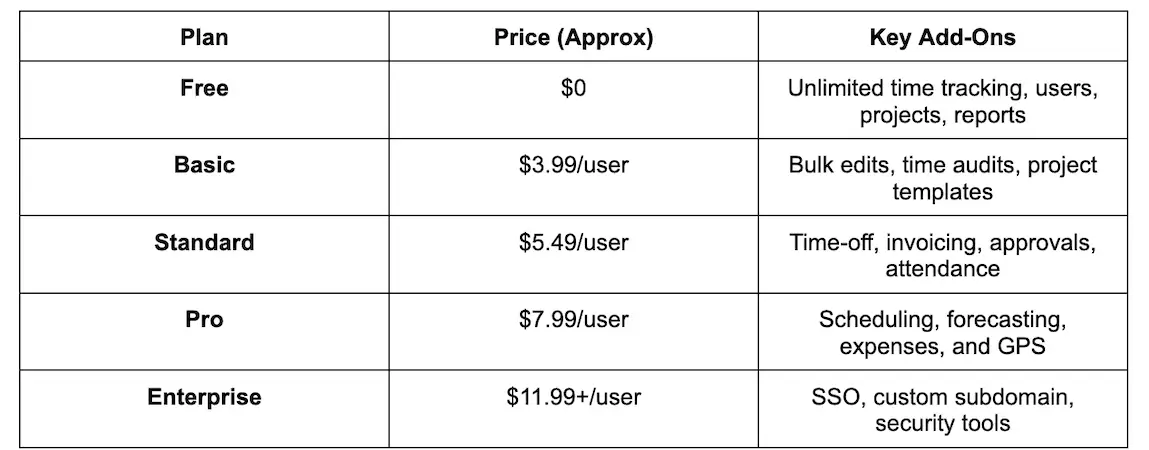 Best time tracking software for virtual businesses - Clockify
Ideal VA Use Cases
Time Tracking & Billing
- Track hours per task or client for accurate invoicing
- View detailed reports by date, project, or client
- Export reports for client billing or internal review
Project Organization
Team or Collaboration
Administrative Support
Field or Location Work (if relevant)
3. Harvest
Harvest is an excellent tool for virtual assistants (VAs) and freelancers who want integrated time tracking, invoicing, and reporting in a single platform. It’s especially beneficial for those who bill by the hour and want to simplify administrative tasks.
However, if you require a free tool that supports multiple users or need GPS and advanced offline features, you might want to consider alternative time-tracking options.
Harvest is ideal for:
- Freelancers, consultants & VAs who bill clients by the hour and want integrated time tracking + invoicing.
- Small to medium teams needing solid visibility into hours, project costs, and client billing.
- Professionals who want one tool to track time, log expenses, and invoice clients without extra software.
Key Features
Time Tracking
Billing & Invoicing
Reporting
Expense Tracking
Integrations
Client & Project Management
Pros
- All-in-one billing workflow
- User-friendly interface that’s easy to learn
- Expense tracking and online payments are supported
- Good reporting to understand time use and project profitability
- Many integrations with project and accounting tools.
Cons
- The free plan is minimal
- No robust offline or GPS tracking
- Mobile app and interface updates sometimes feel clunky
- Reporting and project budgeting are basic compared with some competitors
- It can be more expensive per user than simpler time trackers
Pricing (2025–26)
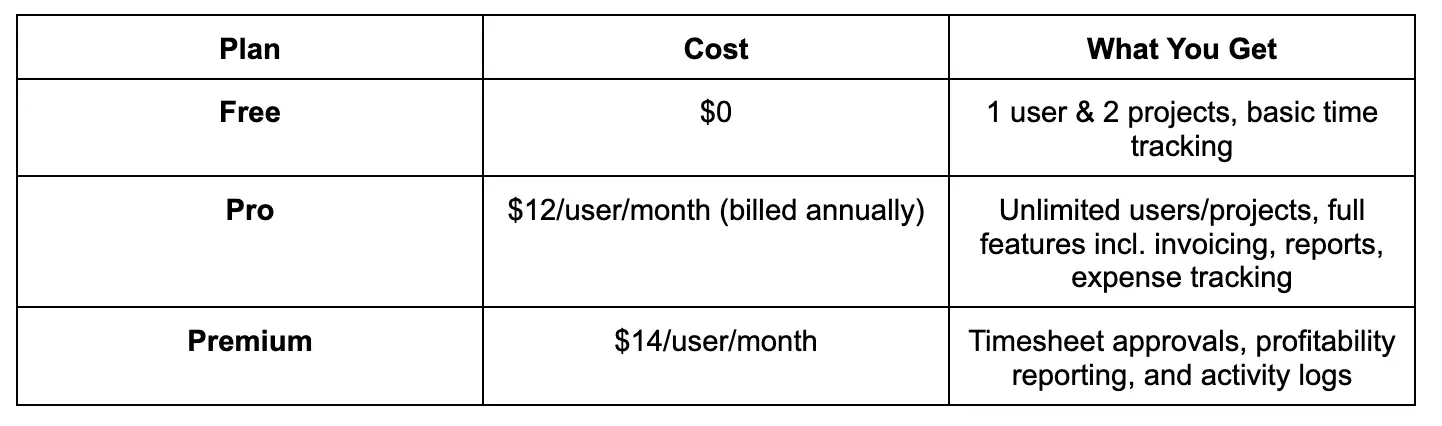 Best time tracking software for virtual assistants - Harvest
Ideal VA Use Cases
Time & Billing
- Track hours per client or project for accurate billing.
- Send professional invoices directly from Harvest.
Reporting & Insights
- Create reports for clients showing where time was spent.
- Review profitability and billable vs. non-billable hours.
Expense Tracking
- Log and bill reimbursable expenses with invoices.
Integrations
- Sync with project tools (Asana, Trello) and accounting (QuickBooks) to fit your workflow.
Small Team Coordination
- Manage time tracking for a small team or subcontractors with shared reports.
4. Hubstaff
Hubstaff is a highly feature-rich time-tracking tool that is particularly beneficial for teams and managers seeking to oversee productivity, scheduling, and payroll on a single platform.
While it is more powerful and complex than basic timers, this complexity makes it well-suited for structured virtual assistant agencies and teams that bill by the hour or manage multiple tasks simultaneously.
Hubstaff is perfect for businesses and teams that require comprehensive time tracking, productivity monitoring, and workforce management. It is particularly beneficial if you're looking for features such as screenshot capabilities, activity levels, payroll integration, scheduling, and GPS tracking for remote or field teams.
Best for:
- Remote teams and agencies that must track hours with accountability
- Managers who want screenshots, app/URL monitoring, and activity metrics
- Teams needing payroll, scheduling, and time-off tools
- Field workers with GPS/geofencing needs
- Less ideal for freelancers who just want simple timing without monitoring pressure.
Key Features
Time Tracking & Monitoring
- Start/stop timers across desktop, web, and mobile
- Activity levels (keyboard/mouse) & optional screenshots
- App and URL tracking for productivity insights
Workforce Management
- Scheduling, attendance, and time-off tracking
- Timesheet approvals and payroll automation
- Expense and project budget tracking
Remote & Field Features
Reporting & Integrations
- Detailed reports on hours, activity, and project time
- Integrations with tools like Trello, Asana, Slack, and QuickBooks
Add-Ons Available
Pros
- Powerful time & productivity tracking suite (screenshots, app/URL logs)
- Built-in payroll, scheduling, and attendance tools, not just time logs
- GPS/geofencing makes it useful for field teams
- Works across platforms (web, desktop, mobile) with offline support
- Integrates with many projects and accounting apps
Cons
- Can feel intrusive to tracked workers (screenshots/activity metrics)
- Pricing adds up quickly with add-ons and multiple users
- UI complexity
- Monitoring metrics sometimes misrepresent non-typing work
- Offline mode is valuable but limited compared with online features
Pricing (2025–26)
Hubstaff plans (approximate per user per month, annual billing):
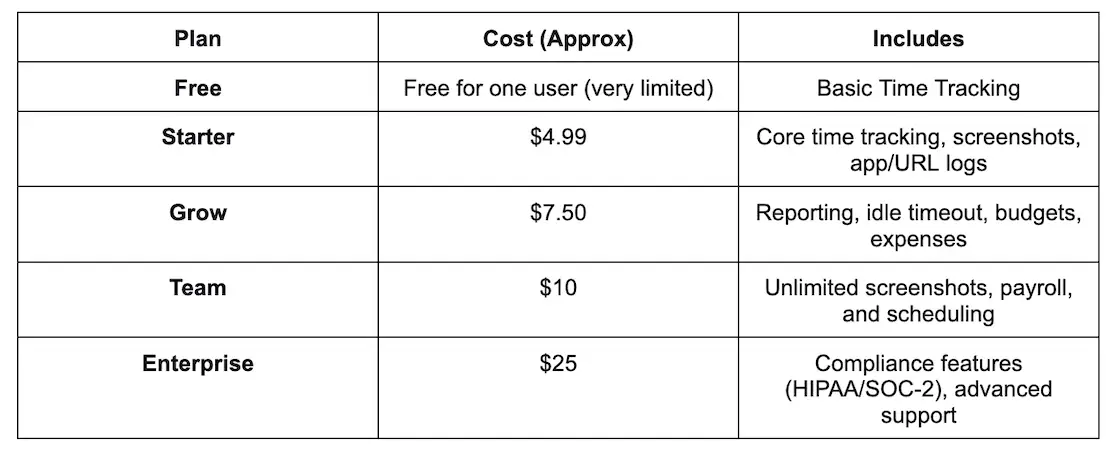 Best time tracking software - Hubstaff
All paid plans include a 14-day free trial. Optional add-ons (such as extra screenshots, Insights, task tools, and location tracking) can increase costs.
Ideal VA Use Cases
Here’s how VAs can leverage Hubstaff effectively:
Time Billing & Accountability
- Track hours by client and task with precision
- Use screenshots and activity logs to justify billed hours
- Auto-generate timesheets for billing or payroll
Reporting for Clients
- Export detailed time and activity reports
- Share productivity insights to demonstrate value
- Use reports to improve task efficiency
Schedule & Manage Workflows
- Plan and assign tasks for team VAs
- Track attendance and approved time off
- Use scheduling tools to organize a multi-client workload
Remote & Field Support (if relevant)
- If VAs support field staff (e.g., client operations), GPS/geofencing ensures accurate location-based time tracking.
Team Oversight
- Useful for VA managers who need to monitor activity, task completion, and project budgets
5. Time Doctor
Time Doctor is ideal for remote teams, agencies, and businesses that require comprehensive time tracking, productivity monitoring, and accountability tools. It is particularly beneficial in understanding how work is performed, going beyond just logged hours.
It is particularly effective for those who need detailed visibility, productivity insights, and payroll integration for time tracking. This comprehensive system is ideal for teams or agencies that emphasize accountability. However, it may feel unmanageable or overly intrusive for simpler virtual assistant (VA) time tracking needs.
Good fit for:
- Remote/hybrid teams wanting activity insights
- Managers who need screenshots, app/URL tracking, and productivity metrics
- Teams that integrate time tracking with payroll or billing workflows
Less ideal for:
- Freelancers or VAs who just want basic timers without monitoring
- Individuals who dislike invasive tracking, like screenshots or activity monitoring
Key Features
Time Tracking & Activity Monitoring
- Automatic & manual time tracking by task/project
- Screenshots and activity metrics (keyboard/mouse use)
- Alerts for non-work sites to reduce distractions
Reporting & Insights
- Detailed time reports by user, project, or client
- Productivity dashboards and analytics
Payroll & Billing
- Payroll integration with providers like QuickBooks, Gusto, PayPal/Wise
Scheduling & Attendance
- Schedules, attendance tracking, and approvals in higher tiers
Offline Support
- Track work offline and sync when online.
Integrations
- Works with project and collaboration tools (60+ integrations)
Pros
- Accurate time and productivity tracking with rich insights.
- Screenshots and monitoring help enforce accountability.
- Strong reporting and payroll integrations streamline billing/payroll.
- Works offline, then syncs later.
Cons
- Can feel invasive; screenshots and activity tracking raise privacy concerns.
- Higher cost per user vs basic time trackers.
- Requires the internet for many features.
- Some users report idle tracking errors or glitches.
- Less suited for freelancers who just want simple time logs.
Pricing (2025–26)
(Typical annual billing — monthly rates may be higher)
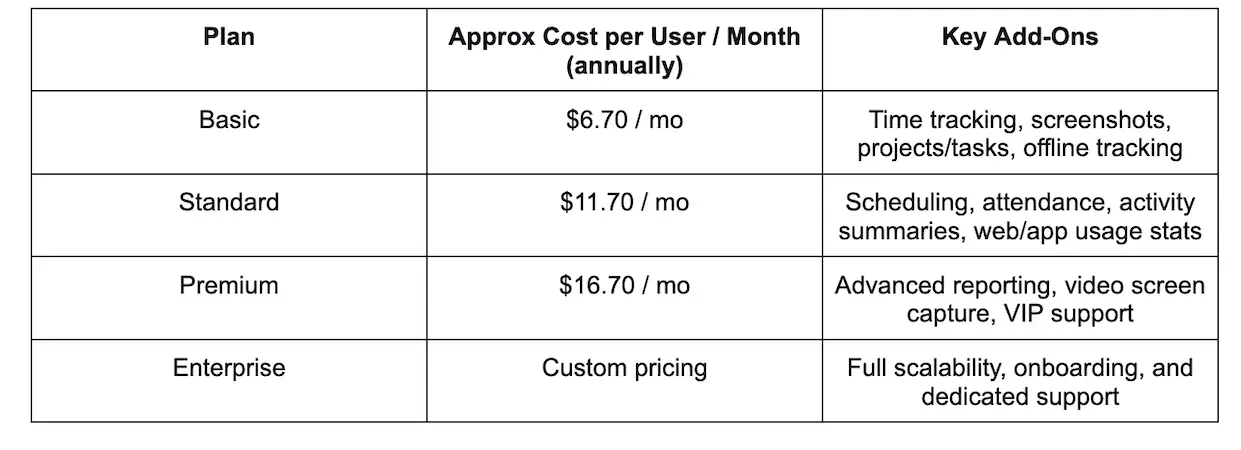 Best time tracking software - Time Doctor
All plans usually come with a free 14-day trial (no credit card required) so you can try before you buy.
Ideal VA Use Cases
Here are ways VAs can benefit from:
Detailed Time & Activity Tracking
- Track hours by client, project, and specific tasks
- Use activity reports and screenshots to document work for hourly billing
Reporting for Clients
- Produce time reports to justify hours and improve transparency.
Productivity & Accountability
- Insights on app/website usage help identify time sinks
- Useful when working with teams that require visibility into work habits
Payroll & Billing Integration
- If you’re managing payroll for VA teams, integration with payroll and accounting helps automate wage payments.
Monitoring Considerations
- Screenshots and activity tracking might be too invasive for solo freelancers or clients who prefer trust-based workflows, and are best used with explicit consent and a clear purpose.
6. actiTIME
actiTIME is a solid choice for Virtual Assistants and small teams that need structured, reliable time tracking with strong reporting and client visibility, including:
- Virtual Assistants working with multiple clients or long-term retainers
- VAs billing hourly or validating fixed-fee work with time data
- Remote assistants who must submit timesheets for approval
- Small VA agencies that need consistent reporting across team members
- It is less ideal for solo users who want fully automatic background tracking with minimal setup.
Key Features
- Core Time Tracking
- Manual time entry
- Weekly timesheets
- Track time by client, project, and task
Reporting & Analytics
- Detailed reports by client, project, task, or user
- Clear separation of billable and non-billable time
- Export reports to PDF, Excel, or CSV
Project & Billing Tools
- Billable rates per task and per user
- Project time budgets with progress indicators
- Overtime tracking and cost calculation
Integrations
- Integrations with accounting and project tools
- API for custom workflows
- Data export for invoicing or payroll systems
Team & Admin Features
- Timesheet approvals
- Role-based access (VA, manager, admin)
- Centralized control over projects and clients
Pros
- Excellent client-level reporting for transparent billing
- Strong fit for recurring VA tasks and long-term clients
- Timesheet approvals improve trust with clients or managers
- Clear structure for billable vs non-billable work
- Works well for both individual VAs and small agencies
Cons
- No fully automatic time tracking
- Requires initial setup of clients and projects
- Interface is more structured than minimalist tools
- Mobile experience is more limited than desktop/web
Pricing (2025–26)
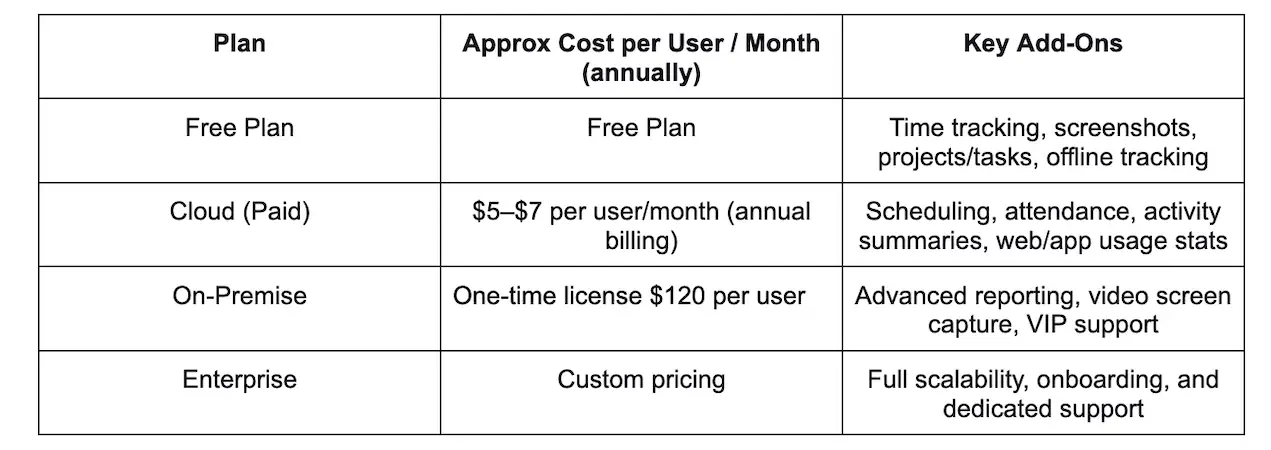 Best time tracking software - actiTIME
Ideal VA Use Cases
Productivity & Billing
- Track billable hours per client and task
- Provide clear time reports to support invoices
- Validate retainers and fixed-fee agreements
Client & Task Organization
- Categorize work such as email, research, admin, content, or support
- Identify time-consuming tasks and optimize workflows
- Maintain historical data for long-term clients
Manager & Client Oversight
- Submit timesheets for review and approval
- Ensure consistent reporting for remote or outsourced VAs
- Reduce disputes over hours worked
VA Teams & Agencies
- Standardize time tracking across multiple assistants
- Monitor costs and time allocation per client
- Keep reporting consistently as the team scales
7. Traqq
Traqq is a time tracker that offers both simplicity and flexibility for virtual assistants. It allows you to track your time automatically or manually add offline work. You can improve invoicing by tracking your time accurately and understand what usually distracts you, so you can make better decisions about how you work and improve your overall productivity.
Traqq is ideal for:
- VAs and freelancers who need to track their billable hours accurately and get paid for all the time they actually work
- Businesses that want to improve employees’ productivity without invading their privacy
- Individual professionals who need a simple and free solution to track their time without complex setup
Key features:
Time Tracking
- Track your time automatically or add time manually for offline work, meetings, or tasks done away from your computer.
Reporting
- View detailed reports and export them in different formats to share with clients or keep for your own records.
App and website usage
- See what sites and apps take up your time so you can identify distractions and understand where your workday really goes.
Productivity Insights
- View AI-powered insights on your productivity trends and see how your work patterns change over time.
Smart notifications
- Customize break reminders to maintain a healthy work-life balance and get alerts if you forget to start the timer.
Pros
- Automatic time tracking with offline capabilities
- Strong security features and no hidden surveillance
- AI-powered insights into productivity patterns
- Website and app usage monitoring
- Customizable reporting
Cons
- No mobile app available
- No GPS tracking
Pricing (2025–26)
 Best time tracking software - Traqq
Ideal VA Use Cases
Time Tracking
- Track billable hours for your clients or projects to ensure accurate billing.
- View your idle time to understand when you lose focus.
Reporting
- Generate detailed reports to share with clients as proof of work or to review how much time you spend on different projects and tasks.
App and Website Usage
- See which apps and websites take up most of your day to identify distractions.
Smart Notifications
- Set reminders to take breaks to make sure you don’t burn out.
AI-powered Insights
- Track your productivity patterns over time to understand when you work best and how your focus changes throughout the week.
8. RescueTime
RescueTime is ideal for individual knowledge workers and freelancers seeking automatic productivity tracking and insights into how they spend their time on computers and devices, without the need for manual timers. It is particularly effective at helping users identify distractions and enhance their focus. However, it is not intended for client billing, invoicing, or detailed project time allocation.
RescueTime is an effective automatic productivity tracker, distinct from a traditional client billing tool. It is ideal for virtual assistants who want to analyze and enhance their work habits, reduce distractions, and improve efficiency. However, it is not suitable for those seeking detailed project or client time billing, invoicing, or payroll features.
Best fit if you want:
- Automated time-use insights by app/website
- Tools to eliminate distractions and build focus habits
- Productivity reports for personal improvement
Less ideal if you need:
- Billable hours tracking for clients
- Invoicing, payroll, or team time management features
Key Features
Automatic Time Tracking
Tracks your app and website usage in the background, no start/stop timers required.
Productivity Reports & Insights
Detailed dashboards show where your time goes, trends over days/weeks, and what’s productive vs distracting.
FocusTime & Goal Tools
Block distracting websites during focus sessions and set productivity goals with alerts.
Timesheets & Offline Logging
Premium plans include automatic timesheets and the ability to log offline time.
Calendar Integration
Sync calendar events into your timeline to see meetings included in your tracked time.
Team Productivity Dashboards (Team Plans)
For teams, shared reporting and team productivity summaries are available.
Pros
- Automatic tracking
- Clear insights into real digital habits
- Focus tools
- Desktop and mobile support with cross-platform data
- Privacy-focused
Cons
- Not meant for client billing or invoicing
- Manual project tracking and task tagging are limited
- The free plan is relatively basic
- iOS and Android tracking have limitations
- Lacks detailed team management features like approvals, payroll, or scheduling
Pricing (2025)
(Approximate, based on RescueTime plans)
Free (Lite) — $0
- Automatic tracking, basic reporting, and limited history.
Premium (Solo) — $12/mo monthly or $78/year ($6.50/mo annual)
- Full tracking, FocusTime, goals, offline time, calendar sync, and advanced reports.
Team / Team+ — From $9–$16/user/mo (annual)
- Includes premium features plus team dashboards and shared goals.
Ideal VA Use Cases
RescueTime isn’t primarily a billing or task time tracker, but it can still be helpful in a VA context:
Personal Productivity & Workflow Improvement
- Understand which apps or activities are eating up your workday.
- Identify time drains (meetings, email, distracting sites) and set goals to improve focus.
Time Awareness for Better Planning
- See how much time you really spend on task types overall. Useful if you bill clients but need insight into your habits.
Focus Sessions for Deep Work
- Use FocusTime to block distractions when working on key deliverables.
Team Productivity (Team Plans)
- Monitor overall productivity trends across team members without invasive tracking.
9. Everhour
Everhour is an excellent tool for teams, agencies, and freelancers looking for seamless time tracking that integrates with project management software such as Asana, Trello, ClickUp, and Jira. It also offers features for project budgeting, billing, and reporting, all without switching between applications.
This makes it particularly valuable when you need time tracking embedded within your existing workflow, such as tracking tasks in Asana or ClickUp, rather than using a separate time-tracking tool.
Everhour is a robust time-tracking and project-budgeting tool that excels when integrated with task-management applications such as Asana, ClickUp, Trello, and Jira. This integration allows you to track and manage time in relation to the work you are already doing.
It is beneficial for billing clients, managing budgets, or coordinating teams. However, solo virtual assistants may find the paid plan's minimum seat requirement a limiting factor.
Best for:
- Teams and small agencies tracking multiple projects
- Professionals billing clients by time and budget
- People who want time tracking inside task tools
Key Features
Time Tracking
- Start/stop timer or manual entries for hours per task/project
- Track time for team members and add notes
- Timesheet views and exportable reports
Integrations
- Deep integrations with Asana, Trello, ClickUp, Jira, GitHub, Todoist, Notion, Basecamp, etc
- A browser extension lets you track time right inside these apps.
Project Budgeting & Billing
- Set budgets and alerts to avoid overruns
- Track billable rates, costs, and expenses
- Generate invoices (depending on plan)
Reporting & Visibility
- Project and team reports with customizable filters
- Export reports for accounting or presentations
Team & Management
- Time approvals, time cards, time off/leave tracking
- Optional screenshots and SSO for enterprise usage
Pros
- Integrates in-app to track time directly where tasks live (Asana, Trello, ClickUp, etc.)
- Strong budgeting and billing tools to stay on project budget
- Customizable reporting and exports for clients and internal use
- Helpful for teams for time approvals, tracking for multiple members
- Free plan available for basic tracking up to 5 seats
Cons
- Free plan has no integrations (which are a key value for many users)
- The minimum paid plan requires five users, which can feel pricey for solo VAs
- Some users find time reporting less accurate across time zones
- Mobile apps and offline use are limited compared with desktop use
- Slight learning curve for advanced features
Pricing (2025–26)
(Approx — based on annual billing for best value)
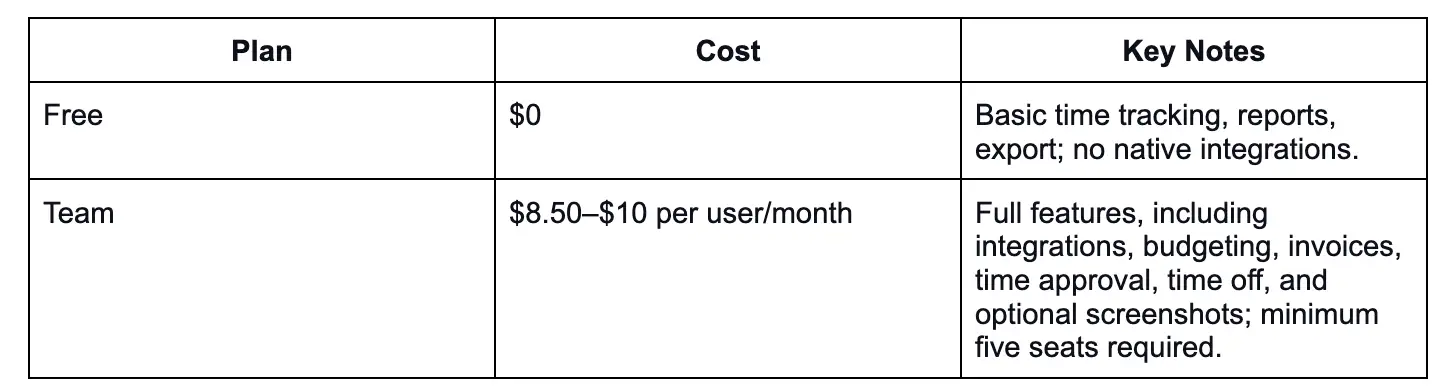 Best time tracking software - Everhour
Ideal VA Use Cases
Here’s how Virtual Assistants can use Everhour well:
Client Billing & Hour Tracking
- Track hours by client/project/task and export clean reports for invoices.
- Useful when you bill clients by the hour and need precise logs.
Embedded Time Tracking in PM Tools
- Start/stop tracking inside tools you already use (like Asana, ClickUp, Trello).
- Saves time switching between apps and keeps the flow uninterrupted.
Project Budgeting & Planning
- Set budgets and alerts when a project nears its limits.
- Helps manage retainer hours or project caps.
Reports & Exports for Clients
- Generate detailed reports (daily/weekly/monthly) showing time spent by task/client.
- Export to CSV/PDF for invoicing or client transparency.
Team Coordination (if working with others)
- Maintain timesheets and approvals across multiple VAs or contractors.
- Track leave/time off and coordinate project resources.
10. FreshBooks
FreshBooks is a user-friendly accounting solution that integrates invoicing, time tracking, expense management, and payment processing into a single platform. It is especially beneficial for freelancers, virtual assistants, consultants, and small service businesses, particularly when accurate billing and straightforward financial management are more important than complex accounting features.
It helps manage invoicing, expenses, time tracking, and payments without the complexity of heavy accounting jargon. This software is tailored for smaller operations rather than large enterprises with intricate accounting needs.
Key Features
Invoicing & Billing
- Create professional and customizable invoices quickly
- Set up recurring invoices and automated payment reminders
- Clients can pay via credit card or bank transfer directly through invoices
Time Tracking
- Built-in time tracking on all plans
- Convert tracked time into invoice line items for accurate billing
Expense & Accounting Tools
- Track and categorize expenses
- Connect bank accounts for automated expense import
- Access basic accounting reports (profit & loss, tax time summaries)
Estimates & Proposals
- Send estimates and convert them to invoices once approved
- Manage client proposals from within the platform
Mobile App
- iOS & Android apps let you invoice, track time, and capture receipts on the go
Integrations & Add-Ons
- Integrates with payment gateways, payroll services (like Gusto), and other business apps
- Optional add-ons include advanced payments and payroll integrations.
Pros
- Extremely user-friendly and intuitive
- Strong invoicing tools and automated reminders save time
- Time tracking is included on all plans
- Mobile support for invoicing and receipt capture
- Solid expense tracking and reporting for tax time
Cons
Pricing can be higher than some alternatives, especially as client volume grows, SaaSworthy.
- Limited advanced accounting features on lower tiers (no double-entry or bank reconciliation on basic plans)
- Extra fees for additional users and add-ons (e.g., advanced payments, payroll)
- Client limits on lower plans (e.g., Lite plan restricts billable clients)
- Not ideal for businesses needing full accounting or robust inventory management
Pricing (2025)
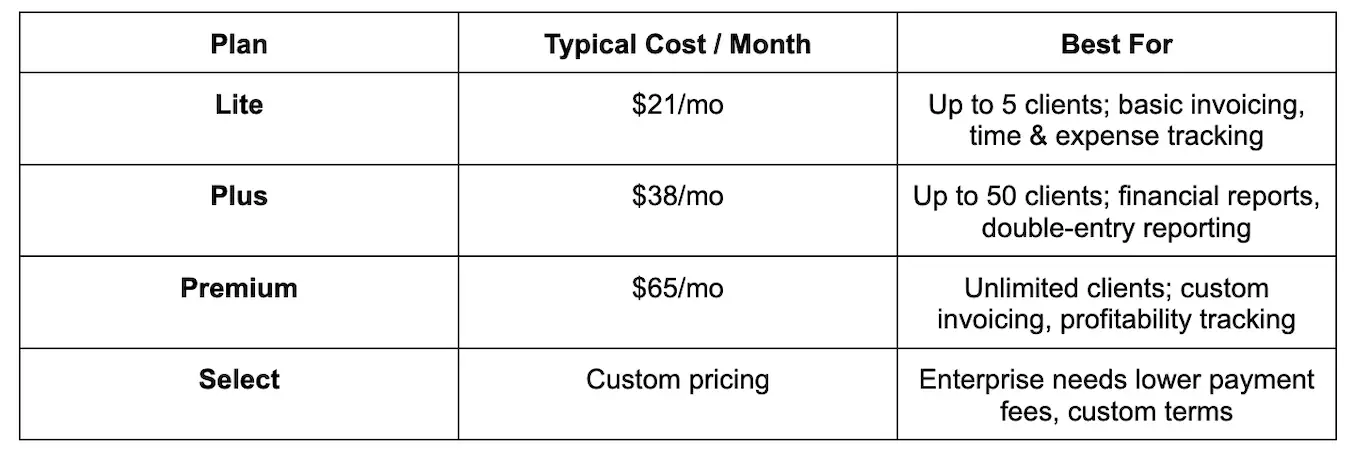 Best time tracking software - FreshBooks
Ideal VA Use Cases
Client Billing & Invoicing
- Generate and send professional invoices to clients.
- Automate recurring billing for ongoing retainer clients.
- Track payments and reminders to reduce overdue invoices.
Time Tracking & Billing
- Log hours spent on tasks and easily add them to invoices.
- Useful when billing clients hourly for VA services.
Expense Management
- Track project-related expenses and attach them to client invoices.
- Organize receipts and categorize expenses for tax tim.
Financial Reporting
- Pull basic profit/loss and expense reports for tax season or client transparency.
- Show clients how time and expenses translate into billed work.
On-the-Go Management
- Use the mobile app to invoice, track receipts, and enter mileage when away from a desktop.
Team & Client Collaboration
- Invite clients to view invoices or proposals in the FreshBooks client portal.
- Add team members (with paid seats) to help manage bookkeeping.
How to Choose the Right Time Tracking Software for Your Needs
Choosing the right time tracking software requires balancing your operational goals, such as billing accuracy, productivity insights, or payroll compliance, with ease of use to ensure team adoption.
1. Identify Your Workflow Style
- The Independent Freelancer: Simplified with a strong focus on accurate billable hours for a few clients.
- The High-Context Shifter: Usually shifts focus among several projects, tasks, or meetings during the day.
- The Field-Based Professional: is on-site at multiple client locations (e.g., construction, healthcare, consulting) and requires verified proof of location.
- The Remote/Distributed Team Manager: wants a clear picture of the remote team's productivity and often needs automated insights or occasional activity checks.
- The Project-Centric Agency: Handles complex timelines and requires time tracking that deeply integrates with project management and invoicing tools.
Key Features
- AI-Driven Automation
- Cross-Platform Accessibility
- Compliance and Security
- Hands-Free Options
2. Determine Your Core Must-Have Features
Choosing time-capturing software effectively begins with understanding the business's most essential needs. Think of functionalities such as automatic tracking, project and task assignment, mobile access, and reporting to ensure precise data.
Also, don’t forget about fundamental features like ease of use, integration with payroll and accounting systems, and team management tools (such as visibility and approval options) to ensure a smooth workflow. Check if the tool is suitable for your team size, budget, and business processes to facilitate work and customer invoicing.
3. Consider Your Client Requirements
When selecting time tracking software, it's essential to align its technical capabilities with your clients' expectations, particularly regarding transparency, billing accuracy, and project visibility. The choice of the right tool should also consider your workforce structure and the types of client engagements you have.
1. Match Software to Your Client Type
- Freelance & Solo Consultants
-
- Top Choice: Toggl Track for simplicity or Harvest for direct invoice-to-payment workflows.
- Agencies & Multi-Project Teams
-
- Top Choice: Avaza for all-in-one project management and invoicing, or Time Doctor for providing clients with "proof of work" screenshots.
- Field & Mobile Services
-
- Top Choice: ClockShark or QuickBooks Time for location-based verification.
2. Essential Client-Facing Features
- Transparent Reporting
- Client Access Portals
- Differentiated Billing Rates
- Billable vs. Non-Billable Tracking
3. Technical & Operational Requirements
- Integration with Tech Stacks
- AI-Powered Automation
- Compliance and Security
4. Implementation Steps
- Map Workflows
- Define "Must-Haves"
- Run a Pilot
4. Set a Budget
When planning a budget for time-tracking software, start by identifying the essential features you need, such as integrations, reporting, mobile access, and compliance. Next, distinguish between must-have features and nice-to-have ones.
Finally, explore tiered pricing options, usually charged per user per month, ranging from free to paid. Consider factors such as value, user-friendliness, and scalability to ensure that the software can grow with your needs. It's essential to avoid overspending while still obtaining the necessary functionalities, such as tracking billable hours, managing projects, and integrating payroll.
5. Assess Ease of Use
Evaluating ease of use is vital to the long-term adoption and return on investment in time-tracking software, as overly complex systems can lead to employee resistance and inaccurate data.
Core Criteria for Assessing Ease of Use
When evaluating potential software, focus on these five functional pillars:
- Simple Interaction Design: Look for one-click timers that start and stop instantly without requiring multiple menus. Interfaces should be clean, color-coded, and intuitive enough for non-technical users to master in minutes.
- Minimal Setup & Learning Curve: Ideal software should prominently place core fundamentals and tuck away additional complex features. Avoid "bloated" tools that require extensive manual reading just to perform basic tasks.
- Automation Level: Prioritize tools with automated features to reduce manual administrative burden:
-
-
Automatic timers that trigger based on activity or app usage.
-
Idle detection to automatically pause or prompt adjustments when a user is inactive.
-
Smart reminders that notify users to start or stop tracking.
-
- Platform Accessibility: Ensure the software works seamlessly across all devices your team uses, including web, desktop (Windows/Mac), and mobile (iOS/Android). Mobile apps are essential for field workers and real-time syncing.
- Workflow Integration: True ease of use comes from never having to leave your primary workspace. Choose a tracker that integrates directly into tools like Trello, Asana, Jira, or QuickBooks via native plugins or browser extensions.
Recommended "Easy-to-Use" Software
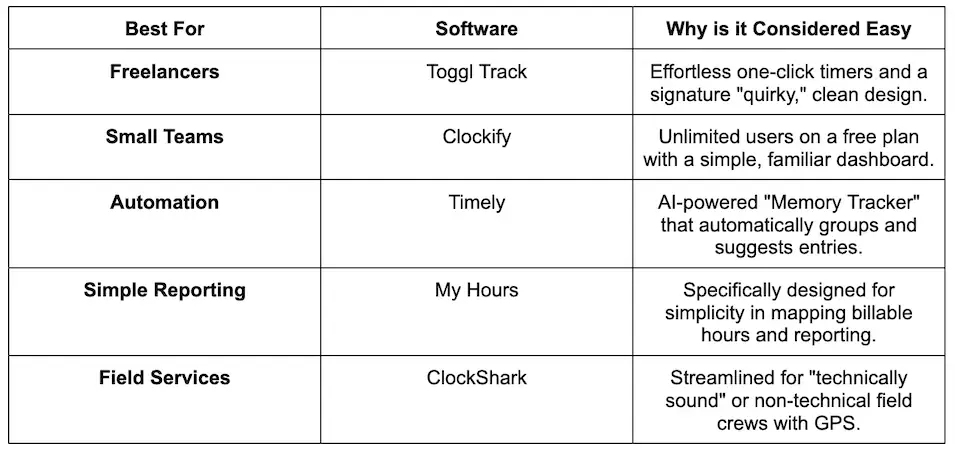 Best time tracking sofware - recommended software
6. Test Before Committing
When choosing the right time tracking software, it's crucial to begin by clearly defining your requirements. Once you have a good understanding of what you need, narrow down your options by conducting thorough research. Finally, use free trials to assess how well the software performs in real-world scenarios before making your final decision.