


Issues with remote work productivity arise mainly from how teams coordinate, not from how much work they put in. As in any other workplace, employees complete tasks and meet deadlines while logged in during working hours. But the slowdown emerges between tasks, especially when work passes from one person to another.
This is why research from Stanford SIEPR and the Institute for the Study of Labor (IZA) measures this gap, finding that fully remote productivity is about 10–20% lower than in-person productivity.
While working from home eliminates travel time, it also removes the chance to ask a quick question at a colleague's desk or to observe how a senior colleague handles a difficult call.
What you want is a solution that addresses the gap this research identified and recovers the 10% of productivity your organization is missing.
How to build systems that reduce productivity gaps in a remote organization
Building systems with remote team software such as Breeze can help bridge gaps in collaboration. It requires changing how teams handle every piece of information.
For this, the three-step plan to organize information offers a good starting point.
A 3-Step Plan to Organize Information
All necessary work-related documents are stored in one place with access control to keep every team member in sync. It stops the questions that delay the work. Usually, it is "Where’s what and for whom?"
To get started with solving this issue:
Step #1: Define storage architecture
Create a single naming convention for all folders and documents so that a person can guess a file's location without seeing it first.
- Create a naming rule: Use a format like [Date]-[Project]-[Topic].
- Remove private drafts: Refrain your staff from keeping work in personal folders or private cloud drives.
- Audit the top level: Limit your main server to five clear folders, such as Active Projects, Client Assets, Internal Procedures, and so on.
Actionable Step: Use the standard Task Templates in Asana, which include a required File Location field.
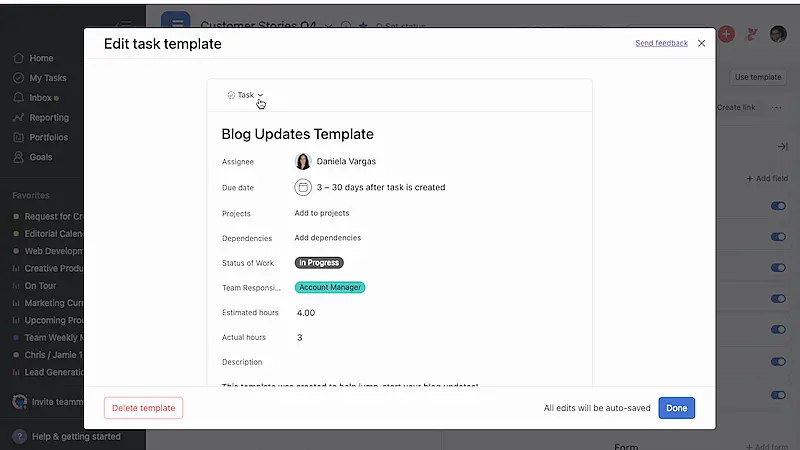 Why remote productivity lags and how system fix it - task template
Source: Asana Templates
This forces the employee to link the actual document from your server directly into the Asana task using your naming rule.
Step #2. Build a Master Entry Map
A folder tree is often too deep for a person to navigate quickly. So what you want is a single document that acts as a map for the entire business. Let this map contain direct links to the most important folders and current project files.
Instead of clicking through ten layers of folders, a worker opens the map and clicks one link to reach their destination.
- Link the essentials: Put links to the current week's goals and active client files at the very top of this map.
- Define permissions: Write exactly who has access to which folders next to the links, so there is no confusion about who can edit a file.
- Assign a map keeper: Choose one person to update these links every Monday morning so the information stays up to date and not broken.
Bonus Tip: Asana can serve as your actual master entry map by using the Project Overview and Portfolios features. Check plans and features against Asana pricing as you move through the next stages of collaboration. For instance, you can build a basic map on the Starter plan, but the Advanced Plan ($24.99 per user/month) is better if you need Portfolios to have a high-level view of all active projects in one place.
Step #3: Enforce the Search-First Protocol
Try changing the team's behavior so that asking someone for a file is the very last resort. This step involves a strict rule requiring that every piece of information be searchable by keywords.
- Tag every asset: Require staff to add three keywords to the description of every uploaded file.
- Record the search failure: When someone has to ask "where is this," they must also document why the search tool failed to find it.
- Organize information in documents: If an important link is shared in a chat message, move it to the Master Entry Map (step #2) immediately so it does not disappear from the chat history.
Bringing status check cycles to an end
Leaders often schedule recurring meetings to request progress updates because they no longer see people at their desks. However, these interruptions carry a high price. It typically takes between 23 and 25 minutes for a person to return to a state of deep concentration after a single disruption. As a result, a brief 10-minute check-in actually removes 35 minutes of productive time from each participant's day.
To prevent this time loss, you can shift to automated systems that track progress and handle routine coordination. Adopting AI productivity tools enables teams to centralize information and automatically update task statuses. It's a move that ensures everyone stays informed about project timelines without needing to pause their work for a verbal report.
By moving away from manual check-ins, you eliminate the 352 hours talking about work that the average knowledge worker spends talking about work rather than performing it.
These are the few tips that help end the status check cycles and improve remote productivity lags.
Here’s how to end the status check cycles to improve productivity lags in remote work.
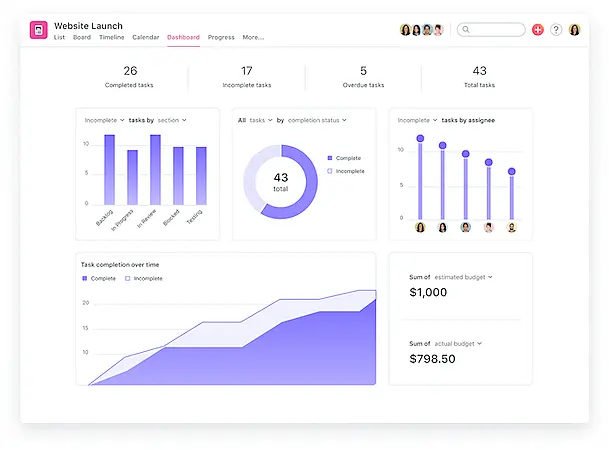 Why remote productivity lags and how systems fix it - building a status dashboard
Source: Asana
When you use a tool like Asana or a shared sheet, the status of a project is determined by the data, not by a verbal report.
What the dashboard must contain (non-negotiable fields)
- Owner (one person)
- Status (one of 4–5 fixed options)
- Next action (single sentence)
- Due date (one date)
- Blocker (Yes/No)
- If blocked: blocker type + who can unblock
Quick tips to implement this:
Building a project traffic light system: Build one on your main dashboard. Use Green for On Track, Yellow for At Risk, and Red for Blocked. Managers only call or message people who are marked as Yellow or Red.
Force status updates via workflow rules: Accept no update in case there’s no progression. For example: a customer onboarding cannot be started cannot move to the review phase unless the link to work is filled. Or, you can even make the blocker a hard field instead of a comment, which forces employees to think of possible bottlenecks early on. To streamline these rules, it is best to go with your choice of workflow automation tools that improve business processes.
Transition to impact-specific communication
Most status meetings will have information that everyone already knows or that doesn't require a reaction. It’s just about what’s done and what’s left — a problem that’s well managed by following the above tip. What you can have instead is a system where meetings only take place is a signal suggesting impact to the goal, such as a blocked task or a change in strategy.
For this, you can have:
A written status channel: Replace the daily stand-up with a written status channel in your internal communication tool. Every person posts three bullet points at 9:00 AM: what they finished yesterday, what they are doing today, and any blockers.
Workflow automation planned for handoffs
In many remote teams, a task stops moving because the first person finishes their part but fails to notify the second person. Workflow automation solves this by turning handoffs into system events rather than human reminders.
Instead of a person asking, "Is this ready?" the system moves work forward the moment predefined conditions are met.
Where automation creates the biggest productivity lift
The highest leverage sits in transition stages, not creation stages. Task creation needs human judgment, not hands off.
When a task changes state, the system should immediately:
- Assign the next owner
- Notify the stakeholder
- Surface dependencies
- Update the dashboard
Here’s how you can automate the workflow.
Define transition triggers
A signature move in any marketing operations audit is to see the triggers between departmental handoffs. The same applies to any department where handoff begins with a state change, which must again be system-recognized.
- Create fixed workflow states across projects
- Define what each state operationally means
- Require evidence fields before status change (file link, draft, asset)
- Block forward movement if required fields remain empty
Establishing the criteria for a clean handoff
Automation works best when the data being passed is complete and accurate. You must set up validation steps that prevent a task from moving forward if it is missing essential assets.
If a developer tries to move a feature to the QA but forgets to include the previous bug fixes, the system should block the transition. This forces the staff to be disciplined and prevents the editor from wasting time asking where the missing files are located.
- Set up status-based triggers: Create a rule in your project tool that automatically changes the owner of a task when the status moves from In-Progress to Ready for Review.
- Automate deadline shifts: Link your tasks so that if the first person is two days late, the deadlines for everyone else in that chain automatically shift forward to reflect the new reality and expected handoffs.
Pritesh Jagtap, founder of GrowthOS, a growth marketing agency specializing in SEO, paid ads and YouTube growth, notes that, "We are fully remote, so I rely on strict handoff rules and not ad-hoc pings on Slack. Every task must include a link to the working file, fixed states, and an owner. When it hits ‘Ready for Review,’ automation reassigns, notifies, and updates dashboards automatically."
Implement Open Knowledge
Open knowledge is the practice of building a searchable library of company processes and decisions into a written or recorded asset that anyone in the company can find at any time. In a remote business, the 10% to 20% productivity drop often happens because employees cannot lean over a desk to ask for help.
With an institutional knowledge base, the organization makes sure that the work is not paused because the person who knows something is offline.
Employees spend about 1.8 hours per day searching for information. Companies that improve knowledge sharing through searchable systems can raise productivity by 20–25%.
Here’s what can be done to roll out the open knowledge policy.
Document processes at the moment of execution
Every time a team repeats a task, that task should convert into a documented playbook. Which means, every time a staff member asks a question that has been answered before, the response should not just be the answer, but a link to the permanent document where that answer lives.
Summarize key details: If a decision is made in a meeting or a private chat, the person who made the decision must summarize it in the central knowledge base within one hour.
Screen-recording tools: Use screen-recording tools for technical training. Instead of a live one-on-one demo, the expert records their screen while doing the task once, and that video becomes the permanent "How-to" guide for all future employees.
Apart from these, you can also:
- Convert repeatable workflows into SOP documents
- Attach templates and examples inside the SOP
- Store documentation in a central wiki, not folders
- Link SOPs directly inside task templates
Build search-first knowledge retrieval
To extract the best out of this whole documentation process, you need to make sure that the retrieval is frictionless. If you cannot search for answers from the library, then the documentation becomes archival, not operational.
For example, if a person needs to know how to issue a refund,they should be able to find that specific process quickly using a keyword search, regardless of whether that task belongs to finance or customer support.
Here’s what helps.
A knowledge champion: Have a knowledge champion who spends two hours a week auditing the search terms. They’d look for search failures that throw up terms people looked for but did not find, and then create the missing content or fix the tags.
Use a Wiki structure: In your project management software, create a top-level page for every major recurring task. Each page must include: the goal of the task, the tools needed, the step-by-step instructions, and a link to the last successful version of that task.

