


In 2024, 78% of global organizations reported using AI, up from just 55% the year before.
The biggest leap? Content.
From drafting blog posts to generating videos, AI content tools have shifted from niche experiments to everyday essentials. Whether it's Claude for research, ChatGPT for drafting, or Midjourney for visuals, AI now covers every corner of content creation.
For marketers, this means less time stuck on blank pages and more time refining ideas, strategies, and campaigns. These tools don't replace creativity; they sharpen it.
This guide walks you through how to use AI content tools efficiently, starting with what they are, where they fit, and how to make them work for you.
First, let’s understand what these tools really do and where they shine.
What Are AI Content Creation Tools?
AI content creation tools are software solutions that use machine learning, natural language processing (NLP), and generative AI to assist with or automate content tasks across multiple formats, such as text, images, video, and audio. They help marketers with everything from generating ideas to writing drafts, optimizing SEO, and creating visuals, all in less time and at a lower cost.
These tools are built on key technologies:
- Large language models like ChatGPT or Claude generate written content from prompts.
- Computer vision models such as Midjourney and Runway create or edit images and videos from text or sample inputs.
- Analytics engines like Perplexity or Tableau analyze content performance and audience insights.
Back in the day, AI tools meant grammar checkers like Grammarly. Today, they’re full creative systems. Many platforms now support entire workflows: research, ideation, writing, visuals, optimization, and repurposing from a single dashboard.
Now, we will see how these tools actually boost efficiency across your workflow.
The Benefits of Using AI Content Creation Tools for Efficiency
AI content tools are built for speed, scale, and precision. When integrated into your workflow, they don’t just save time; they significantly improve content quality and output across channels. Here’s how:
1. Time Savings
AI speeds up the research, drafting, and editing stages, cutting production time by up to 70%. Instead of spending five hours writing a blog, marketers now create solid first drafts in under 30 minutes using tools like Claude and ChatGPT.
2. Quality Improvements
AI ensures content stays consistent in tone, follows SEO guidelines, and adapts to audience segments. As per Mercer, around 40% of executives now cite content creation as one of the top use cases where AI boosts productivity and quality.
3. Scalability
With tools like Writesonic Workflows and Jasper, marketers quickly generate variations for blogs, email, and social posts all from a single draft. SurveyMonkey found that in 2025, 93% of marketers used AI to increase content velocity.
4. Cost-Effectiveness
AI reduces outsourcing needs by handling repetitive content internally. A single subscription to a writing or visual tool (averaging $50–$100/month) can replace hours of agency or freelance work.
5. Industry Adoption
AI isn’t just improving individual workflows; it’s becoming the default across creative teams. According to Envato’s Beyond Adoption: The State of AI in Creative Work 2026 report, nearly half (49%) of creative professionals now use AI tools every day, with marketers and content creators among the fastest adopters.
Next, we’ll look at the different categories of tools and what each one is built to handle.
Diverse Categories of AI Content Creation Tools
AI tools work best when used in combination. Below are the most effective options across six key categories, each with examples you can plug into your content workflow today. Many marketers are also using AI for SEO to enhance keyword targeting, optimize on-page content, and streamline their overall content creation process for better search visibility.
1. Writing and Ideation Tools
These tools help you generate ideas, outlines, and long-form content with speed and structure.
Jasper
A go-to for content teams managing brand voice at scale. Jasper uses pre-built templates, SEO mode, and memory to generate copy that sounds consistent across emails, blogs, and ads. Ideal for fast-moving teams handling multiple client brands.
Claude 4.5 Opus
Built by Anthropic, Claude 4.5 Opus is known for its intelligence and efficiency in coding and agents (with new Chrome and Excel integrations). It excels at enterprise workflows, complex tasks, and computer use that needs advanced reasoning. Great for agentic workflows, evaluating LLMs, or drafting strategic content.
ChatGPT-5.1
OpenAI’s flagship model offers configurable reasoning effort and superior coding capabilities. Works well for agentic tasks and complex workflows. Integrated with various tools, it fits into daily content ops easily.
GetResponse
GetResponse is one of the most sophisticated AI-powered marketing automation tools available today. The platform lets marketers draft an entire email sequence using AI with very little human interference. The GetResponse Course Creator tool uses AI to build a complete online course and structure it into specific chapters with AI.
 Writing and ideation tools - GetResponse
Source: GetResponse
Distribution.ai
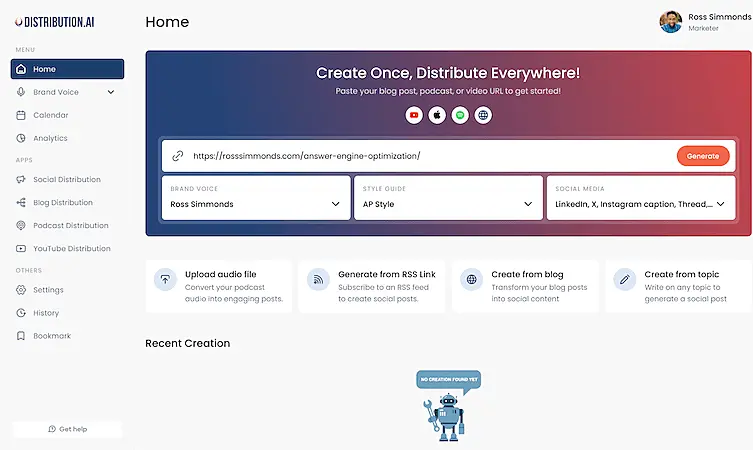
Built for marketers and agencies, Distribution.ai repurposes your existing content assets such as blogs, podcasts, and videos to automatically generate platform-ready posts for LinkedIn, X, Instagram, Bluesky, and email campaigns.
You can also schedule posts, A/B test copies, analyze metrics like click-through rates, likes, and impressions, and identify top-performing posts to refine your social media marketing strategy.
 Writing and ideation tools - Distribution.ai
Source: Distribution.ai
2. Editing and Optimization Tools
Polish your drafts, ensure SEO compliance, and rewrite with better structure.
Grammarly
Real-time grammar and tone correction tool that integrates with Google Docs, email, and web editors. The Business version includes brand tone settings, making it perfect for teams aiming for a consistent voice across multiple channels.
Quillbot
Best known for its AI-powered paraphrasing, QuillBot helps rewrite or simplify sentences while preserving meaning. It also includes a summarizer, grammar checker, and citation generator, which are useful for marketers and researchers alike.
Surfer SEO
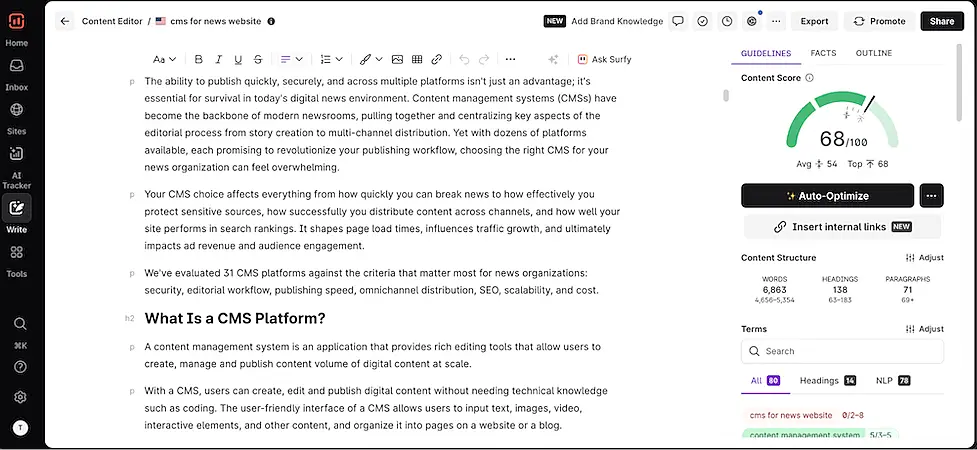
Optimizes content by analyzing top-ranking pages. Gives real-time feedback on keyword usage, headings, paragraph structure, and readability. Works well alongside Jasper and Frase for writers focused on organic search growth.
 Editing and optimization tools - Surfer SEO
Source: Surfer SEO
Frase
Frase helps you build content briefs, analyze SERPs, and generate outlines based on competitor data. It's ideal for SEO content teams looking to standardize how content is planned and structured.
Image and Visual Creation Tools
Convert concepts into visual assets with zero design background.
Venngage
An AI-powered visual design platform for marketers creating infographics, reports, and diagrams without a designer. Venngage's AI generators (infographic maker, diagram builder, chart creator, image generator) transform prompts or raw data into editable visuals instantly, while Brand Kit, automated branding, and accessibility compliance keep every asset on-brand and inclusive across channels.
Midjourney v7
A text-to-image generator is used widely for branding, creative storytelling, and UI concepts. Its latest version improves text and image prompt handling with faster generation. Best for marketers who need mood boards, custom illustrations, or hero banners.
Pixlr
Pixlr leverages AI tools like background remover, smart resize, and one-click object removal. Good for quick edits, thumbnails, and basic social graphics without opening Photoshop. Also includes batch editing.
Canva Magic Studio
Canva’s AI suite can create entire design drafts from a single text prompt. Magic Resize adapts visuals to fit any platform. Works well for agencies needing pitch decks, social assets, and ads in minutes.
Video Production Tools
Produce short-form videos from scripts or text in a matter of minutes.
Tagshop AI
A powerful AI UGC tool that instantly transforms product links into studio-quality AI video ads. You don’t need any editing skills or camera to create such ads. Just paste any product URL and Tagshop AI automatically generates UGC-style promotional videos.
It extracts product images, descriptions, and key benefits from your link and converts them into high-performing video ads optimized for platforms like Facebook, TikTok, and Instagram.
Predis.ai
 Video production tools - Predis.AI
Source: Predis.ai
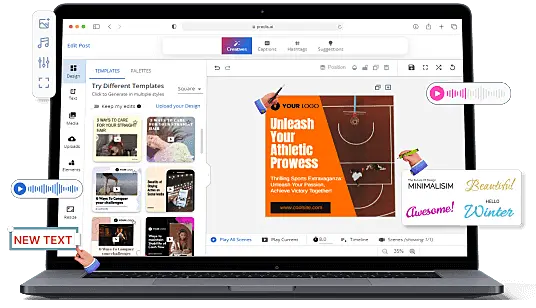
Predis.ai is an easy-to-use AI tool that helps you make AI videos and images quickly. It has a special option for product videos, so you can tell the tool what you need and get clean, professional results. The videos are created fast, and the editing area lets you add your logo, colors, and other brand details without any hassle.
You can make ready-to-post videos, carousels, and captions just by typing a short prompt. The tool adjusts everything for Instagram, TikTok, LinkedIn, and YouTube Shorts, making it very helpful for marketers and small business owners who want to save time.
It also connects smoothly with all social media accounts, so you can schedule and publish your posts directly. This all-in-one process, from creating to posting, makes it easier to stay active and consistent online.
Synthesia
A leading AI video platform that turns written scripts into avatar-led videos. No camera, mic, or editing software needed. Commonly used for product explainers, onboarding, and training content. The best part? It’s available in 120+ languages.
Runway Gen-4.5
The latest from Runway can generate high-definition video scenes from text with unprecedented visual fidelity. Useful for realistic motion, cinematic outputs, or enterprise video production. The model supports improved consistency and integrates with Premiere Pro and After Effects.
Lumen5
Transforms blog posts or text content into short social videos. Pulls in headlines, phrases, and stock visuals to create narrative sequences. Used often by content teams to repurpose blogs for YouTube Shorts and LinkedIn posts.
Social Media-Specific Tools
Designed to manage, schedule, and repurpose content at scale.
Buffer AI Assistant
Crafts AI-generated captions and hashtags tailored to each platform. Suggests variations for LinkedIn, Instagram, and Twitter based on your post history. Saves time on drafting, while keeping engagement high.
Sprinklr Magic Edit
Automatically trims long-form content (like webinars or blog posts) into bite-sized, shareable social posts. Combines AI editing with scheduling, making it a full content repurposing engine for social media teams.
Analytics and Personalization Tools
Back your content with data, then personalize it for segments.
Tableau
A visual analytics platform that connects with your CMS and social dashboards. Helps track content performance across formats. Ideal for identifying what topics, formats, or authors are generating the highest ROI.
Dynamic Yield
Uses behavioral data to personalize headlines, CTAs, and entire content blocks in real time. Popular in e-commerce and SaaS for delivering tailored messaging to different customer segments without needing separate pages.
Actionable Tips for Maximizing Efficiency With AI Content Tools
Using AI tools is easy. Using them efficiently takes practice. The following strategies help you speed up workflows, reduce revisions, and maintain quality across formats.
1. Write Prompts Like Briefs, Not Commands
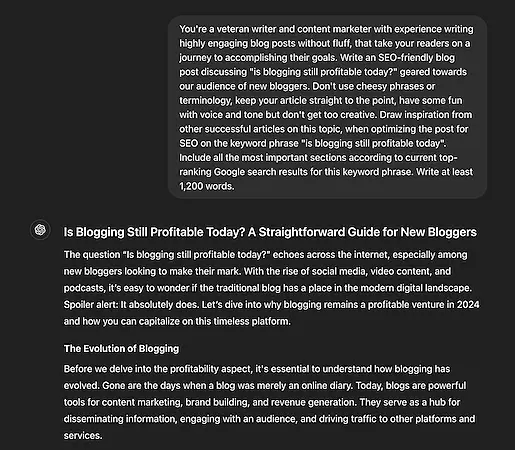
Think of prompts as mini creative briefs. AI performs best with context.
Bad prompt: "Write a blog intro on AI tools."
Better prompt: "Write a 150-word blog intro explaining how AI tools save marketers time in 2025, using a professional tone and one current stat from a reliable source."
Add layers like:
-
Target audience (e.g., B2B SaaS marketers)
-
Desired tone (e.g., informative but casual)
-
Output format (e.g., numbered list, narrative, FAQ)
Source (e.g., "Use data from McKinsey or Gartner")
 Write prompts like briefs, not commands
Source: ChatGPT
Use templates for recurring tasks so your team isn’t starting from scratch every time.
2. Stack Tools for Multi-Format Campaigns
Don’t use AI in isolation. Map tools for ideation, drafting, visuals, publishing.
How this would look in practice:
- Draft a blog with Claude using a data-backed prompt.
- Summarize key points with ChatGPT into social media blurbs.
- Convert to a video using Lumen5 or Runway.
- Design carousel graphics with Canva Magic Studio.
- Track results in Looker Studio or Tableau.
This saves days of work per campaign and ensures consistent messaging across formats.
3. Post-Edit With Human Filters, Not Just Grammar
AI outputs are clean but often soulless. After generating, edit for:
- Personal anecdotes
- Brand-specific phrases
- Cultural nuance or regional slang
- CTA alignment with product goals
This is where good marketers win. Use AI to get to 80%, then layer in human insight for the final 20%.
4. Build Repurposing Into the Drafting Process
Instead of creating one blog post, structure it as a content nucleus.
Example:
- Include listicle sections that double as LinkedIn carousel slides.
- Insert tweetable insights and data points for X threads.
- Use H2s that can become topics for YouTube Shorts.
You can pre-format AI outputs using these structural cues so repurposing happens simultaneously, not as an afterthought.
5. Feed AI Your Best Work (Train, Don’t Just Prompt)
Many tools let you upload tone guides, sample content, or brand guidelines. Use that.
Upload past high-performing blogs, product descriptions, or emails into tools like Jasper, Writer, or Copy.ai. The more examples it sees, the less time you spend reworking off-brand outputs.
Also, document prompt+output pairs that worked well so your team can build a shared "prompt playbook."
6. Create a Quarterly AI Content Audit Ritual
Every 90 days:
- Run your website/blog through Surfer SEO or Frase to find outdated content.
- Analyze top-converting pieces and reverse-engineer the structure.
- Check your AI-generated content library for pieces that underperformed and identify why (tone mismatch, weak CTA, overused structure).
- Update your prompt library based on what’s working.
Set this up as a repeatable system, not a one-time task. Teams that evolve their AI process quarterly are faster to spot shifts in performance.

